Brand impersonation is not limited to a misspelled website. It can appear as a cloned checkout page, a lookalike support account, a sponsored search result, a fake mobile app, or an email that borrows a trusted display name. The goal is usually to borrow confidence that a real organization has already earned. A practical response is not to hunt for one decisive clue. It is to build a small, defensible evidence chain across independent sources.
This guide uses a defensive OSINT approach for consumers, analysts, and brand-protection teams. It helps you decide what to verify, what to document, and when to stop interacting. It does not label every unusual site as malicious. Suspicious does not equal malicious. A match does not equal confirmation. No obvious warning signs do not guarantee safety.
Quick Answer: How Can You Spot Brand Impersonation Online?
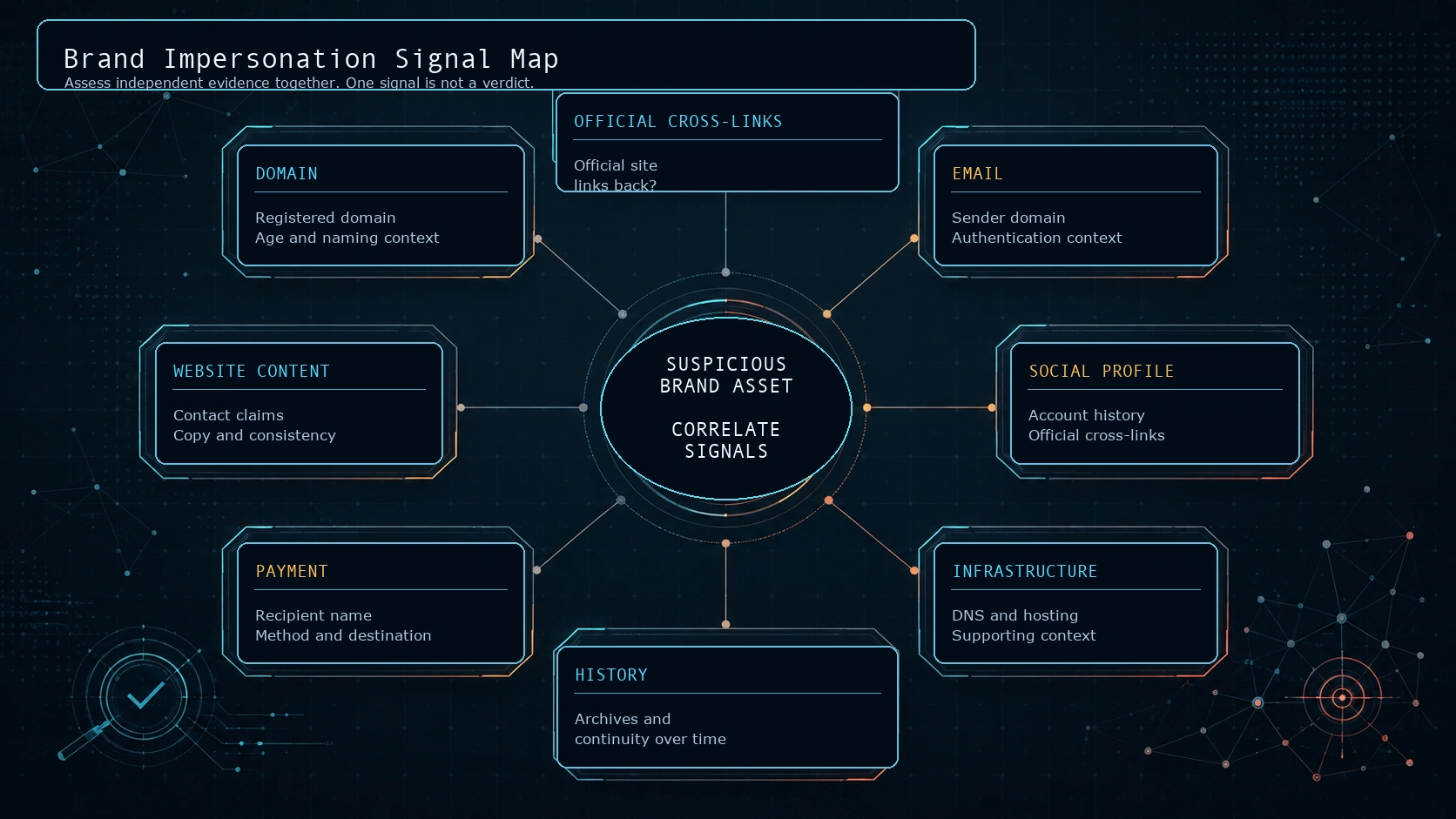
Start with the official brand source, not the suspicious page. Find the organization through a known bookmark, a bill, a verified app-store link, or a carefully checked search result. Then compare the suspicious asset against that independent source: the registered domain, official social links, listed support channels, payment destination, app publisher, and stated partner relationships.
Look for contradictions rather than trying to prove intent from appearance alone. A copied logo is easy to obtain. A valid HTTPS connection only protects transport to the domain you reached. A newly registered domain can belong to a legitimate new campaign. But a brand word in a subdomain, a different support email, an unexplained payment recipient, and no link from the real brand site form a materially stronger pattern when they appear together.
What Brand Impersonation Looks Like
Brand impersonation is the misleading presentation of a site, account, message, application, or offer as connected to a real organization when that relationship has not been established. It can involve fake websites, deceptive support profiles, typosquatting, copied shops, misleading advertisements, fake account-recovery prompts, or profiles that use brand imagery without authorization.
The visual surface is often persuasive because branding is designed to be recognizable. Logos, colors, product names, and familiar language can be reproduced without proving ownership. That is why a defensive review should move from appearance to identity and relationship. Ask: who controls the domain, who controls the payment flow, where does the official brand point users, and do the independent facts agree?
Build a Brand Trust Chain Before You Trust a Single Page
A useful trust chain has several links: official domain, website, social profiles, support channels, apps, and payment or account pages. Each link should be checked against another link that is independently controlled. For example, an official domain might link to an app-store listing; the app-store publisher name and support URL should align with the official site; the support page should lead to the same account portal.
This matters because a suspicious asset can create many self-references. A profile can link to a website, and that website can quote the profile. That is still one source family. A brand partner directory, official newsroom page, app-store developer record, or customer-service contact published on a known official domain supplies a more independent check.
- Strong confirmation: a known official site independently links to the asset or names the relationship.
- Supporting context: domain registration timing, archives, DNS data, and consistent business details.
- Weak confirmation: matching logos, a similar account handle, a badge, or a claim of affiliation on the suspected asset itself.
Read the URL Before Reading the Page
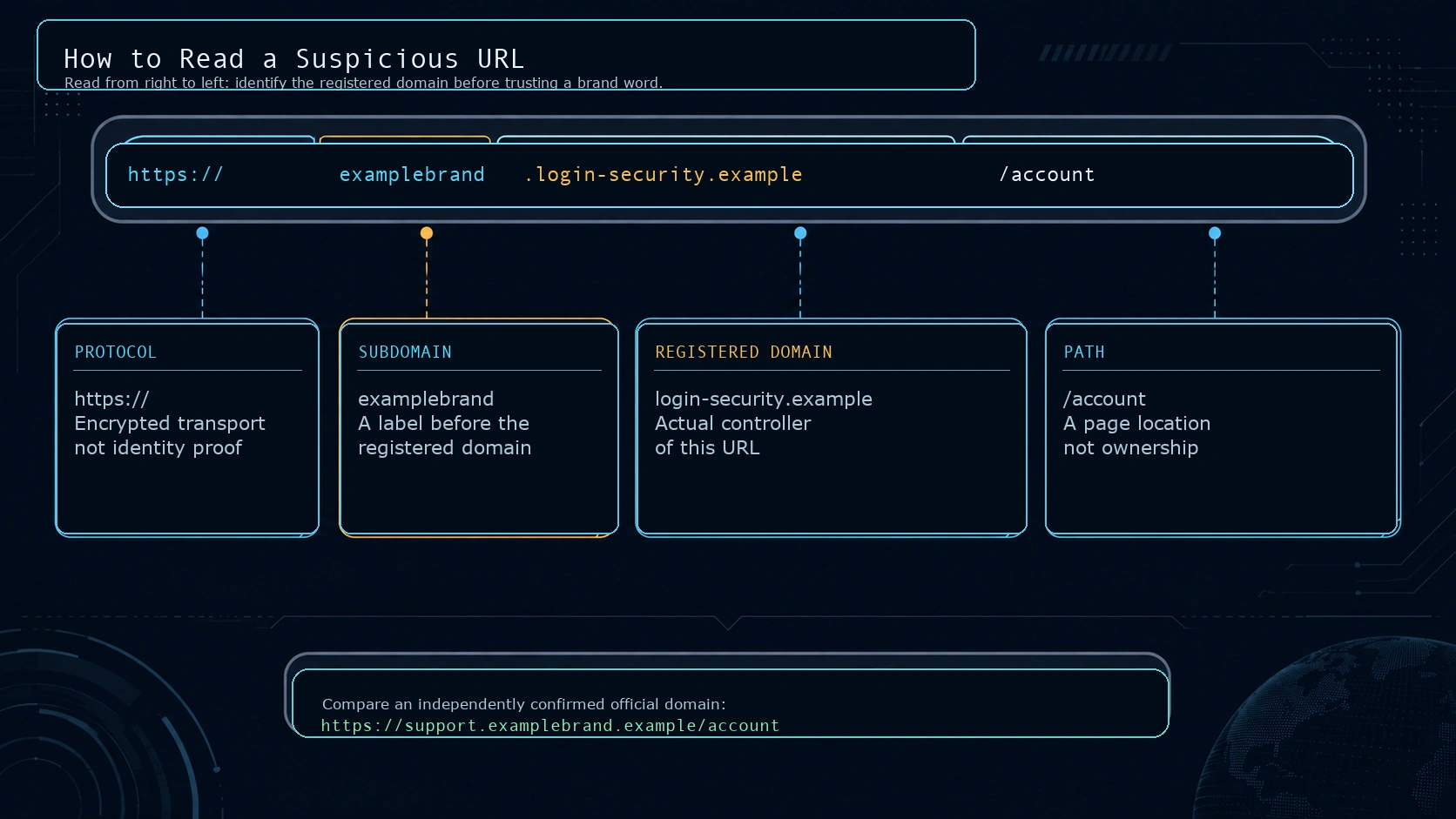
Many decisions are made after a page has already borrowed attention with a logo or urgent message. Pause at the address bar first. The most useful question is: what is the registered domain that controls this address? In a standard hostname, labels to the left are subdomains. A familiar word placed there can be visually persuasive without making the brand the owner of the domain.
Use a right-to-left reading habit
Consider the fictional address examplebrand.login-security.example/account. The important ownership clue is at the right: login-security.example. The word examplebrand is a subdomain controlled by whoever controls that registered domain. Likewise, www.examplebrand.com.security-check.test is controlled by security-check.test, not by the earlier brand-like words.
Do not infer too much from a single pattern. Hyphens, extra words, alternate top-level domains, character substitutions, and location words can be legitimate in brand campaigns, regional sites, or partner programs. They become more concerning when the domain has no confirmed relationship to the official brand and other independent signals disagree.
Lookalikes and internationalized names require care
Internationalized domain names allow non-ASCII scripts and are important for a multilingual internet. They can also create visual-confusability issues when characters render similarly across scripts. The IDNA standards describe these naming and rendering considerations, but a visual resemblance is not proof of fraud. If a name is hard to read confidently, do not rely on the rendering. Navigate to the official site through a known route and compare the destination there. The IDNA definitions and security discussion explain why naming alone cannot solve every spoofing problem.
HTTPS protects transport, not brand identity
A lock icon or HTTPS connection is still valuable: it helps protect the connection between your browser and the domain you actually reached. It does not establish that the domain belongs to a particular brand. Chrome makes the same distinction in its guidance: a secure connection means traffic is private in transit, while users still need to check the site name to confirm they are on the intended site. See Chrome guidance on secure site connections.
Conversely, an HTTPS warning deserves attention because a private connection could not be established. The practical rule is balanced: HTTPS is necessary for protecting sensitive traffic, but it is not a brand-verification service.
Use Domain Registration Data as Context, Not a Verdict
Registration data can help create a timeline. ICANN now positions RDAP as the standardized path for current generic top-level-domain registration data, with structured responses and authoritative service discovery. Use the ICANN Lookup service or another appropriate RDAP client to examine what is publicly available.
Useful observations may include registration date, registrar, nameservers, status information, and change history where accessible. A domain registered days ago that is asking for account credentials is worth more scrutiny than a long-established official domain. Still, new does not mean malicious. New companies, short-lived promotions, migrations, and newly launched country sites are common. Privacy-protected or redacted registrant data also does not prove wrongdoing; available registration fields vary by policy, registrar, and jurisdiction.
Web archives can add a second timeline. A long-running site with coherent history may reduce concern, while a recent domain that suddenly presents itself as a long-established brand may create a contradiction. Archive absence is not proof: some sites block crawling, change frequently, or were never captured. Treat time-based evidence as one supporting signal, not a substitute for an official cross-link.
Why Infrastructure Evidence Needs Humility
DNS records, certificates, hosting providers, content-delivery networks, and IP addresses can help an analyst group technical observations. They rarely establish business ownership by themselves. Many unrelated organizations share cloud platforms, CDNs, analytics providers, registrars, and hosts. Shared infrastructure can be useful for finding related pages or documenting repeat behavior, but it is not proof that two sites have the same operator.
Write the narrowest claim the evidence supports. For example: the domain resolved to an address also used by several unrelated sites at the time of collection is an observation. the sites are run by the same actor is a much stronger inference that requires more evidence. This distinction protects both users and analysts from false accusations.
Inspect the Website, Contact Details, and Email Route
Copied brand elements, polished product photos, and clean grammar are weak identity signals. Legitimate small businesses can have imperfect copy; deceptive pages can be expertly edited. More useful questions are whether policies, returns, support contacts, legal entity information, and account-recovery flows line up with information independently published by the brand.
When a message claims to come from a business, compare the display name with the full sender address and the domain after the at sign. A familiar display name can be chosen freely. Do not use the phone number or link in the unexpected message to verify it. The FTC recommends contacting the organization using a number or website you already know is real rather than the information in the message. Read the FTC phishing guidance for consumer reporting and recovery steps.
SPF, DKIM, and DMARC are email-authentication mechanisms that can help receiving systems assess whether a message is authorized for a domain. They are relevant evidence in an email-security review, but they do not prove that every message is safe or that a brand relationship is genuine. They also do not turn a visible display name into proof. CISA includes these controls in its counter-phishing guidance alongside user awareness and reporting.
Social Profiles, Search Results, Ads, and Apps Need Their Own Checks
A profile badge, a large follower count, or a familiar avatar may be worth noting, but none is enough on its own. Platform verification systems and badges can change, and they do not necessarily confirm every external link posted by an account. Check whether the profile is linked from the official brand domain, whether its listed support address matches the official contact path, whether its history is coherent, and whether the account is asking users to leave the established support process.
Search placement is not a relationship certificate. The FTC warns that scammers can use paid search results, familiar company names, and official-looking websites to steer people elsewhere. If you know the official address, type it directly or use a saved bookmark. See the FTC note on scammy online search results.
For mobile apps, start from a link on the confirmed official site when possible. Compare the publisher or developer name, support URL, privacy information, requested permissions, update history, and account flow. Apple and Google both prohibit app impersonation under their current policies, but a store listing is not a guarantee that a particular app is the official one. Review the Apple App Review Guidelines and Google Play impersonation policy for the platform position.
Payment creates an especially valuable cross-check. An unfamiliar personal recipient, a payment method inconsistent with the brand, a request for gift cards or cryptocurrency, or pressure to pay outside the normal portal warrants a stop-and-verify step. It is not a rule that every unusual payment request is criminal, but it is a high-impact contradiction. The FTC specifically flags unexpected requests for gift cards, cryptocurrency, and wire transfers in its guidance on business impersonator scams.
Use Independent Sources for Verification
The most valuable evidence often comes from a source the suspicious asset cannot edit. An alleged reseller may say Official Partner on its own site. That statement is not independent confirmation. A partner directory, authorized-dealer locator, official press release, or customer-support response reached through the known brand domain is stronger because it originates elsewhere.
Also consider source dependency. Five reputation sites that all repeat the same registration date may represent one underlying data point, not five independent confirmations. Build a small evidence table with the source, collection time, direct observation, and how independent it is. This keeps an investigation from becoming a count of duplicated signals.
Separate What You Observe From What You Conclude
| Observation | What it supports | What it does not prove |
|---|---|---|
| The domain was registered six days ago. | A reason to perform more verification before sharing data or paying. | That the site is fraudulent. |
| The page uses the official brand logo. | That the page is presenting a brand association. | That the brand owns or authorizes the page. |
| The site has a valid HTTPS connection. | That traffic to that domain is encrypted in transit. | That the domain represents the intended brand. |
| The support profile has a badge and many followers. | A lead to cross-check against official links and contact details. | That a specific message or payment instruction is genuine. |
| The payment recipient differs from published brand details. | A meaningful contradiction that raises risk. | The legal identity or intent of the operator. |
Defensive OSINT needs evidence chains, not leaps. Phrase reports in terms of what was observed, what was verified independently, and what remains unknown. That makes the work more useful to a fraud team, platform reviewer, or customer-service escalation.
Classify the Relationship Before You Escalate
Not every non-official page is an impersonator. The right category may be an official property, an authorized third party, an unofficial but legitimate seller, a suspicious asset, or a confirmed malicious operation. Classification avoids treating normal market activity as evidence of fraud.
| Category | Typical evidence | Appropriate next step |
|---|---|---|
| Official | Confirmed brand domain or official source links to the asset. | Use normal safety practices. |
| Authorized third party | Official partner directory, reseller locator, or written confirmation supports the relationship. | Confirm the scope of authorization. |
| Unofficial but legitimate | Independent business identity and transparent terms, but no claim of official status. | Evaluate it as a third party, not as the brand. |
| Suspicious | Material mismatches or missing verification, with no conclusive malicious evidence. | Do not enter data or pay; verify through official channels. |
| Confirmed malicious | Authoritative takedown notice, platform finding, or direct evidence of fraud. | Report, preserve evidence, and follow incident response procedures. |
Use Confidence Levels, Not Binary Labels
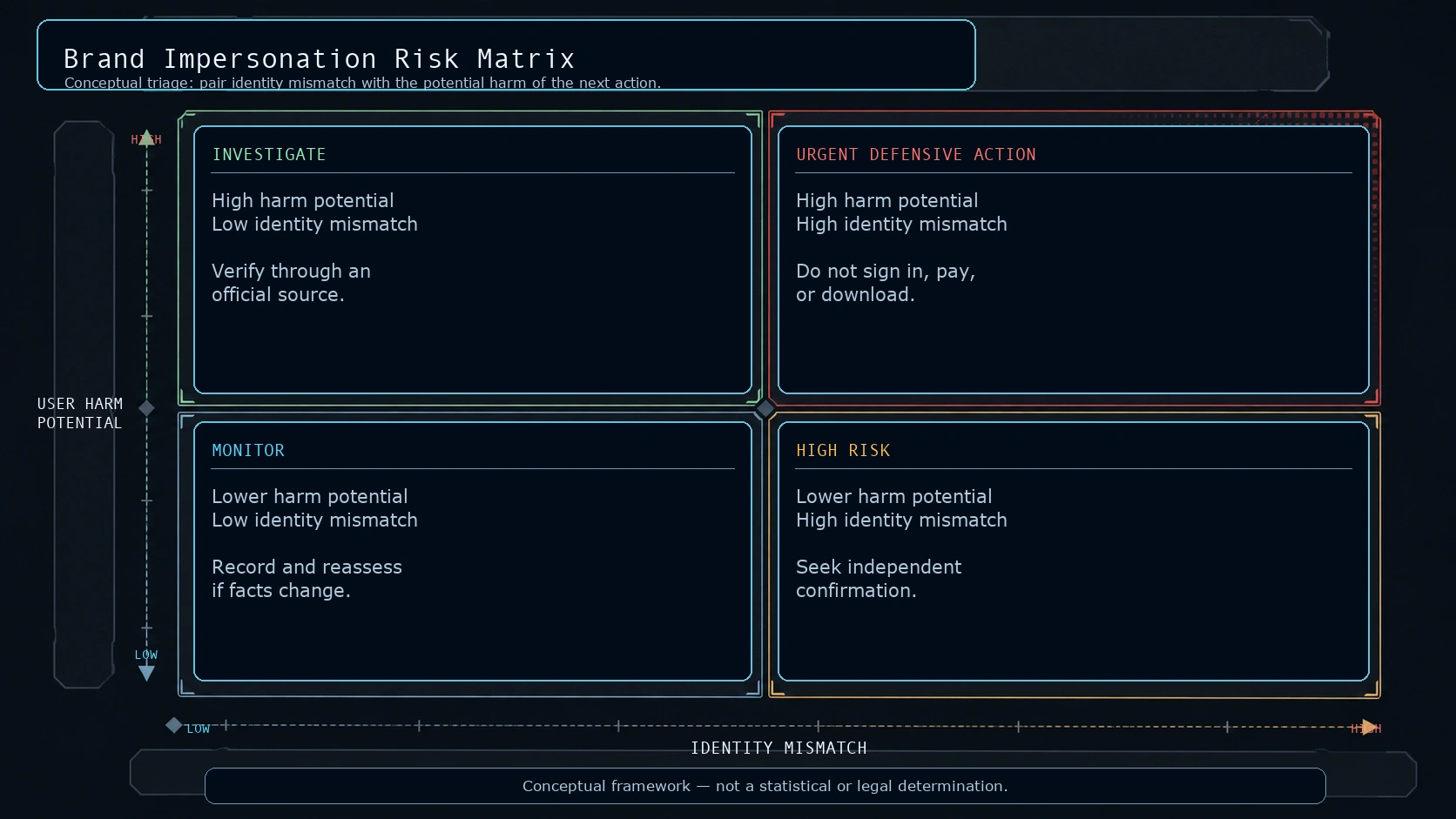
A confidence model helps turn findings into proportionate action. It is not a legal decision, a score, or an accusation. It simply communicates how much verification has been completed and what level of care is appropriate.
| Level | Pattern | Defensive action |
|---|---|---|
| Low Concern | Identity details align and an official source corroborates the relationship. | Continue normal caution; keep an eye on later changes. |
| Suspicious | One or more mismatches exist, but evidence is incomplete or ambiguous. | Pause, independently verify, and avoid sensitive interaction. |
| High Risk | Several independent signals conflict with claimed identity or payment flow. | Do not log in, pay, download, or continue through the asset. |
| Confirmed | Reliable authority, platform, or direct evidence establishes malicious activity. | Report through the relevant channel and preserve evidence. |
A 20-Item Defensive Brand Impersonation Checklist
- Open the confirmed official site through a bookmark, known address, or verified app-store link.
- Compare the claimed page with official links from that source.
- Identify the registered domain, not only the familiar word in the URL.
- Read hostnames from right to left before clicking or signing in.
- Treat HTTPS as transport protection, not proof of brand ownership.
- Check RDAP registration timing as supporting context.
- Do not treat domain privacy or redaction as proof of wrongdoing.
- Use archives carefully to look for continuity, not as a pass-or-fail test.
- Record DNS or hosting overlap as context, never as ownership proof alone.
- Compare legal, returns, support, and account-recovery details with official sources.
- Compare the complete sender domain, not only the visible email display name.
- Use SPF, DKIM, and DMARC results as narrow email evidence, not a trust seal.
- Check social profiles against official site links and long-term account history.
- Do not assume a badge, ad, or search rank proves an official relationship.
- Reach support through independently known contact details.
- Check mobile-app publisher, support URL, permissions, and official cross-links.
- Compare payment recipient and method with the normal brand process.
- Treat unusual urgency as a social signal, not a standalone verdict.
- Capture the URL, timestamp, screenshot, sender, and public facts without altering evidence.
- Report suspected abuse through the brand, platform, browser, registrar, or public authority channel.
The VERIFY Framework
VERIFY is a practical editorial framework for defensive research, not an industry standard or a replacement for legal, platform, or incident-response procedures.
- V — Verify the official source: start from a confirmed brand domain or known contact channel.
- E — Examine the URL: identify the registered domain and distinguish it from subdomains and paths.
- R — Review independent signals: compare registration context, history, social links, and published contacts.
- I — Inspect the interaction: note credential requests, payment destination, downloads, and urgency.
- F — Find contradictions: look for facts that do not fit the claimed relationship.
- Y — Yield a confidence judgment: choose a proportionate action without claiming more than the evidence supports.
Fictional Case Study: Northstar Gear
Assume the confirmed official store is northstargear.example. A user receives a promotion from northstar-gear-support.example. The page copies a familiar logo and says it is an official support clearance event. The domain appears recent in registration data, the contact address uses a different domain, the official site does not link to the promotion, the payment page names an unrelated recipient, and the associated social account has a new history with no official cross-link.
No single point resolves the case. The logo could be copied, the new domain could theoretically be a campaign, and the social account could be newly launched. Together, the independent mismatches support a high-risk impersonation indicators assessment. The correct action is to stop before entering credentials or payment data, then contact Northstar Gear through northstargear.example or another independently confirmed channel.
False-Positive Case: A Legitimate Authorized Reseller
Now imagine a retailer uses a domain that does not contain the brand name and has a different payment system. At first glance, that may look inconsistent. A check of an official partner directory for the brand lists the retailer by name and links to its site. That independent cross-link disconfirms the initial suspicion. The page should be assessed as an authorized third party, while ordinary shopping and payment caution still applies.
This is why a good investigation actively looks for both confirming and contradictory evidence. A process that only collects suspicious signals will over-flag legitimate businesses. A process that only looks for reassuring signals will miss deceptive ones.
What to Do When You Suspect Impersonation
Stop the interaction before it becomes an incident. Do not enter credentials, send money, download files, or continue a conversation through the contact path that raised concern. Close the page and navigate to the official address independently. If you already entered a password, change it from the official site, make sure it is unique, and enable multi-factor authentication where available. If card or bank details were shared, contact the financial provider through its known number promptly.
Report the issue through appropriate channels. For a suspicious website or phishing message, the UK NCSC reporting guidance explains how to report suspected sites without entering personal information. US users can report phishing or fraud through the FTC consumer guidance and ReportFraud. Brands, platforms, registrars, and browsers may also have abuse-reporting channels. Report facts and evidence; do not retaliate, attempt to access the system, or disrupt infrastructure.
Preserve Evidence Without Increasing Risk
Record the complete URL, collection time and time zone, visible page title, screenshots, sender address, account handle, payment request, and public registration information. Keep original emails or messages where safe to do so. Do not edit screenshots, fabricate timestamps, or download suspicious attachments in order to collect more proof. A short, clean record is more useful than a large collection of unverifiable copies.
SpiderFoot Tools can support the research discipline behind this process by keeping public-reference checks and source context separate from conclusions. Use only identifiers you are authorized to investigate, review the original source before drawing a conclusion, and treat returned public matches as leads rather than proof of identity, ownership, intent, or wrongdoing.
For Brand Owners: Monitor Defensively and Document Clearly
Brand protection teams can monitor combinations of the brand name with public support, login, payment, delivery, account, or campaign terms without turning that monitoring into an accusation engine. The aim is to find assets worth verification, identify customer harm pathways, and prioritize reports. Maintain a case record that separates collection facts from analytical assessment. A useful report includes the claimed brand relationship, URLs, screenshots, collection times, domain and contact observations, user-risk indicators, and the official source used for comparison.
Do not publish attribution claims based solely on shared hosting, similar wording, or a single technical overlap. Avoid contacting a suspicious operator through their own channels to demand proof; that can expose staff to social engineering and can alter the evidence trail. Use established abuse, legal, platform, or law-enforcement routes when escalation is justified.
Watch: Recognize and Report Phishing
CISA produced this short phishing-awareness video as part of its Secure Our World program. It is useful for the first defensive move in an impersonation case: pause before clicking, recognize the unexpected request, and report through a trusted process.
A video or browser warning can support user awareness, but it does not replace the cross-checking method above. Browser protections such as Chrome Safe Browsing can warn about known or detected risk. A missing warning should never be treated as positive confirmation of a brand relationship.
Frequently Asked Questions
Is a misspelled domain always a scam?
No. It is a reason to pause and verify. A typo, unusual name, or alternate top-level domain becomes more meaningful when other independently checked facts conflict with the claimed brand relationship.
Can HTTPS prove a site is official?
No. HTTPS helps protect the connection to the domain you visited. It does not prove that the domain represents the brand you intended to reach.
Does a new domain prove malicious intent?
No. New domains are common. Use age as context and compare it with official links, contacts, payment flow, history, and the action the page asks you to take.
Does private WHOIS or RDAP data mean the owner is hiding something?
No. Public registration data can be redacted or limited for policy and privacy reasons. Missing data is not a finding of fraud.
Can a copied logo prove impersonation?
It proves only that the logo is being displayed. Ownership and authorization require independent verification from the real brand or another authoritative source.
Can I trust a verified social-media badge?
Use it as one signal, then check whether the official brand site independently links to the profile and whether the profile directs users to the same official support path.
Are sponsored search results official?
Not necessarily. Paid placement is an advertising placement, not proof of a commercial relationship. Use a known official address or independently confirmed contact details.
Can shared hosting show that two sites have the same owner?
Usually not. Cloud, CDN, and hosting infrastructure is widely shared. Treat technical overlap as supporting context and seek stronger identity evidence.
How can I check an alleged reseller?
Look for an official dealer locator, partner directory, press release, or confirmation obtained through a known official brand contact route.
What if I already entered credentials?
Go directly to the official site, change the password, ensure it is not reused elsewhere, enable multi-factor authentication, and follow the official account-recovery guidance.
Should I confront the suspected impersonator?
No. Preserve evidence and report through the appropriate official, platform, registrar, or public authority channel. Do not hack back, disrupt services, or attempt to identify an operator through unauthorized access.
What should I include in a report?
Include the full URL or handle, timestamps, screenshots, message headers when available, payment instructions, your official comparison source, and a concise distinction between observations and conclusions.
Sources and Further Reading
- Recognize and Report Phishing — Cybersecurity and Infrastructure Security Agency
- How To Recognize and Avoid Phishing Scams — Federal Trade Commission
- Business Impersonator Scams — Federal Trade Commission
- Online Search Results: The Good, the Bad, and the Scammy — Federal Trade Commission
- ICANN Lookup Frequently Asked Questions — Internet Corporation for Assigned Names and Numbers
- Registration Data Access Protocol — Internet Corporation for Assigned Names and Numbers
- RFC 5890: Internationalized Domain Names for Applications — Internet Engineering Task Force
- Check if a Site Connection Is Secure — Google Chrome Help
- How Chrome Safe Browsing Keeps Browsing Data Private — Google Chrome Help
- Report a Scam Website — UK National Cyber Security Centre
- Impersonation Policy — Google Play Console Help
- App Review Guidelines — Apple Developer
- Phishing: Actions to Help Prevent Being Hooked — Cybersecurity and Infrastructure Security Agency
- How To Report Fraud at ReportFraud.gov — Federal Trade Commission