Search privacy is not a badge, a slogan, or a claim that an OSINT request leaves no trace. It is a set of concrete data flows: what your browser sends, what this application stores, which values can be forwarded to a search source, what a cache keeps briefly, and which records sit outside this codebase altogether. This guide documents those flows for SpiderFoot.tools as reviewed on September 4, 2026. It is written for people who want to research responsibly and understand the privacy cost before entering a username, email address, or IP address.
The short version is deliberately plain: username and email searches create a first-party, browser-linked research-history task and send the target to scan services needed to return results. An explicit IP lookup follows a different path: the target IP is sent to this application and then queried server-side through an IP-intelligence provider. The IP address of your own connection is separate data, and the application can receive it through the request. The site also loads analytics, consent, advertising, and other third-party browser resources. None of that is compatible with calling a search “anonymous.”
How This Page Differs From Our Privacy Policy
The Privacy Policy is the operative policy page. It describes categories of information, rights, contact routes, and broad data-use commitments. This page has a narrower job: to make a search path inspectable. It names the distinction between a visitor’s connection IP and a target IP, separates browser storage from application history, identifies the cache timers that are actually set in code, and distinguishes an application fact from an infrastructure or provider question that the repository cannot answer.
That distinction matters. “We use security logs” can be true while still leaving open whether a raw query appears in an edge access log. “We use cookies” can be true while still leaving open whether a particular consent state applies to a particular advertising vendor. A useful transparency page does not fill those gaps with reassuring language. It gives you the current, bounded answer and links you to the policy for rights and contact details.
Quick Answer: What Happens to Your Search?
| Privacy Question | Our Current Practice | Important Detail |
|---|---|---|
| Does a username or email search create first-party state? | Yes. A research-history task is created before the scan and later updated with the query, timestamps, a request-IP field, and selected result content. | The record is associated with a browser identifier; search without signing in is not the same as anonymous search. |
| Does an IP search use that same history task? | Not in the normal IP-tool path reviewed here. | An empty IP request reads connection information; an explicitly supplied target IP is validated and routed to the IP-intelligence path. |
| Is the search input normally placed in the page URL? | Manual searches are submitted as request bodies, not as a normal page URL parameter. | Supported ?username= and ?email= deep links are moved into session storage and removed from the visible URL early in page load; the original request may already have reached infrastructure. |
| Are third-party browser scripts present? | Yes. The shared layout loads consent, analytics, advertising, font, UI-library, and JavaScript CDN resources. | Those browser-side services have their own processing and retention terms. The source review cannot prove their production configuration or retention. |
| Is there a cache? | Yes. Explicit target-IP results can be cached for 15 minutes; optional organic web-result responses can be cached for 7 days. | A cache is not the same thing as the search-history table, and the timers do not establish a deletion period for other records. |
| Do we have a verified no-logging promise? | No such blanket promise should be inferred. | Application file logging exists for upstream failures; no query-specific scanner logging statement was found, but source review alone cannot settle web-server, CDN, WAF, or provider logs. |
| Is there a published self-service history deletion control? | None was found in the audited route set. | Use the contact route in the Privacy Policy for a request; do not assume clearing a browser cookie deletes a server-side record. |
What Happens When You Start an OSINT Search?
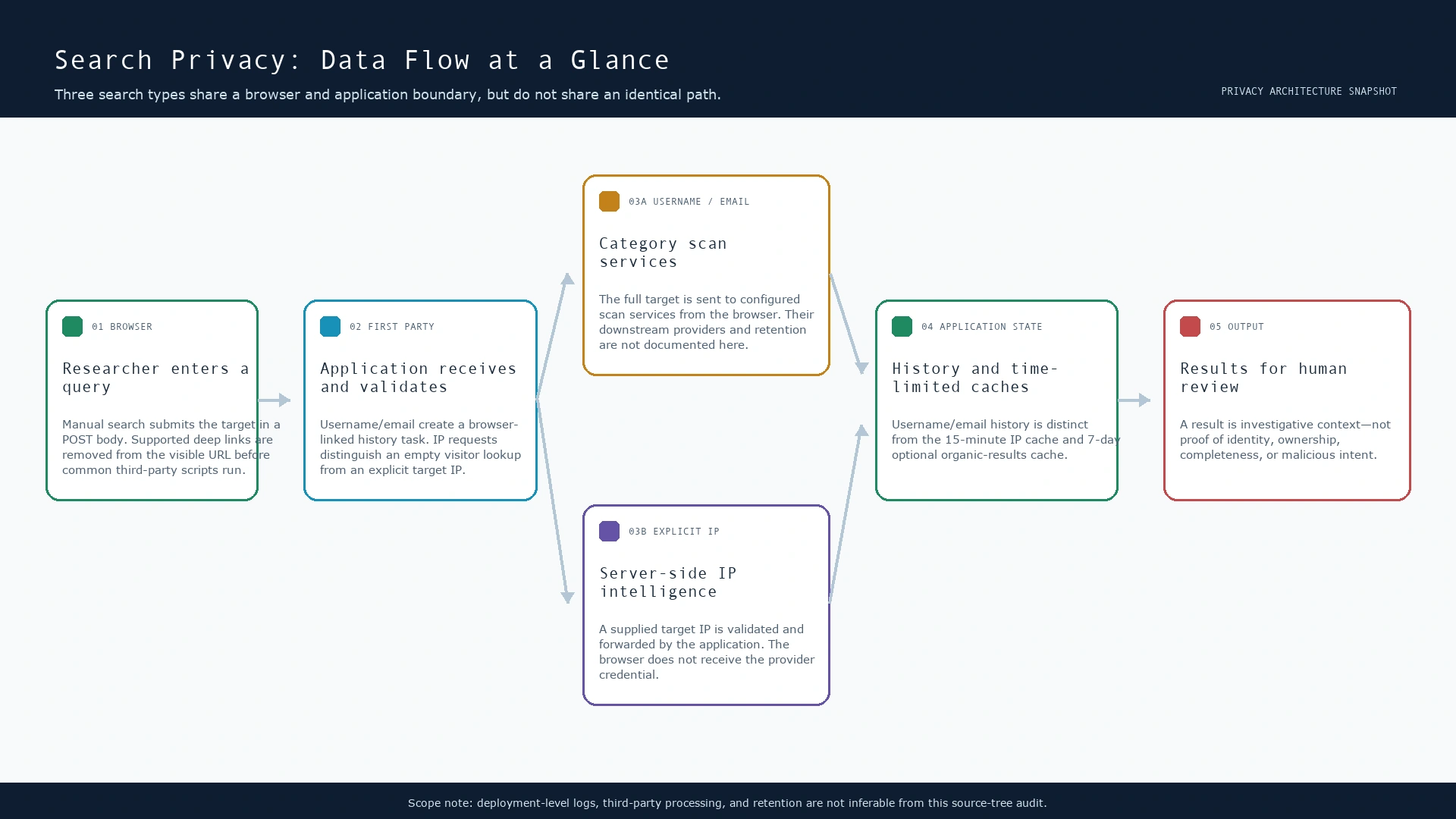
Every search begins with a value that may be sensitive in context. A username can identify a person across services. An email address can be personal data, corporate data, or both. An IP address can describe a service, a network, or a person’s connection in a particular setting. Before using any of the tools, apply the site’s Terms and your own lawful-purpose test: have a legitimate reason, use no more data than needed, and do not publish raw results as a conclusion about a person.
1. Browser input and request construction
For the usual username and email forms, the page keeps the query out of the browser address bar and sends it in application requests. That reduces one common accidental disclosure route, but it does not create secrecy: browser extensions, endpoint protection, the application, and any needed search source still process the request. The interface can also restore a supported search from a deep link. For that case, the shared layout now copies a non-empty username or email value to sessionStorage and removes the matching parameter from the visible URL before the common third-party browser scripts are loaded.
This is a minimization control, not a retrospective deletion control. A URL parameter can be part of the original request seen by the web stack, and it may have been present in browser history before page JavaScript runs. The site additionally configures Google Analytics page-view fields with query-free page location and referrer values. Google’s own Analytics guidance says URL paths and parameters sent to Analytics must not contain personally identifiable information.[4]
2. Browser-linked history for username and email work
When a valid username or email search begins, the application creates a research-history task before the scanner finishes. The reviewed code stores a search type, query, task identifier, completion state, timestamps, a request-IP field, and selected result content. It associates the task with a first-party browser identifier. The application sets that identifier with a configured 10-year expiry; it is used to locate or create the corresponding browser-associated user record. A login is not required for this behavior.
Two practical consequences follow. First, a search started in an ordinary browser session is not anonymous merely because no account name was entered. Second, removing the browser identifier can stop that browser from looking up the same history association, but it does not itself delete the history record already stored by the application. The reviewed code has no fixed search-history expiry and no self-service deletion endpoint. If you need to make a data-rights request, follow the contact details on the Privacy Policy.
3. External scan and optional web-result branches
Username and email tools call configured category scan services to obtain their scan responses. Those browser-initiated requests contain the full target value needed for the lookup. The public project does not enumerate the worker’s downstream sources or their retention practices, so this page does not pretend that a target never leaves the first-party application. When the optional organic web-results feature is enabled and allowed, the application can also send the full query server-side to its organic-results provider; the application cache for that response is set to 7 days.
In contrast, the IP tool uses a server-side provider call only after a visitor submits a target IP. The browser sends that target to the first-party application, the application validates the value, and the application makes the provider call. The credential used for that specific IP-intelligence call is not delivered to browser code. A cached target-IP response can last 15 minutes. These implementation paths explain data movement; they do not turn a provider result into a verified identity claim.
Different Searches May Use Different Data Flows
“Search” is not one uniform operation here. Treating username, email, and IP lookups as identical would hide the choices that affect both privacy and interpretation.
| Tool | First-party application path | External boundary | State created in this review |
|---|---|---|---|
| Username search | Validates the input and creates/updates a browser-linked history task. | Browser calls configured category scan services; optional organic web lookup can receive the full query server-side. | History task, selected result content, timestamps, request-IP field; optional organic-result cache. |
| Email search | Validates the input and creates/updates a browser-linked history task. | Browser calls configured category scan services; optional organic web lookup can receive the full query server-side. | History task, selected result content, timestamps, request-IP field; optional organic-result cache. |
| IP search | With no target, renders connection information supplied through request headers. With a target, validates and proxies that value. | A supplied target IP is sent server-side to the IP-intelligence provider. | 15-minute target-IP cache when applicable; no normal username/email history task in the reviewed IP path. |
For a methodology-oriented view of how to interpret returned evidence, see Methodology. The privacy lesson is simpler: submit only the data needed for your question, and do not assume that a public-data lookup is free of data-processing consequences for the researcher or the subject.
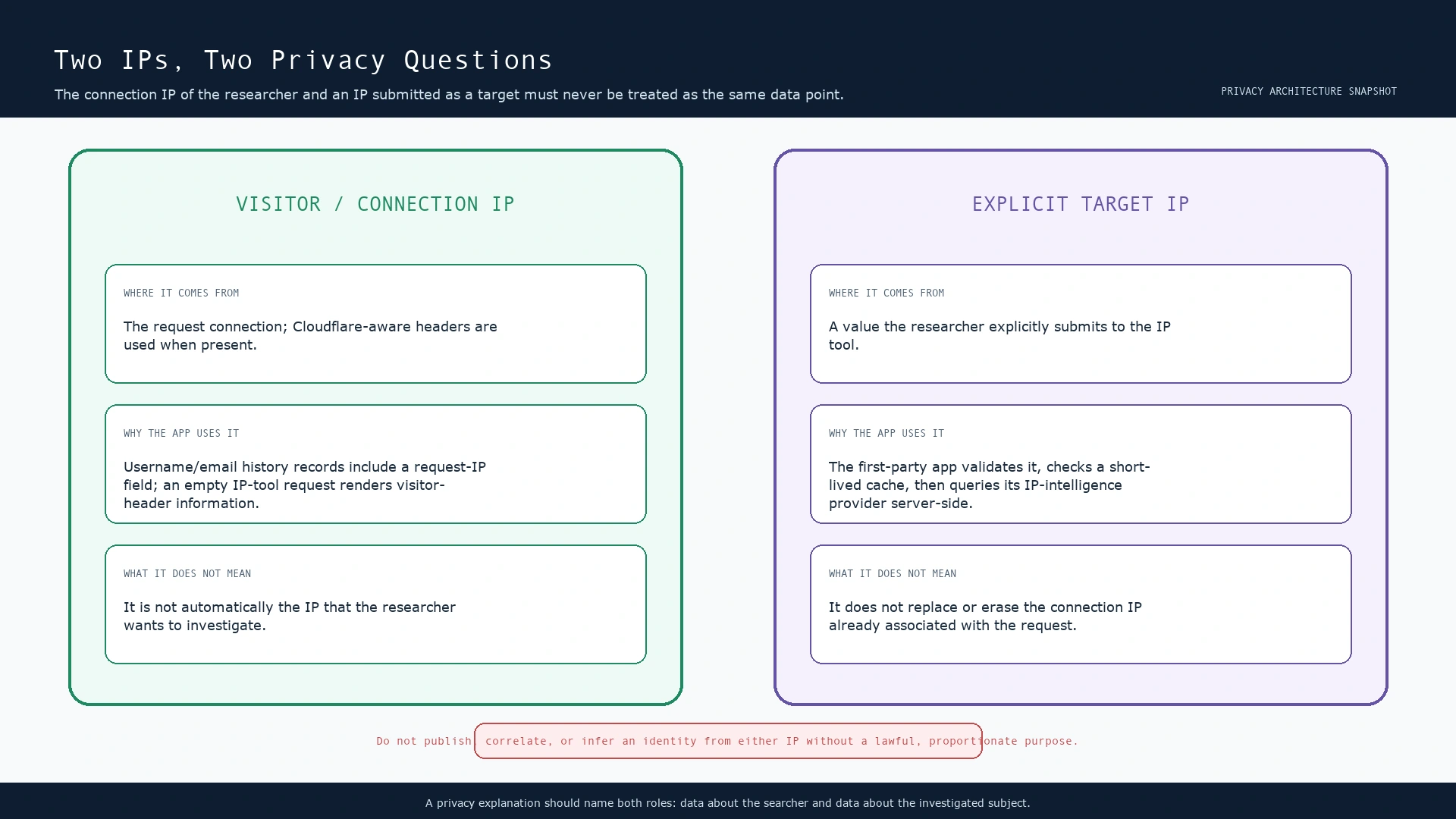
Your IP Address and the IP Address You Search Are Different Data
These two values are easy to blur together and should not be. Your visitor IP is technical metadata about the connection making the request. The application reads Cloudflare-aware headers when they are present and otherwise falls back to the origin request address. For username and email history tasks, that request-IP field is stored with the task. For an empty IP-tool request, the page displays information based on the current connection’s available request headers.
A target IP is a value you explicitly type into the IP tool. It may describe a website, service, VPN exit, office network, home connection, or shared infrastructure. The application validates that target and forwards it server-side for IP intelligence. It is not a substitute for your visitor IP, and your visitor IP is not an instruction to investigate it. Cloudflare documents that its CF-Connecting-IP header conveys the client address that connected to Cloudflare to an origin server, subject to the configuration and request path involved.[11]
Application Logs, Web-Server Logs, GET vs. POST, and Browser History
The application’s configured log driver is a file log. The reviewed IP and organic-result paths write warning or error entries when an upstream call fails. No scanner-route statement that deliberately logs a raw query was found in this audit. That is useful but incomplete: an exception message can carry upstream context, and the reviewed source does not show a dedicated scanner-route redaction layer. It would therefore be inaccurate to promise that a query can never reach an application log.
Deployment-level logging is a separate question. This repository does not include production Nginx, Apache, CDN, WAF, load-balancer, observability, or backup retention configuration. The rewrite configuration preserves query strings when routing a request. Consequently, a username or email delivered in a legacy deep-link URL can be visible to original-request infrastructure even though the browser now removes it from the visible URL immediately afterward. This article cannot state a retention period or guarantee absence for those logs.
GET versus POST is a transport detail, not a privacy guarantee. A POST body is generally less likely than a query string to be copied into the browser address bar, bookmarks, and many URL-oriented analytics fields. It is still sent to the recipient and may be processed by application, security, or provider systems. The category scan services used by the browser have their own request patterns; do not infer that a target is hidden from the service just because the initial first-party form used POST.
Browser history deserves the same care. The usual form flow does not place the target in the page URL. Supported deep links are cleaned from the visible address shortly after document parsing begins, and the referrer policy is set to strict-origin-when-cross-origin. Under that policy, cross-origin referrers are reduced to the origin rather than the full path and query in normal compatible browser handling.[6] But history prior to that script, copied URLs, screenshots, browser extensions, and the original infrastructure request are outside the reach of the cleanup.
Analytics, Advertising, Cookies, and Other Third Parties
The shared site layout loads Google Analytics, a consent-management component, Ezoic advertising/analytics resources, Google Fonts, Tailwind CDN, Font Awesome CDN, and jQuery CDN. This means browser-side requests to third parties occur on the page. The application source does not show those providers receiving the first-party database history directly; that should not be confused with a claim that browser-side scripts have no privacy implications. Their data handling is governed by their own configuration, consent state, and policies.
For analytics specifically, the implementation now supplies Google Analytics with a query-free page location and referrer for the initial page-view configuration. That is designed to keep a supported username or email deep-link parameter out of those configured page-view fields. It does not strip a target from a request needed by an external scan source, nor can it rewrite a value already delivered to an edge or origin request. Google Analytics documentation also requires properties not to send information that could identify an individual in URL paths or parameters.[4]
The application itself sets a first-party browser identifier with a configured 10-year expiry and uses it to associate the browser with a user record and search history. A consent manager and advertising technology may set or read additional browser state subject to their live configuration and user choices. During this code review, application JavaScript did not use localStorage for search state. It does use sessionStorage for the short-lived pending-search handoff described above. Web Storage is browser-side storage scoped to the origin; it is not a deletion mechanism for data already sent to a server.[7]
For further context on consent and vendor behavior, consult the provider documentation and the site’s policy disclosures. Ezoic’s documentation describes its consent-management and privacy framework; it should be read as third-party documentation, not as a statement that this source review can validate every live vendor decision.[12]
Search Privacy and Target Privacy Are Two Different Questions
Search privacy asks what can be learned about the person or browser performing research: connection metadata, browser identifier, query, timestamps, consent state, and activity history. Target privacy asks what the query itself may reveal about a person, account, organization, or network. Both matter, and neither is solved by calling a source “public.”
A defensive team investigating a typosquatted brand may have a valid reason to search a username or IP. That does not give the team a reason to expose a researcher’s browsing history or to publish a subject’s raw identifiers without context. Conversely, a researcher who wants private search behavior must understand that submitting a target creates processing obligations and evidence-quality limits. The responsible default is minimization: collect and share the least information needed for a defined, legitimate purpose. That matches the UK ICO’s explanation of data minimisation and its guidance on data protection by design and by default.[9][10]
Cache, History, Retention, and Data Minimization
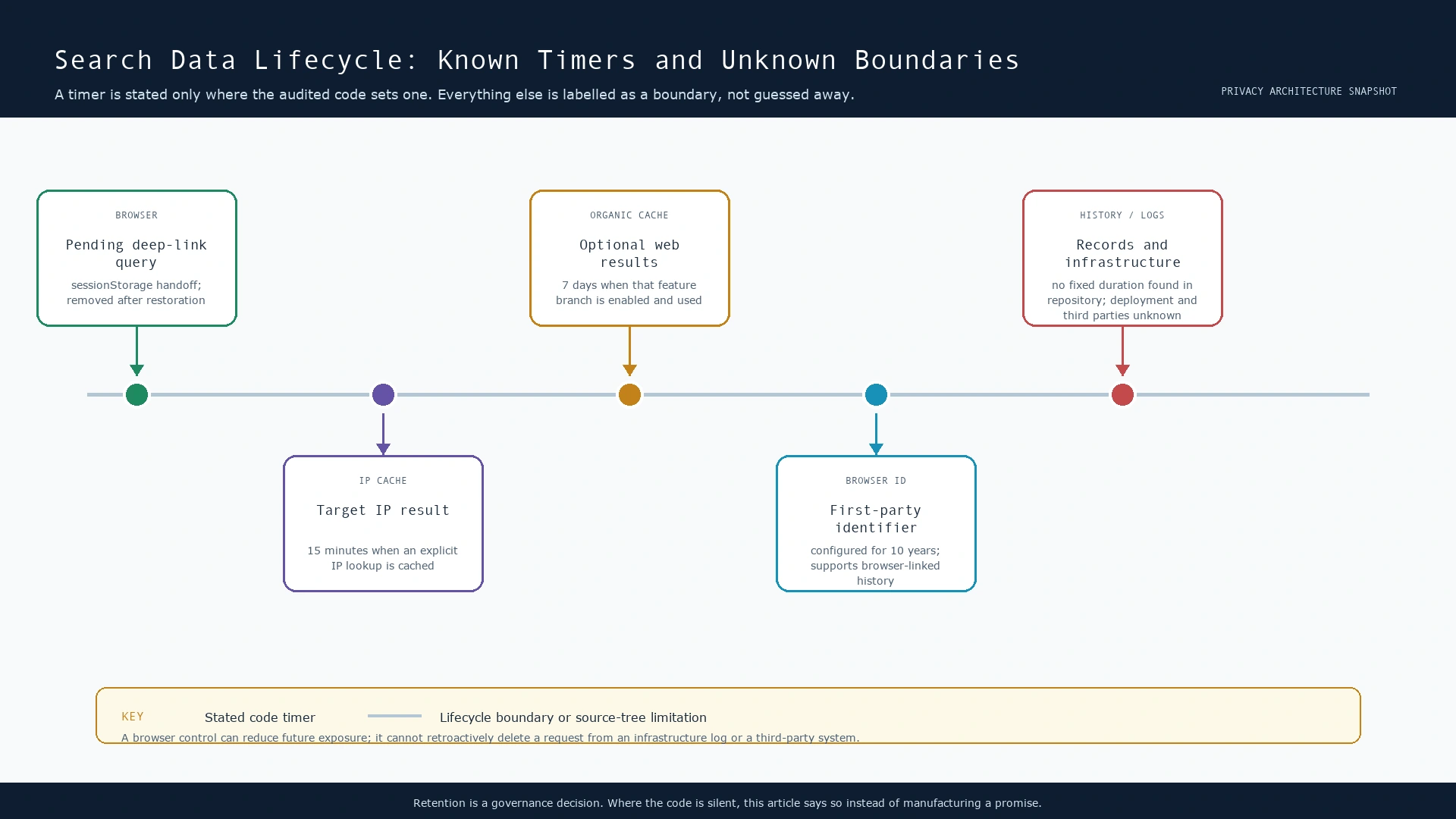
The following lifecycle map is intentionally cautious. It marks a duration only where code sets one. It does not turn a cache expiry into a claim about every copy of data, and it does not invent a retention period where the source tree is silent.
| Data or state | What the audited code establishes | What it does not establish |
|---|---|---|
| Pending supported deep-link query | Stored temporarily in sessionStorage only to restore the intended scan, then removed after use. | It cannot remove the original request from infrastructure or remove a copied URL from another device or service. |
| Explicit target-IP cache | Cached IP-intelligence response can expire after 15 minutes. | It does not state how the external provider retains the target or how deployment backups behave. |
| Optional organic web-result cache | Application cache duration is 7 days for that branch. | It is not a promise that a username/email history task or provider record expires after 7 days. |
| Browser identifier | Configured with a 10-year expiry and used for browser-linked user/history association. | It does not by itself identify a real-world person, but it can still link activity within the application context. |
| Username/email search history | Stores the query and related task data described above. | No fixed deletion timer or self-service deletion route was identified in this source audit. |
| Server, CDN, WAF, provider, or vendor records | They may exist depending on deployed and third-party systems. | The source tree does not expose their collection scope or retention; no claim is made here. |
OWASP’s logging guidance is a useful engineering lens: logs need enough context to support security operations, but sensitive data should be protected and excluded or masked where appropriate.[8] The implementation change for deep links follows the same idea: remove a supported query from common browser-side page metadata as early as possible, without claiming that client-side code can erase data from a request that already arrived elsewhere.
What We Changed After This Review
This review found a narrow, concrete exposure: a supported ?username= or ?email= automatic-search link could put the target in the visible page URL while common third-party browser scripts loaded. The site now moves that supported value into session storage and removes the matching parameter from the displayed URL before those common scripts run. It preserves the existing automatic-search behavior. The Google Analytics page-view configuration also supplies page location and referrer values without query strings, and the document declares a strict cross-origin referrer policy.
The limitation is part of the change, not fine print: this does not remove the original request from a browser’s earlier history state, edge/origin access logging, copied links, external scanning services, or any other system that already received the value. It is a reduction in future browser-side exposure, not a claim of erasure. The Privacy Policy has been updated to state that same boundary.
Practical Privacy Checklist for Researchers
- Use the smallest identifier that answers a legitimate, authorized question. Do not bulk-submit personal data “just in case.”
- Prefer the normal form flow over putting a sensitive username or email address into a shareable URL. If someone gives you such a URL, avoid forwarding it unchanged.
- Read the Privacy Policy before submitting personal data, and use its contact route for a rights or deletion request.
- Separate observations from conclusions. A public result or a category label is evidence to assess, not proof of account control, identity, intent, or completeness.
- Do not publish a target’s raw email, username, IP, or result set merely because it was technically retrievable. Redact, aggregate, and retain only what your justified purpose needs.
- Review your own browser, extension, organizational logging, and consent settings. The site cannot control data captured by your endpoint or network.
- Do not use these tools to profile, harass, dox, impersonate, or evade another person’s privacy and safety. If the purpose is unclear, stop and seek appropriate authorization.
Frequently Asked Questions
Is SpiderFoot.tools anonymous?
No. Username and email searches create a first-party history task associated with a persistent browser identifier, and the application processes request metadata including a request-IP field. The page also loads browser-side third-party resources. “No account login” is not an anonymity guarantee.
Are my username or email searches saved?
For the reviewed username/email paths, yes: the application creates and updates a research-history task containing the submitted query and related task data. The source audit did not find a fixed retention time or self-service delete route. See the Privacy Policy for contact information.
Does clearing cookies delete my previous searches?
No. Clearing a browser identifier may prevent that browser from retrieving the same association, but it does not delete the application history record or any infrastructure/provider record. Treat client-side clearing and server-side deletion as different actions.
Does the site use cookies or browser storage?
Yes. The application sets a first-party browser identifier. A short-lived supported deep-link handoff uses sessionStorage. The shared layout also includes consent and advertising/analytics resources that can have their own browser-state behavior subject to live configuration and consent choices.
Does the site use analytics or advertising technology?
Yes. The shared page layout includes Google Analytics and Ezoic-related consent, advertising, and analytics resources. The current GA page-view configuration removes query strings from the page location and referrer it supplies. That does not create a broad guarantee about every third-party request or vendor retention policy.
Will a username, email, or IP be sent to another service?
It can be. Username and email scans send the full target to configured category scan services, and an optional organic-results branch can send the query server-side to an organic search-results provider when enabled. An explicit target IP is sent server-side to the IP-intelligence provider. The provider-specific retention and downstream processing are not fully disclosed in this repository.
Is a submitted target IP the same as my IP address?
No. Your connection IP is request metadata about the researcher’s browser. A target IP is a separate value you type into the IP tool. The article’s IP boundary diagram explains the difference and why both values deserve care.
Why is there no embedded YouTube video on this page?
The publication review found useful general material about analytics URL redaction, but no video that documents this application’s own search path. An embed would also introduce another third-party browser request, so this page keeps the implementation explanation self-contained and links to primary documentation instead.
Sources and Further Reading
- SpiderFoot.tools Privacy Policy — policy terms, contact route, and the current deep-link handling disclosure.
- SpiderFoot.tools Methodology — guidance on interpreting OSINT outputs and evidentiary limits.
- SpiderFoot.tools Terms of Service — authorized-use and responsibility context.
- Google Analytics: Best practices to avoid sending PII — Google’s requirement to avoid personally identifiable information in URLs and collected data.
- Google Analytics: Safeguarding your data — controls and responsibilities for collected analytics data.
- MDN: Referrer-Policy — behavior of referrer policies including strict-origin-when-cross-origin.
- MDN: Web Storage API — browser storage interfaces including session and local storage.
- OWASP Logging Cheat Sheet — logging design, data protection, and sensitive-data considerations.
- ICO: Data minimisation — collect and retain only what is adequate, relevant, and limited to the purpose.
- ICO: Data protection by design and by default — privacy engineering principles and controls.
- Cloudflare: HTTP headers — explanation of CF-Connecting-IP and origin request handling.
- Ezoic: GDPR compliance and consent management — third-party consent-management documentation.