SpiderFoot is best understood as an automation philosophy as much as a product: start with a known identifier, ask many public data sources for related signals, organize what comes back, and preserve enough provenance for a researcher to verify the useful leads. The classic SpiderFoot open-source project implements that philosophy as a highly configurable Python application with an embedded Web UI, a command-line interface, more than 200 modules, an SQLite back end, exports, visualizations, and optional API integrations.
SpiderFoot.tools is different. It is an independent, browser-based OSINT platform that brings the reconnaissance pattern associated with classic SpiderFoot into focused online workflows for a username, an email address, or an IP address. It is not the official SpiderFoot website, official SpiderFoot cloud, or a service operated by the original project maintainers. The connection is the investigation model: automated collection produces leads; source-level verification turns those leads into defensible findings.
This guide is based on complete reviews of the three product recordings embedded below. The screenshots show the actual interface, input states, progress indicators, result cards, public-web results, and scan logs visible in those recordings. The examples are demonstrations, not accuracy benchmarks. Counts, availability, and individual sources can change between scans.
What Is SpiderFoot.tools?
SpiderFoot.tools is a browser-based OSINT experience designed for quick, focused reconnaissance. Open the site, select an identifier type, enter the value, execute the scan, review structured results, and open the original sources that deserve verification. There is no local Python environment to prepare, repository to clone, dependency set to install, or local web server to expose.
Classic SpiderFoot remains the broader option when an investigator needs self-hosting, deep module selection, custom configuration, correlation rules, exports, repeatable infrastructure, or command-line automation. Its official repository describes a Python 3 application that can be used through either its embedded Web UI or CLI and can target entities including usernames, email addresses, IP addresses, domains, networks, ASNs, phone numbers, names, and cryptocurrency addresses. Its modules feed one another in a publisher/subscriber model, so one observation can generate new events for other modules to investigate.
That breadth is an advantage, but it creates setup and operating decisions. A conventional local path looks like this: obtain a packaged release or clone the repository, create a compatible Python environment, install requirements, configure modules and API keys where needed, start the local server or CLI, select a target and scan type, then review and export the resulting event graph.
The SpiderFoot.tools path is narrower: open the browser, choose Username, Email, or IP Address, enter an identifier, run the focused scan, inspect the separated result layers, and verify original URLs. This is useful when the research question is already defined and the user values immediate access over the configuration freedom of a self-hosted framework.
| Workflow dimension | Classic SpiderFoot open source | SpiderFoot.tools |
|---|---|---|
| Access model | Self-hosted Python application with Web UI or CLI | Browser-based online interface |
| Setup | Release or Git clone, Python requirements, service configuration | No local SpiderFoot installation |
| Scope | Broad, modular and highly configurable | Focused username, email and IP workflows |
| Best fit | Custom automation, module control, local data handling and repeatable deployments | Immediate, guided reconnaissance on a specific identifier |
| Investigator duty | Define scope, assess source reliability, verify material claims and record uncertainty | |
How to Run a Username OSINT Scan with SpiderFoot.tools
Username OSINT asks where an exact handle appears on publicly reachable services and indexed pages. It is often a productive first step because people and organizations reuse handles across developer communities, forums, games, social networks, publishing platforms, and public profile pages. It is also collision-prone. The same username does not mean the same person, especially when the string is a common name or short word.
The following silent recording shows the complete username reconnaissance workflow in SpiderFoot.tools, from entering maxim through progressive result collection, grouped public-web results, and the source-by-source scan log.
Step 1 — Enter the exact username
Open the Username scanner. The selected tab, terminal path, placeholder, and usage tips all confirm that the page expects a username. Enter the handle without an @ symbol. The recording uses maxim, a deliberately useful teaching example because it is common enough to demonstrate why string equality is weak attribution evidence.
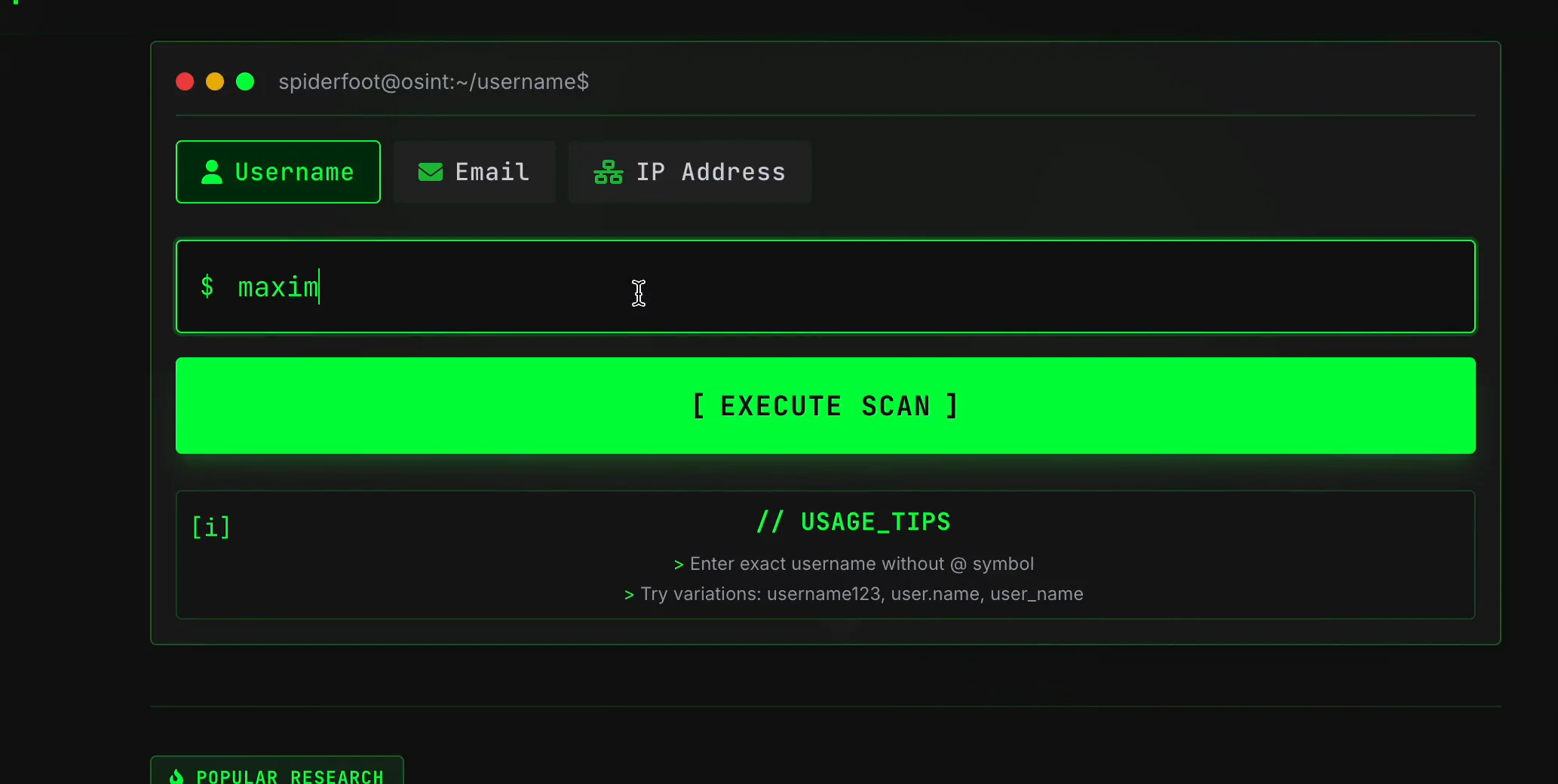
Before selecting Execute Scan, write down the canonical spelling and the reason for the query. If punctuation, numbers, or capitalization variants matter, test them one at a time. Separate scans make it possible to explain which spelling produced each lead.
Step 2 — Follow the batch and worker progress
After execution, the page replaces the input-focused view with a running scan panel. In the recording, the top line advances through named site batches and shows a percentage. A second line reports worker progress and how many candidate matches have been merged. The Pause control remains available while collection continues.
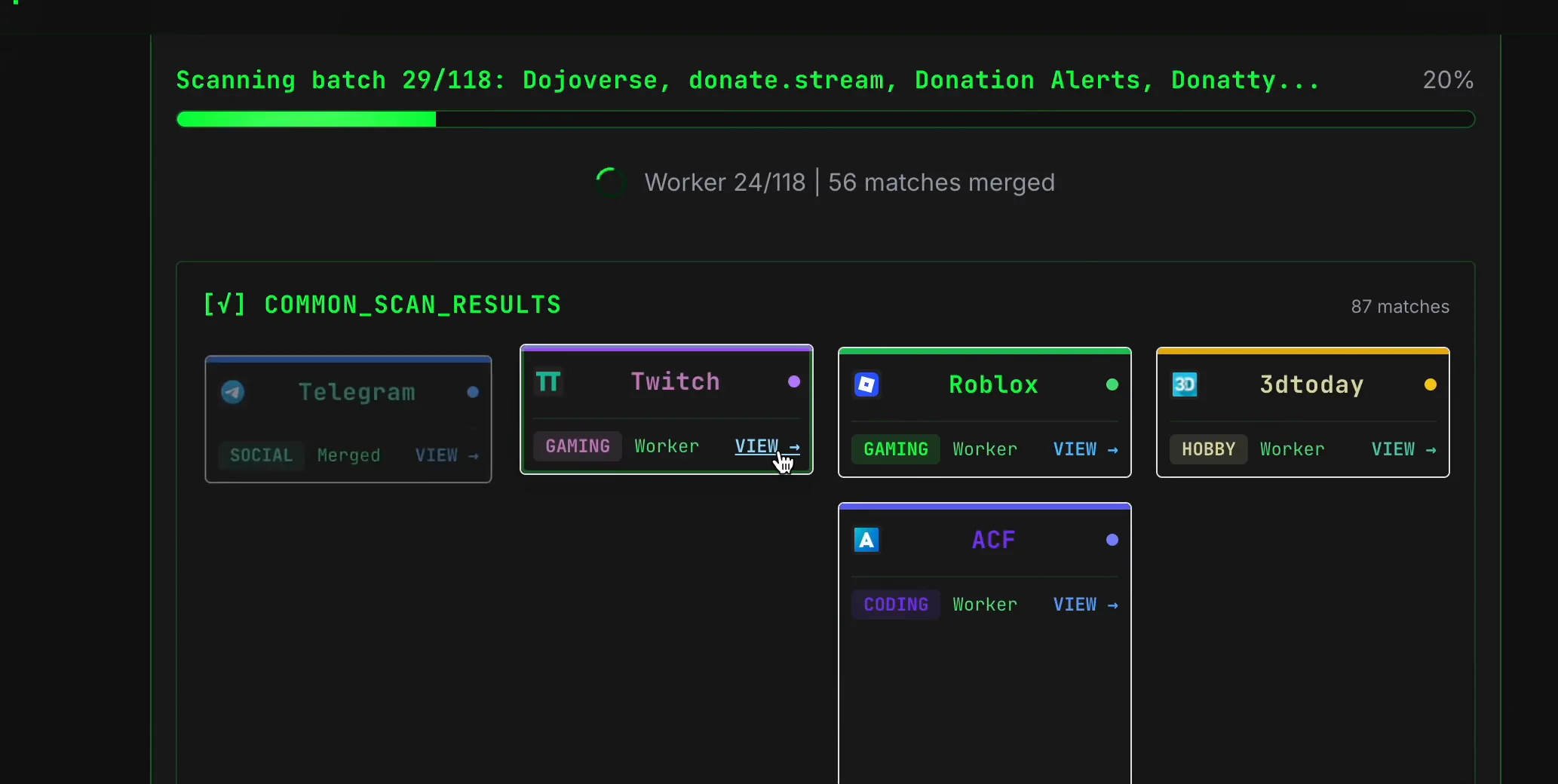
This progressive rendering matters. A card can appear before every source has been checked, and the merged count can change as workers report back. Wait for the scan and the relevant result sections to settle before documenting coverage. If the scan is interrupted, report it as partial rather than interpreting missing cards as negative findings.
Step 3 — Triage Common Scan Results
Common Scan Results is the primary account-discovery layer. Cards are labeled with the service name, a category such as Social, Gaming, Coding, Community, Tech, or Hobby, a collection path such as Worker, API, or Merged, and a View link. Some cards expand to show service-specific public fields. During the demonstration, expanded cards displayed examples such as a handle and user ID on one service and a country, full name, and ranking on another.
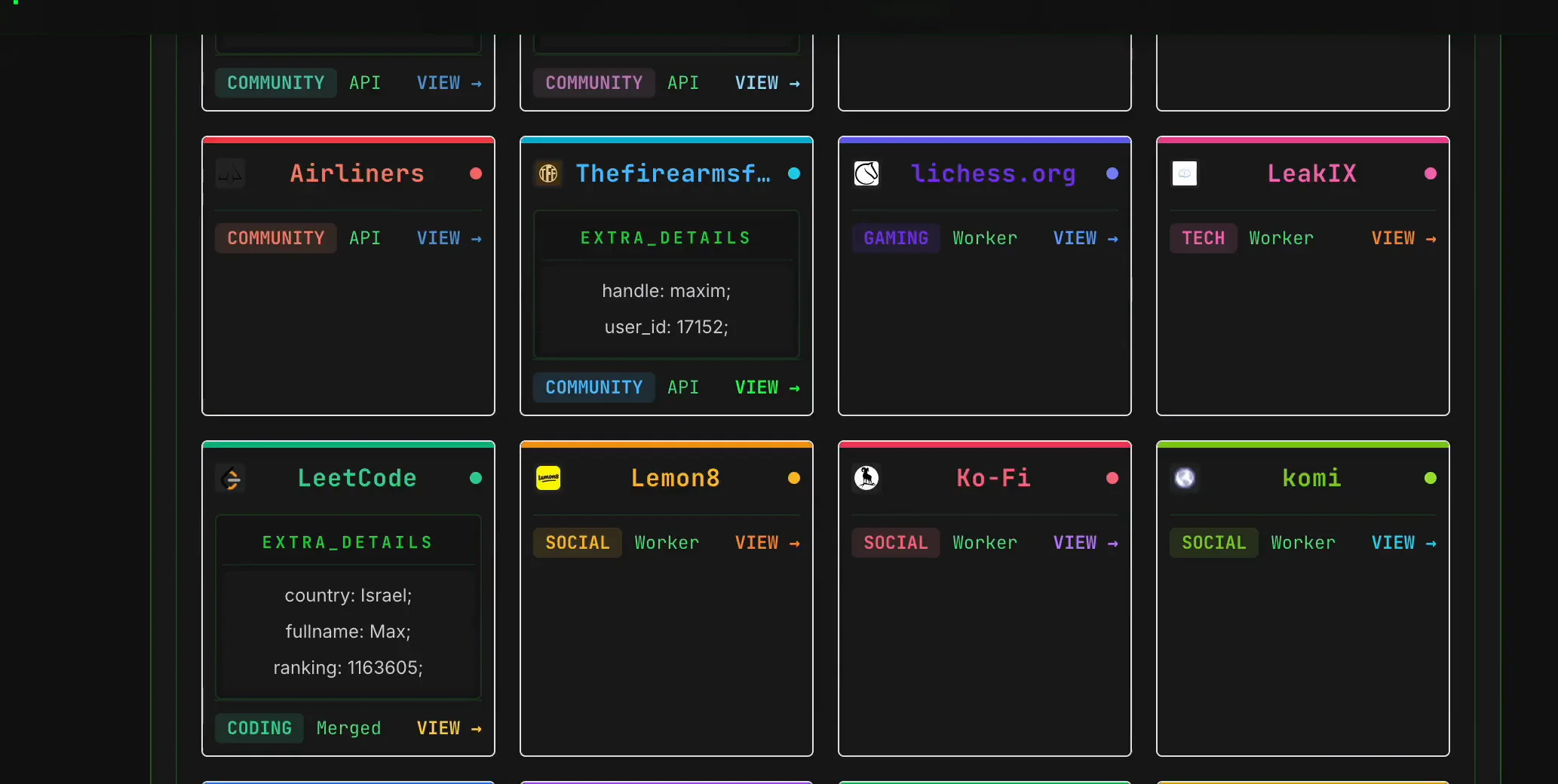
Read each card in three passes:
- Observation: note exactly what the card displays: service, category, status path, public URL, and any extra fields.
- Interpretation: decide what the signal could mean. An exact handle may be a possible profile; a matching display name may slightly strengthen it; conflicting location or dates may weaken it.
- Verification: open the original source and compare independent public details that are relevant to the authorized question.
Do not rank a result highly just because the interface returned rich metadata. A well-populated unrelated profile can look more convincing than a sparse genuine one. Provenance and cross-source agreement matter more than visual detail.
Step 4 — Use Search Engine Results for context, not identity proof
The recording then scrolls from platform cards to Search Engine Results. Results are grouped by domain and show a title with an Open action. For the common string maxim, the recorded results include dictionary definitions, a Wikipedia topic, an Instagram result and unrelated commercial pages. That mixture is an unusually clear demonstration of information gain: search results reveal how ambiguous the input is, not merely where it occurs.
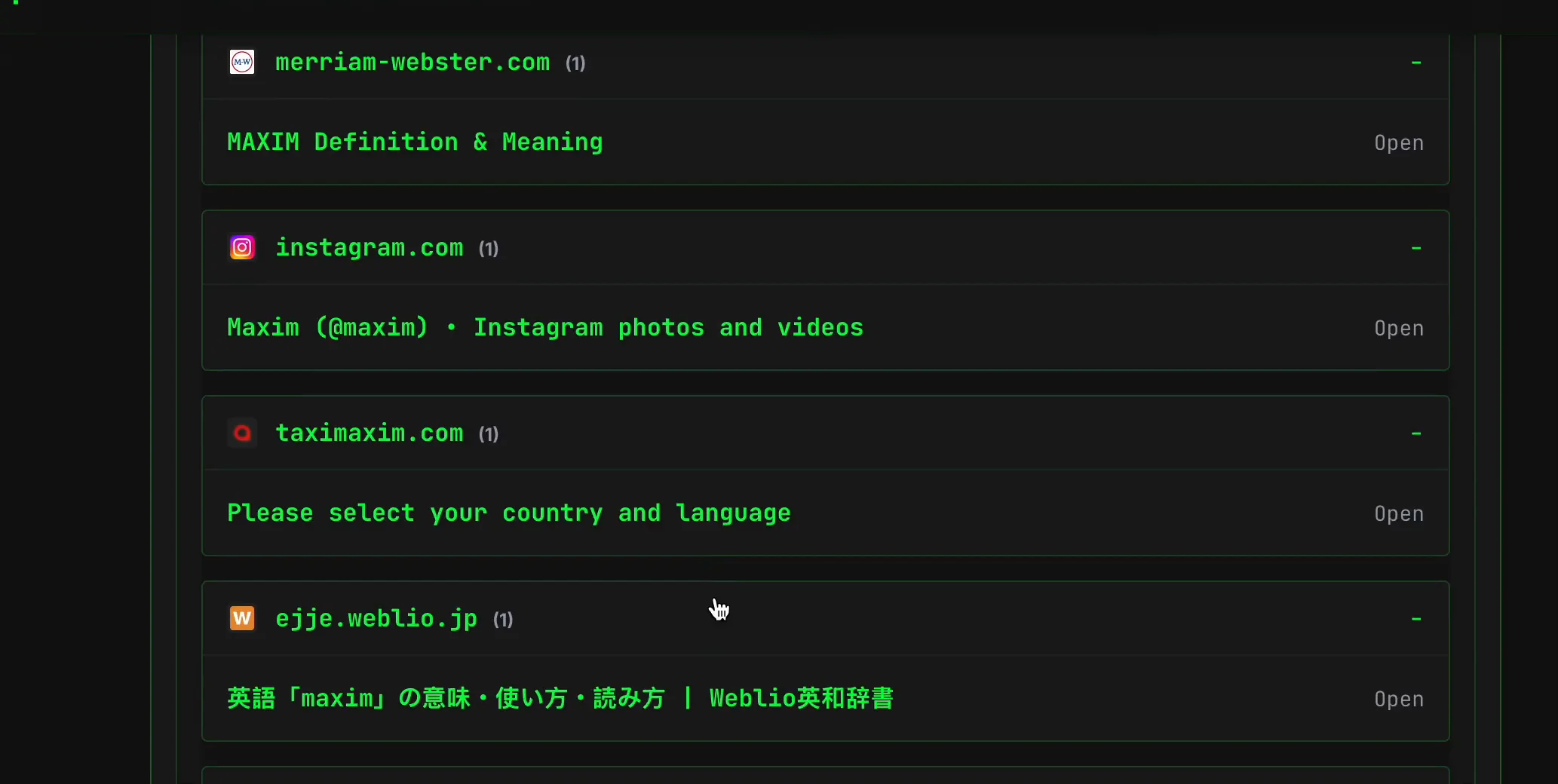
Use search-engine results to locate original pages, discover a relevant domain, or compare how a handle is presented outside a profile route. Snippets can be stale, truncated, localized, or generated from text unrelated to account ownership. Open the source before recording any claim, and capture the page date or last activity where available.
Step 5 — Inspect the Common Site Scan Log
The final username layer is the Common Site Scan Log. It groups source checks by category and reports per-source states such as Found, Not Found, and Error. In the recorded snapshot, the expanded Social group showed 54 entries divided among found, error, and not-found outcomes. Individual error rows included reasons such as an unexpected status code or a requirement that a scanner run synchronously.
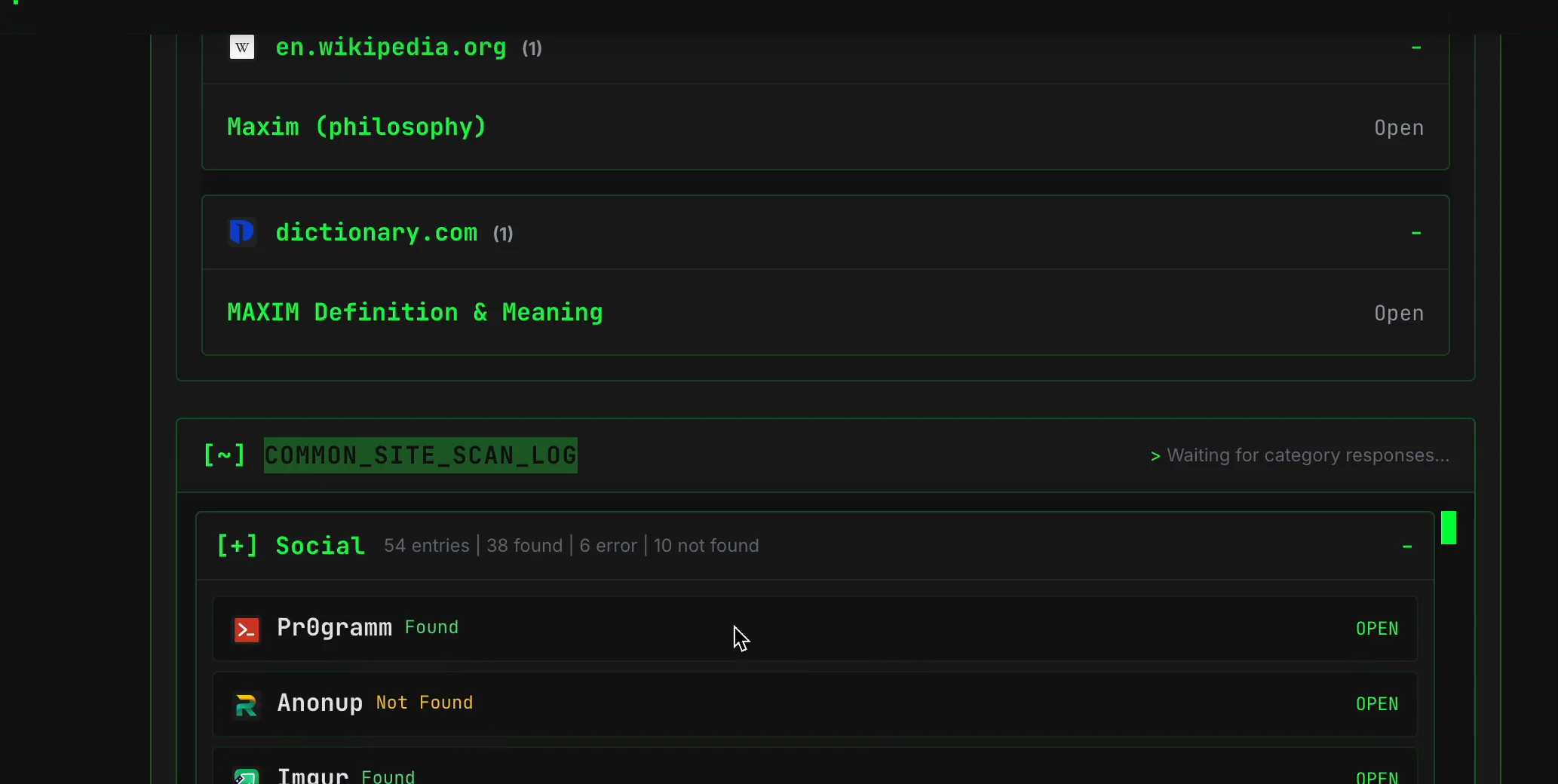
The log is essential when the research question involves absence. Not Found means that a particular check returned the rule-defined negative state at that time. Error means the check did not produce a reliable yes or no. A source can fail because its page structure changed, it rate-limited the request, it returned a bot challenge, its endpoint changed, or the scanner could not interpret the response. Coverage is therefore a set of observed outcomes, not a universal search of the internet.
How to reduce username false positives
Username collisions, abandoned accounts, impersonation, copied biographies, reused avatars, and stale indexing are common. Verify promising profiles with several independent features: avatar history rather than one current image, biographical facts relevant to scope, location consistency, writing style, linked domains, reciprocal links between accounts, creation and activity dates, and public URLs controlled by the same organization. Treat a common username with no corroboration as unconfirmed. If evidence conflicts, preserve the conflict instead of forcing a single identity narrative.
How to Run an Email OSINT Scan with SpiderFoot.tools
Email OSINT starts from a complete address rather than a handle. The question is usually whether public services or indexed pages expose signals related to that address. That can produce stronger technical specificity than a common username, but it still does not prove who currently controls an account. Addresses can be reassigned, shared, aliased, mistyped, compromised, or indexed in stale material.
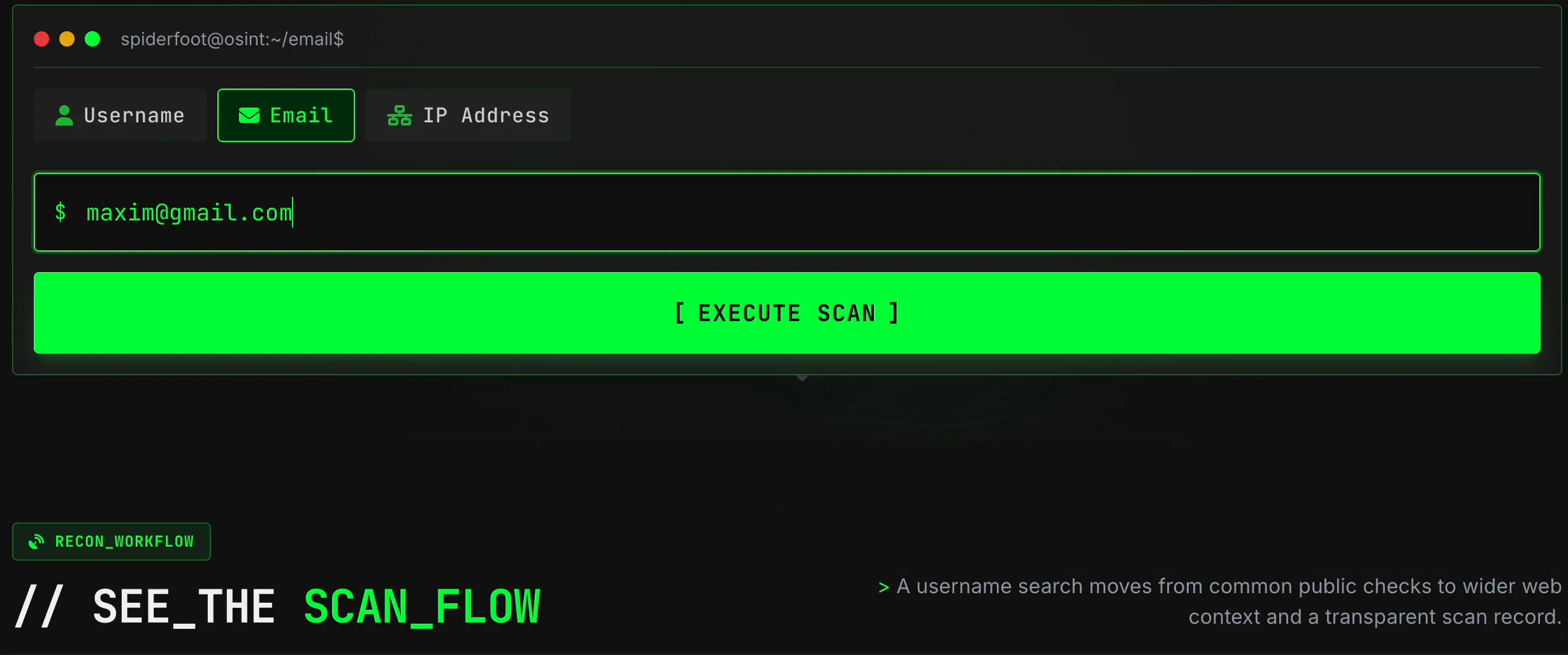
The recording below enters [email protected], runs category checks, renders cards while the scan is in progress, collects grouped public-web results, and expands a log stream containing registered, not-registered, error, and skipped states.
Step 1 — Enter a complete, authorized email address
Open the email OSINT scanner, confirm that the Email tab is selected, and enter the full address. The interface uses the same Execute Scan action as the username workflow. Do not enter a password, recovery code, mailbox contents, or internal case notes. The address is the identifier; secret material cannot improve a public-data scan and creates unnecessary risk.
Step 2 — Watch category progress and incremental cards
The email scan progresses through named categories rather than the username video’s site batches. The recording visibly advances through categories including Social, Music, Gaming, News, Shopping, Sports, Learning, Dev, Adult, Community, Creator and others. A category counter and percentage appear above the results. Common Scan Results cards accumulate underneath, with a category label and a View action.
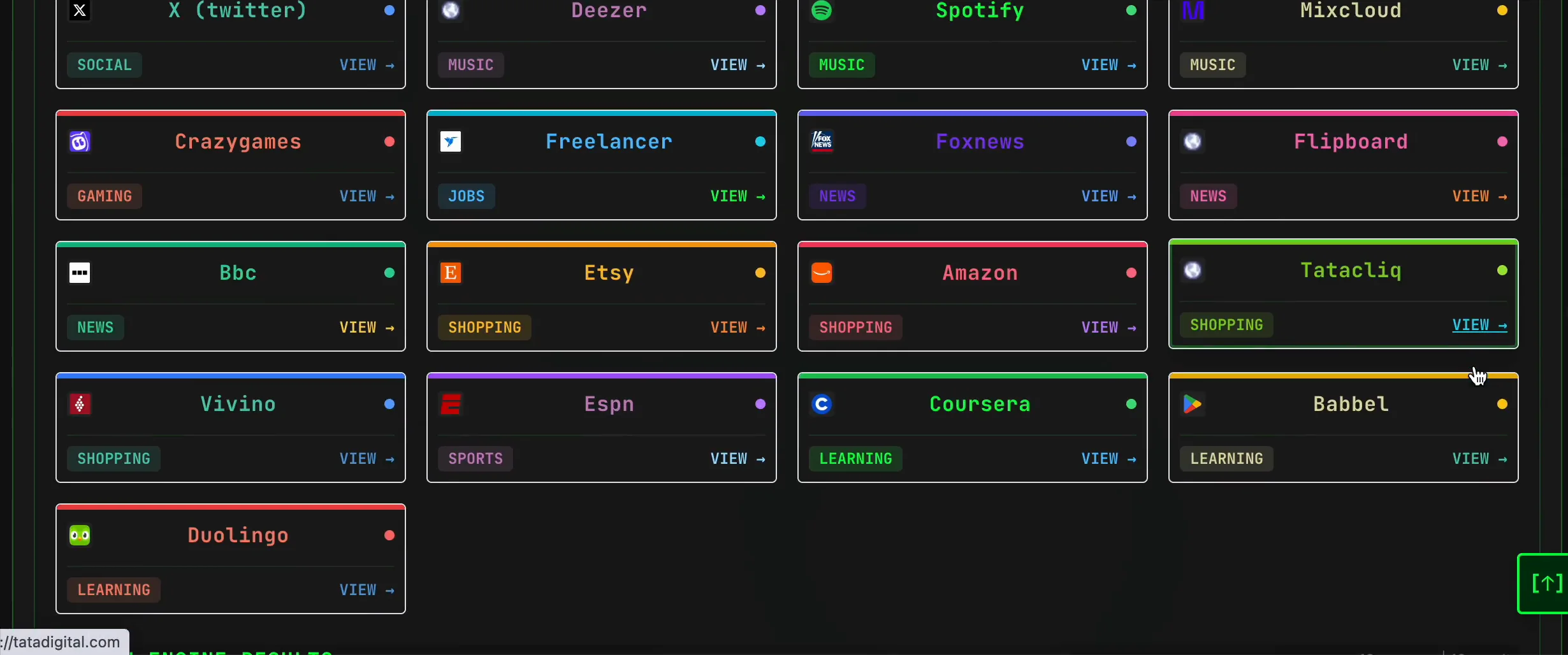
In the recorded run, the completion notice reported 31 matching accounts. That number describes one captured scan against one input at one moment; it is not an accuracy rate and it should not be interpreted as 31 accounts owned by one person. Each card must be assessed independently.
Step 3 — Separate service signals from public-web context
The Email results page also contains grouped Search Engine Results. In the recording, these include pages from unrelated domains, Google Scholar, app listings, and other public-web references containing pieces of the address or name string. This layer answers a different question from a service card. A service card reflects the response rule for a particular service check; a search result shows that an indexed page matched the query. Neither alone proves current account ownership.
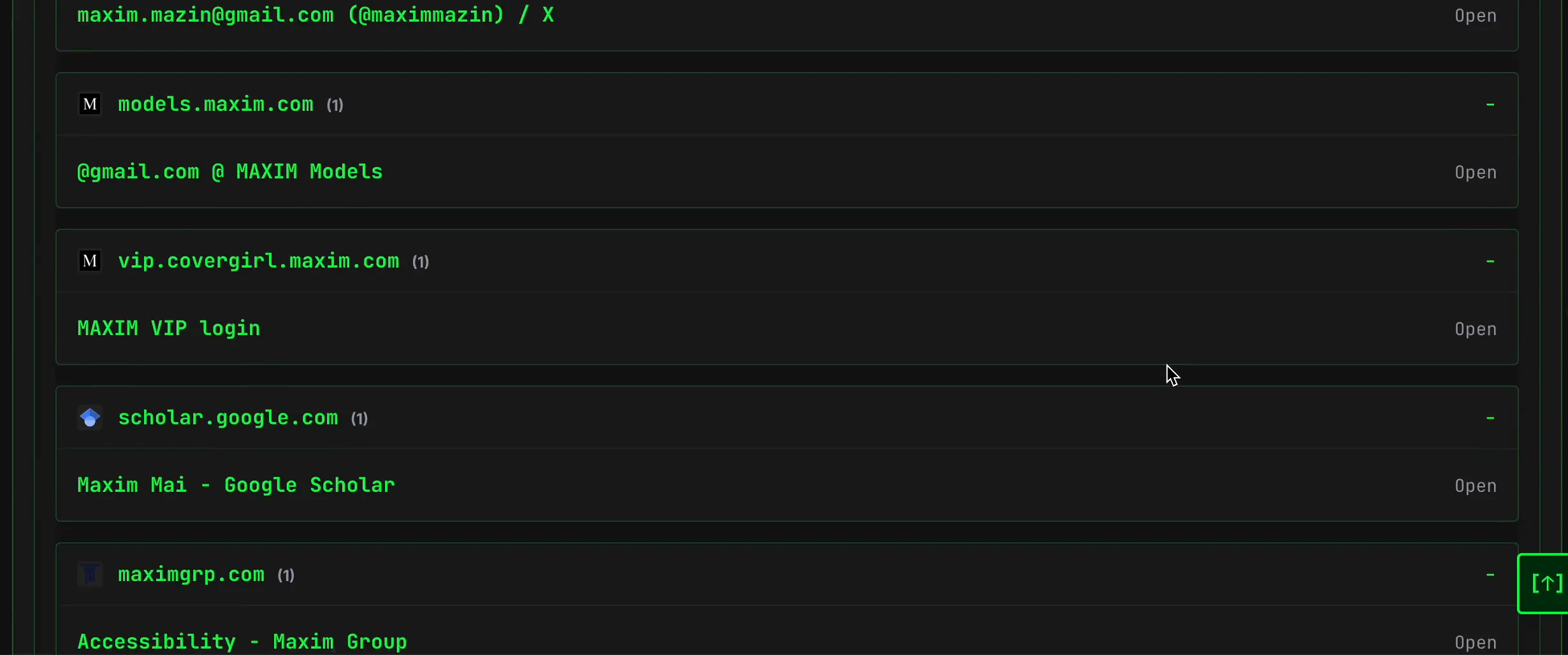
A useful email result is usually one where the exact address appears in attributable, current context relevant to scope. A page that only matches the local-part string or a person with a similar name is weaker. Search snippets should be treated as discovery aids because indexes can lag behind source changes.
Step 4 — Interpret the Scan Log Stream
The email recording finishes with a Scan Log Stream organized into collapsible categories. Individual rows show states including Registered, Not Registered, Error, and Skipped. Error rows in the recording expose concrete failure reasons, including HTTP 403 responses, token-extraction failure, and inability to extract a CSRF token from a login page.
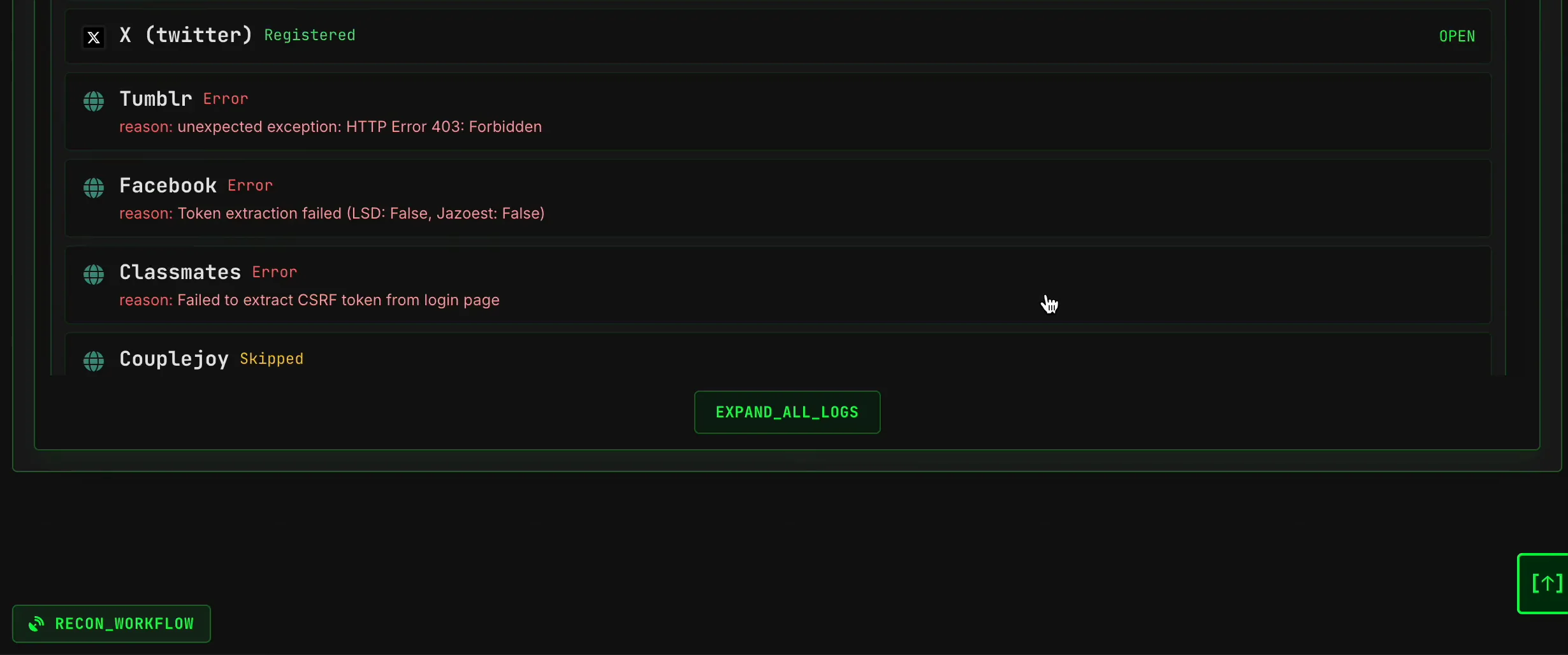
- Registered: the service-specific check produced its positive rule. Treat it as a lead and verify the service context where lawful and possible.
- Not Registered: the check produced its expected negative response at scan time. It does not rule out aliases, private records, regional behavior, or later changes.
- Error: the scanner could not reach or reliably interpret the service. Record it as unknown, not negative.
- Skipped: the check was not completed under the current workflow or conditions. It says nothing about registration.
Third-party endpoints change frequently. Rate limits, anti-automation controls, privacy settings, localization, transient outages, and page redesigns can all alter results. A useful report records both the positive leads and the checks that remained indeterminate.
How to Run an IP Address OSINT Scan with SpiderFoot.tools
IP OSINT is primarily about network context. It can describe an address family, autonomous system, organization, routing or provider context, and coarse location metadata. It cannot, by itself, identify the human being who used an address at a particular time. Consumer ISPs rotate addresses; businesses use gateways; mobile carriers and VPNs share egress; cloud providers host many customers; and proxies separate an observed address from an endpoint user.
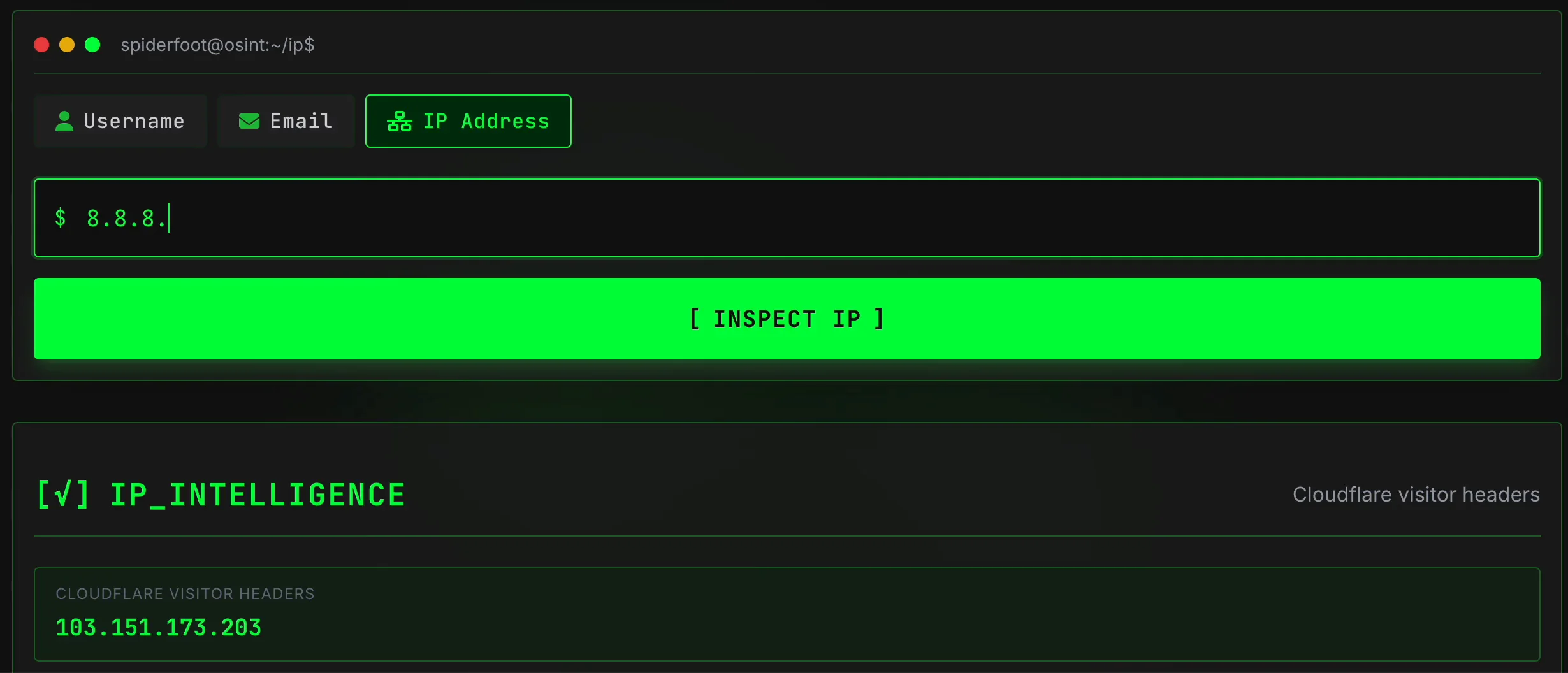
The IP recording demonstrates two distinct modes: leaving the field empty to inspect the current browser connection through Cloudflare visitor headers, and entering 8.8.8.8 to request external network intelligence from Cloudflare Radar.
Step 1 — Inspect the current connection or enter an IP
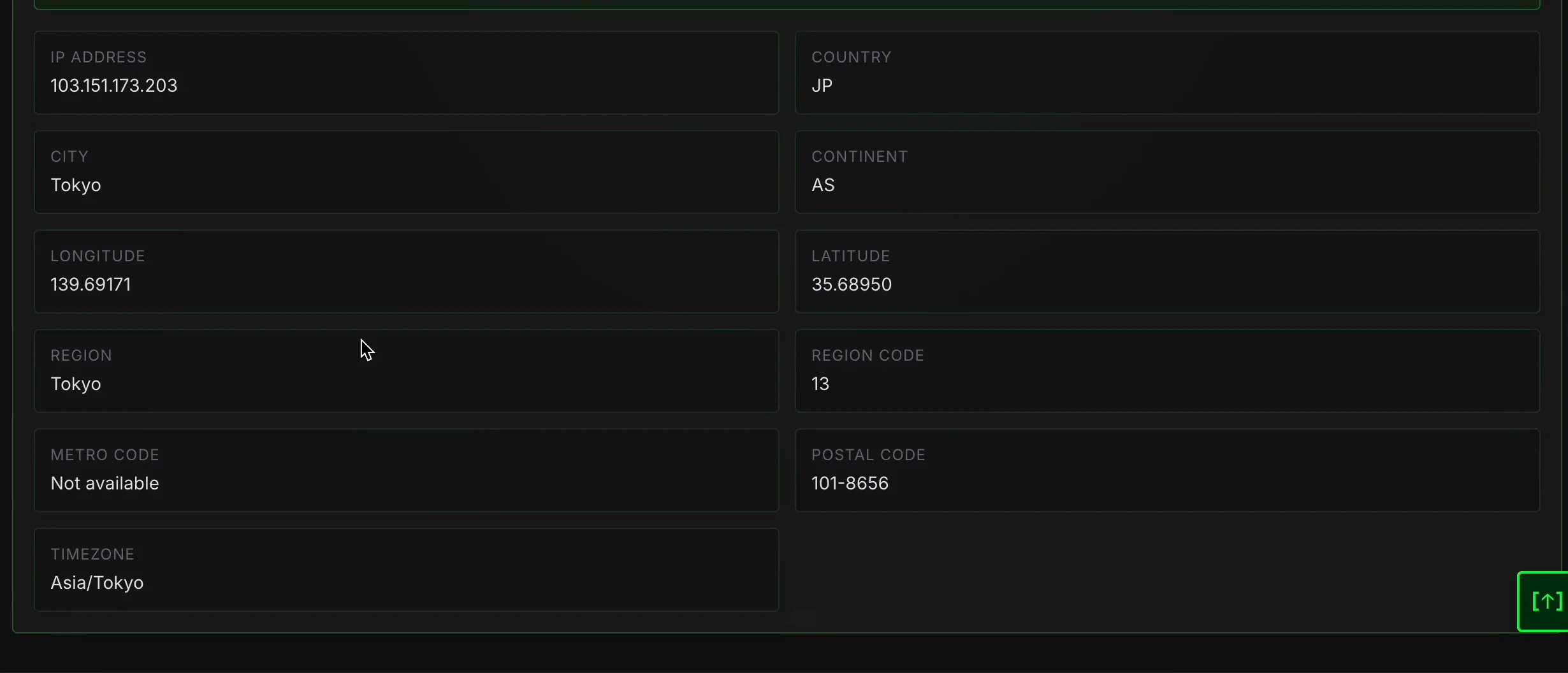
Open the IP Address scanner. The placeholder explicitly says that the field can be left empty to inspect your IP. In the recorded current-connection view, IP Intelligence is labeled Cloudflare visitor headers and displays fields including IP address, country, city, continent, longitude, latitude, region, region code, metro code, postal code, and timezone. Those values describe what the edge request supplied; they are not a GPS reading.
For a different address, enter a complete IPv4 or IPv6 value. The recording types the well-known public address 8.8.8.8 and selects Inspect IP. Use only an address inside the authorized investigation scope, and preserve the relevant timestamp if the question depends on historical assignment.
Step 2 — Read Cloudflare Radar network fields
After the explicit lookup, the result source changes to Cloudflare Radar. For 8.8.8.8, the recording shows IP version IPv4, IP location United States, autonomous system number 15169, autonomous system name GOOGLE, autonomous system organization Google LLC, IP location code US, and autonomous system location US.
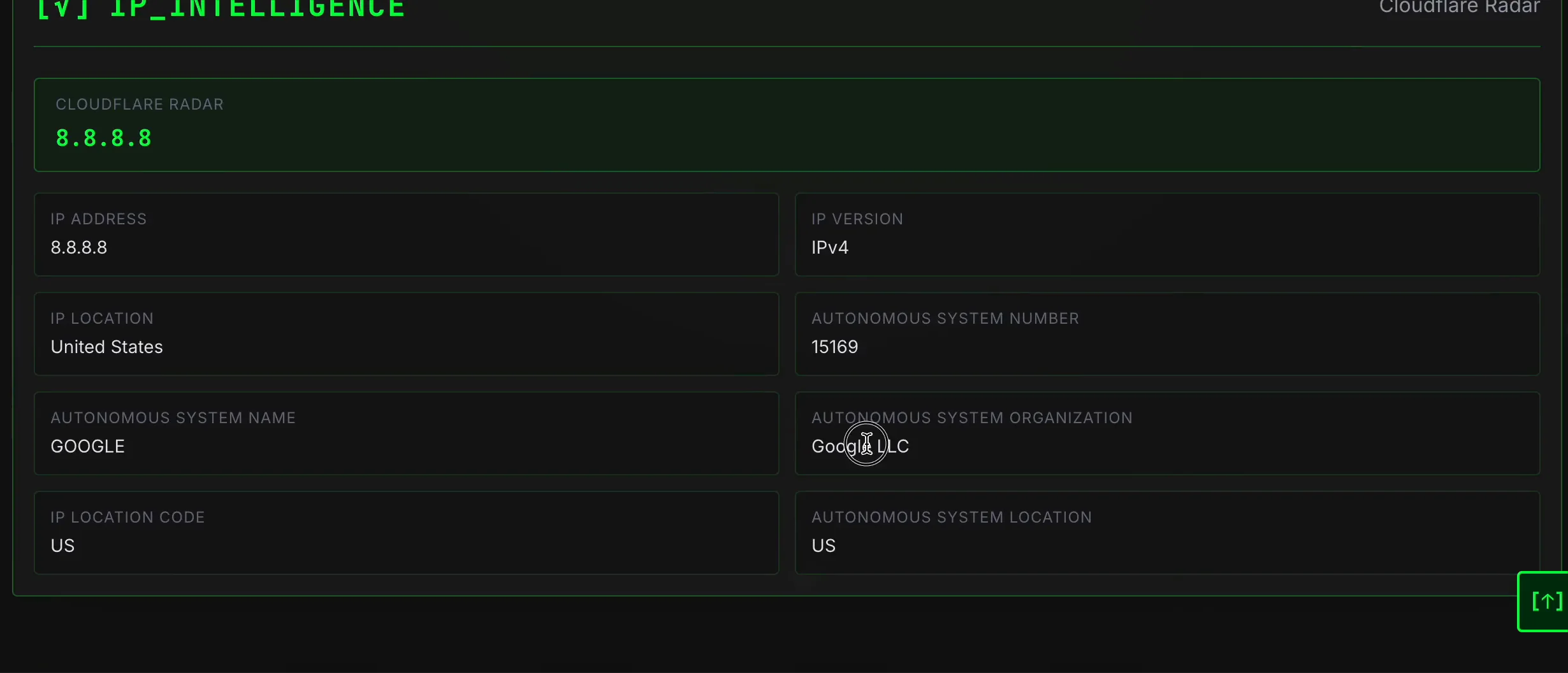
Interpret the fields from broadest to narrowest. The IP version defines the address family. The ASN identifies the routing system announcing the network. The AS name and organization provide operator context. Country or location codes are coarse database attributes and can describe registration or network geography rather than the endpoint’s precise location. For incident response or attribution, corroborate with authoritative routing data, provider records available within lawful process, application logs, and exact timestamps.
Username vs Email vs IP OSINT: Which Should You Use?
| Decision factor | Username | IP | |
|---|---|---|---|
| Input object | Public handle | Complete address | IPv4, IPv6, or current connection |
| Best question | Where does this handle appear publicly? | What public service or web signals relate to this address? | What network context is associated with this address? |
| Typical signal | Profile route, service card, public mention | Registration-rule signal, categorized service card, indexed reference | Address family, ASN, network organization, coarse location |
| Main false-positive risk | Handle collision or impersonation | Stale, shared, aliased or misinterpreted service response | Shared infrastructure or changing assignment |
| What it cannot prove | That every matching profile belongs to one person | That a named person currently controls an account | That a specific person used a device at a location |
| Best verification | Cross-profile dates, links, biography and controlled domains | Exact-address context, source date and independent records | Routing records, provider context, timestamps and system logs |
Start with the most direct authorized identifier. Add another scanner only when it answers a distinct question. More inputs do not automatically create more certainty; they can simply create more unrelated leads.
How to Verify SpiderFoot.tools Results
The interface accelerates discovery, but verification remains a human research task. Use the site’s published methodology as a companion reference and apply the following workflow to every material lead:
- Open the original source. A result card or search snippet is a pointer. Keep the direct public URL and identify which site made the claim.
- Confirm the identifier in context. Check whether the page contains the exact username, full email address, or exact IP. Substring and name-only matches are weaker.
- Record time. Note the scan time and any source publication, profile creation, last activity, routing, or update timestamp relevant to the conclusion.
- Separate source claims from observations. Write “the profile displays location X,” not “the person lives in X,” unless independent evidence supports the latter.
- Compare independent signals. Look for reciprocal links, controlled domains, consistent dates, stable avatars, attributable organization pages, or system logs. Do not count copies of the same source as independent corroboration.
- Review contradictory evidence. A different biography, timeline, language, organization, or network owner can be more important than several superficial matches.
- Check scan completeness. Use progress indicators and logs to identify errors, skipped checks, and sources that were not resolved.
- Assign a confidence level with reasons. Label ambiguous matches unconfirmed and document what additional evidence would be needed.
A Practical, Authorized OSINT Workflow
Consider an organization reviewing a support handle that it owns. The researcher records the approved handle and the goal: find public profiles that could confuse customers. A Username scan returns several cards and web references. The researcher opens original URLs, excludes obvious name collisions, records an impersonating page only if branding, links, dates, and context support that interpretation, and marks ambiguous profiles unconfirmed.
If the organization also owns a published support email address, the researcher runs a separate Email scan. Service signals are compared with organization records and public pages; scan errors remain unresolved. If an IP appears in the organization’s own incident logs, the researcher uses the IP scanner to identify the network and ASN, then correlates that context with the exact log timestamp. The IP result is documented as network intelligence, not person attribution.
The final note has three columns: confirmed observations with source URLs, interpretations with stated confidence, and open questions. Irrelevant personal details are excluded. This workflow is more defensible than copying every result card because it preserves purpose, provenance, uncertainty, and a stop condition.
Limitations, False Positives, and Responsible Use
SpiderFoot.tools depends on public pages, search indexes, service response patterns, and third-party network data. Results can be incomplete or misleading because of username collisions, abandoned or deleted accounts, index delay, localized pages, privacy controls, rate limits, bot protection, provider outages, API changes, routing changes, shared IP infrastructure, and temporary parsing failures.
A positive signal can be false or stale. A negative signal can reflect limited coverage. An error means the question was not answered. Re-run only when the authorized purpose justifies it, and compare timestamps instead of overwriting earlier observations. For deeper discussion of result quality, review the SpiderFoot.tools FAQ, the about page, and other OSINT research guides.
Keep the work proportionate. Search identifiers you own, approved test identifiers, organization assets, or targets inside a documented research scope. Do not use a public-data result to bypass access controls, reset credentials, harass a subject, or make a high-impact decision without appropriate review and independently verified evidence.
Frequently Asked Questions
For concise answers about SpiderFoot.tools, scanner behavior, result interpretation, privacy, and responsible OSINT use, visit the SpiderFoot.tools Frequently Asked Questions.