Email OSINT is often described as if a single lookup can answer a single, simple question: “Does this email exist?” That is not how responsible research works, and it is not what the current SpiderFoot.tools Email Scanner claims to do. This is a code-path transparency guide to the Email Scanner: what it sends, what it displays, what it records, and the boundaries that should stop an investigator from over-reading a result.
Implementation scope. This article is based on a review of the current browser and server code paths for the Email Scanner. It is deliberately narrower than a marketing feature list. Configuration, source availability, regional restrictions, and third-party behaviour can change; the observations below describe the audited path, not a permanent promise.
Short answer: this is an account-context scanner, not a mailbox verifier
The scanner accepts an email-shaped string, creates a search task, and runs category-based account-context checks. It can also show a separate set of optional Google organic results. A positive category card means that the category response returned the status Registered; it does not prove a human identity, present control of an account, successful email delivery, or that the scanner searched every relevant service.
That distinction matters. Internet mail has technical layers beyond an address’s written form: DNS mail-routing information, SMTP behaviour, recipient policy, and mailbox-level acceptance are separate questions. RFC 5321 describes SMTP mail transfer, while RFC 7505 documents one way a domain can expressly state that it accepts no mail. The current Email Scanner path does not perform DNS/MX or SMTP tests, so it does not turn a category match into a deliverability conclusion.
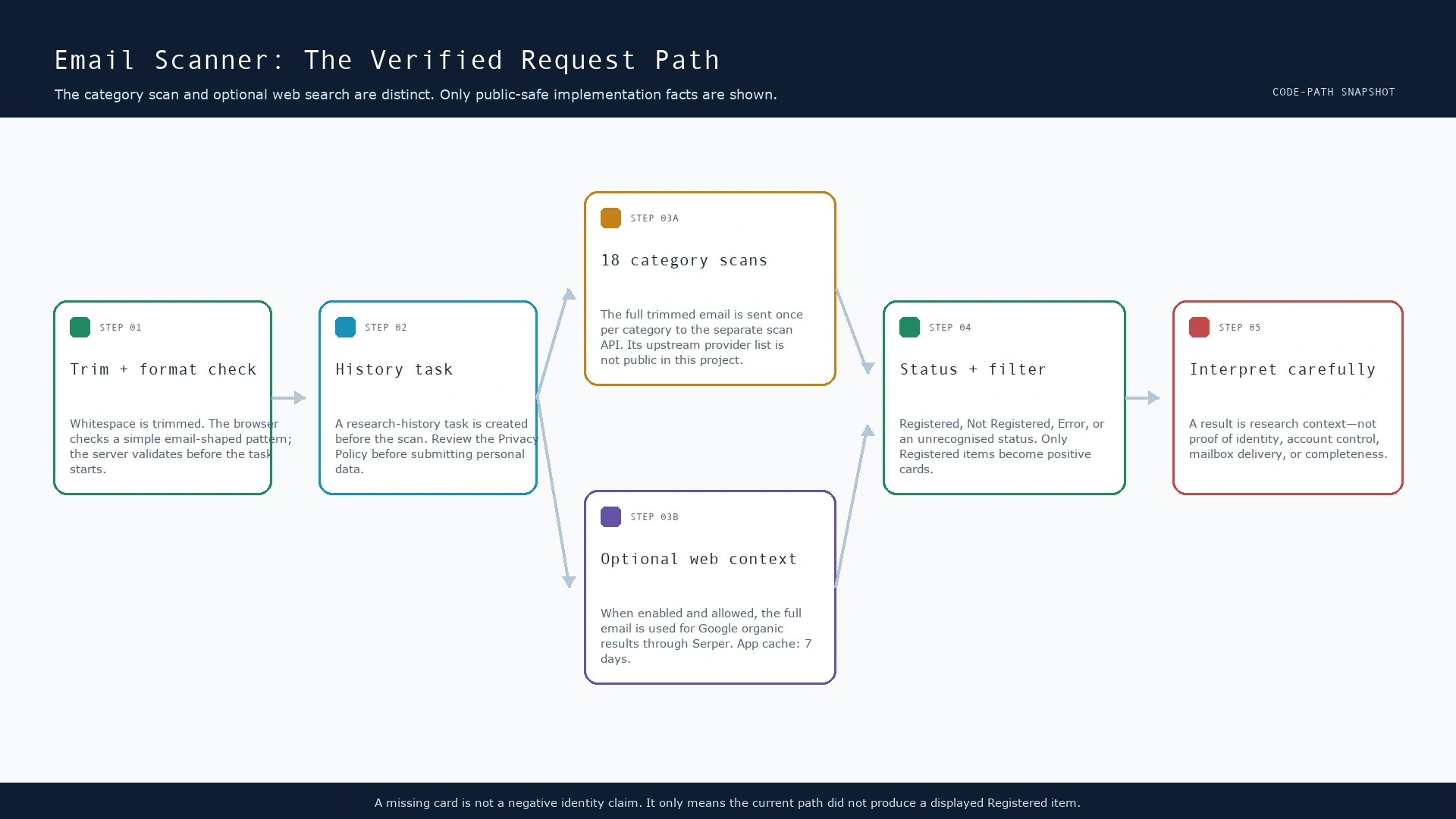
What happens to an address after you press search
- Whitespace is removed, then the shape is checked. The browser trims surrounding whitespace and applies a basic email-shaped pattern. The task-creation path also validates the address server-side. This is input hygiene—not proof of a mailbox, a person, or an organisation.
- A history task is created. The application creates a research-history record before the scan, then updates the record as the task completes. Its Privacy Policy explains that research history can include a submitted query, search type, timestamps, technical metadata, and selected result summaries associated with the browser/account context.
- The category scanner runs 18 labelled requests. The client sends the full trimmed address with every category request. The active categories are: social, music, gaming, jobs, news, shopping, sports, learning, dev, adult, community, creator, crm, entertainment, fitness, hosting, other, travel.
- Each response is given a display status. The UI handles
Registered,Not Registered,Error, and an unrecognised/unknown fallback. OnlyRegistereditems become the positive cards people usually notice first. - Optional public-web context is a separate branch. When that feature is enabled and permitted, the full address is used as an organic web-search query through Serper. Those results are stored separately from category cards and may be served from a seven-day application cache.
One small but useful implementation detail: the input is trimmed before it is sent, but it is not lowercased first. Case-insensitive normalization is used later to de-duplicate positive cards based on site name, URL, and email. Treat that as a presentation safeguard, not an assertion about how every external service treats address casing.
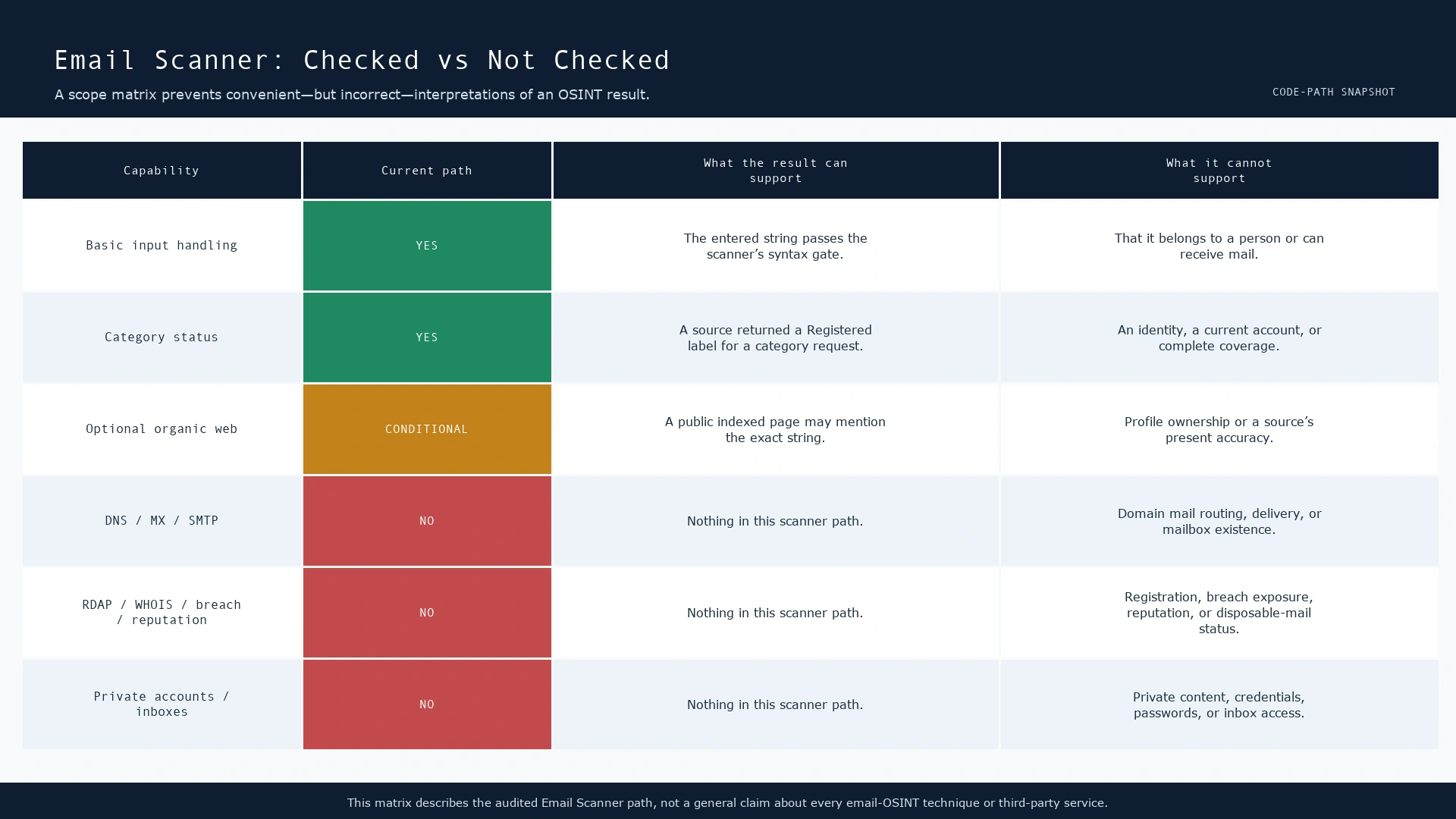
What the scanner checks—and what it does not
| Capability | Current Email Scanner path | A careful interpretation |
|---|---|---|
| Basic email-shaped input validation | Yes, in the browser and on task creation | The supplied string meets the scanner’s input gate. It is not evidence of address ownership or delivery. |
| Category-based account context | Yes, across 18 labels | A Registered status is a source response for that category, not a verified identity or comprehensive account inventory. |
| Positive-card display | Only Registered items are shown as positive cards | No displayed card is not a universal negative. Errors, unsupported sites, and unobserved services remain possible. |
| Organic public-web results | Conditional: feature availability and country rules apply | An indexed page can provide leads. It does not establish who controls an account or whether a page is current. |
| Application history | A task is created before scan; query, timestamps, selected results and a request-IP field are handled in history | Researchers should apply minimisation, authorised-use controls, and the site’s privacy terms. |
| DNS, MX, or SMTP deliverability | No audited Email Scanner path | The tool does not claim an address can receive mail or that a mailbox exists. |
| RDAP/WHOIS, named breach sources, reputation, disposable-mail or avatar checks | No audited Email Scanner path | Do not infer any of those results from a category card or absence of one. |
| Private inboxes, credentials, passwords or private-account content | No | These are outside the scanner’s legitimate, public-facing research scope. |
What does Registered actually mean?
In this interface, it is a display status returned by the category scan. The UI treats it as a candidate positive and builds a card with the site name, URL, and category; it removes duplicate cards that normalize to the same site, URL, and email combination. That is helpful triage, not identity verification.
There are at least four reasons not to overstate it:
- Category labels are not a database inventory. The scanner invokes a separate category scan API, but the project does not publicly name or enumerate its upstream email-data providers. It would be inaccurate to invent a provider list, a coverage percentage, or a retention policy for those unnamed services.
- Source outcomes can be stale or ambiguous. A service may change its account-recovery behaviour, return different responses by region, rate limit a request, or alter an endpoint. An
Erroris operational context, not a negative account result. - A registration signal is not a person signal. Shared addresses, recycled accounts, aliases, role mailboxes, typo-squatted domains, and copied contact details can all produce a lead that needs corroboration.
- Absence is especially weak. The positive-card filter intentionally makes the interface readable, but it also means that “no cards” only describes this scan run and its current sources.
For a practical false-positive method, see Why OSINT Results Can Be Wrong: False Positives. The right next step is a scoped, independently sourced check—not a stronger claim.
The separate public-web search branch
Organic results are not mixed into the category account cards. When available, the application passes the full email string to a Google organic-search service implemented through Serper. The application code caches that response for seven days. A cached result can be useful for continuity, but it is not a fresh observation; a result can also be unavailable when the feature is disabled or the application’s country restrictions reject it.
This branch is best understood as public-reference discovery. Search snippets are generated from indexed page content and may differ for different queries, as Google’s documentation explains. A snippet may reveal that a string appeared on a page, but that can be a contact page, a quoted document, an old paste, a scraped directory, or another person’s attribution. It is not proof of account control, identity, account creation, or inbox reachability.
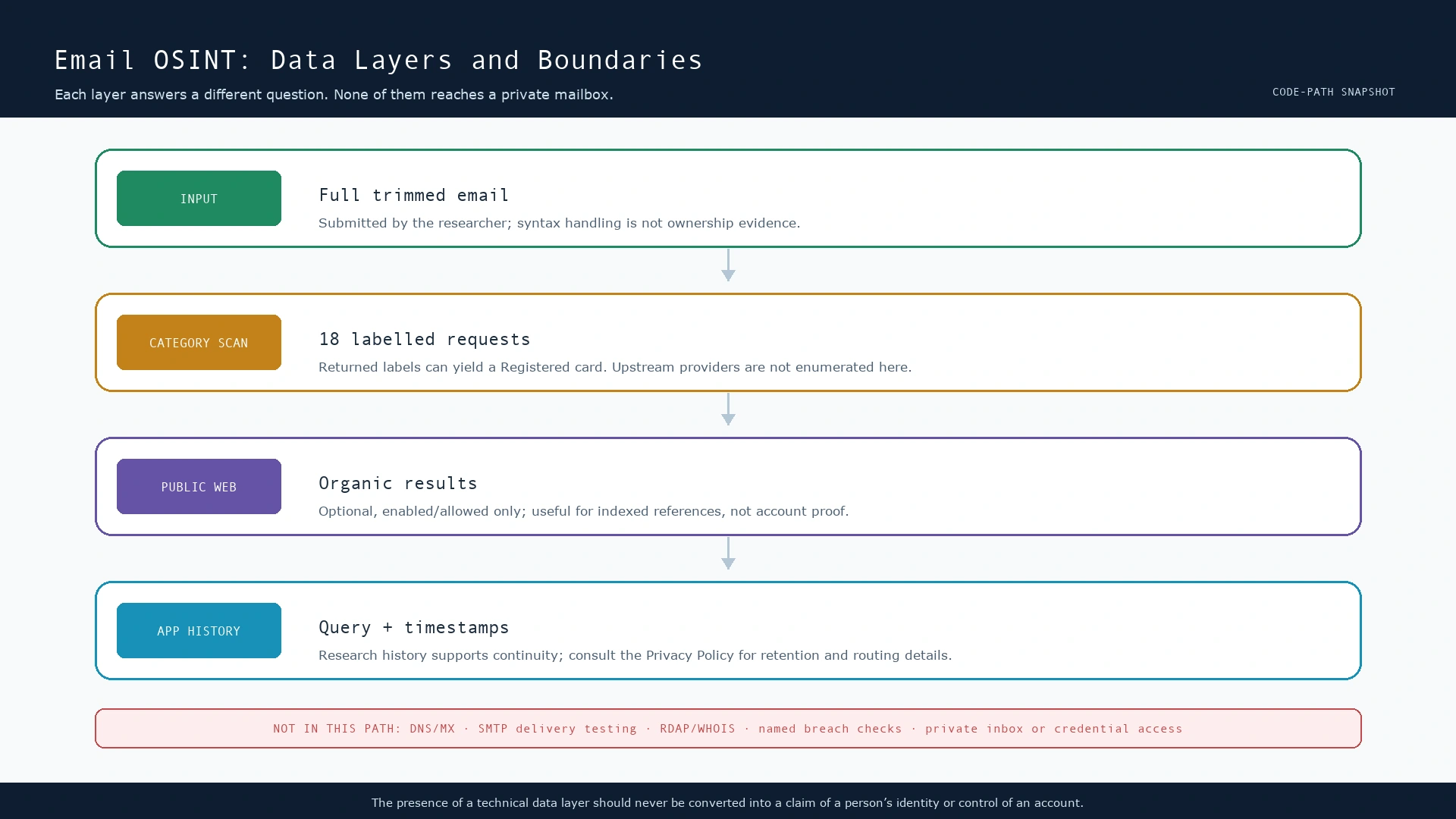
What leaves the browser, and where?
This is the part worth reading before entering anyone’s address. The full trimmed email is sent to the category scan API once per category. The project does not publish the category API’s upstream-provider list, so a transparent article cannot promise that no third party processes it or claim which sites receive it. If the optional web-search branch runs, the full email is also passed as the organic-search query to Serper through the application.
| Data path | Data involved | Why it exists | Important boundary |
|---|---|---|---|
| Scanner input | Full trimmed email address | Runs the category scan | Submit only an address you are authorised to research. |
| Category scan API | Full email plus category label | Returns category outcomes | The project does not name its upstream providers, so their coverage and handling must not be assumed. |
| Optional organic web search | Full email as search query | Finds indexed public-page context | Availability is conditional; the app’s cache period is seven days. |
| Application history | Query, timestamps, selected results, request-IP field and task state | Supports research continuity | Read the Privacy Policy; do not use a shared browser/session for sensitive research. |
The application’s source does not document an application-side cache for the category response path. That tells us only about this application layer: it does not reveal whether an unnamed upstream provider caches, logs, rate-limits, or changes a response. Conversely, the explicit seven-day cache applies to the optional organic web response, not to every Email Scanner result.
What this tool does not do
It does not resolve MX records, inspect DNS routing, or conduct SMTP recipient probing. It does not send a message, attempt a password reset, log in to an account, access an inbox, collect credentials, or retrieve private content. It does not expose an audited named breach-data integration, a reputation score, a disposable-address result, a Gravatar-style avatar result, RDAP data, or WHOIS data in this Email Scanner code path.
Those absences are not shortcomings to work around with more aggressive techniques. They are scope boundaries. For example, email-address verification can trigger privacy, policy, and abuse concerns; RFC 5321 explicitly discusses security considerations around mailbox/address verification. A defensible OSINT process prefers publicly available, proportionate evidence and stops when the decision does not require more collection.
How to interpret a scan without fooling yourself
Use an evidence ladder
| Level | Example observation | Safe wording | Unsafe leap |
|---|---|---|---|
| 1 — Input | The string passes the scanner’s basic input checks. | “The address has a valid-looking form for this tool.” | “The mailbox exists.” |
| 2 — Category lead | A category returns Registered. | “This source returned a registration-style signal that warrants review.” | “This person owns an account there.” |
| 3 — Indexed reference | An organic result contains the address. | “A public page indexed this string at the time of retrieval.” | “The page proves identity or current employment.” |
| 4 — Corroborated, authorised evidence | Independent current public sources agree and the research purpose permits review. | “The evidence supports a time-bounded attribution hypothesis.” | “Attribution is certain.” |
Test a claim, not a person
Suppose a security team needs to check whether a company-controlled contact address has been exposed on public pages. A good question is: “Which public pages reference this authorised address, and are the references current?” A poor question is: “Which private accounts belong to the human behind this address?” The first has a bounded, defensible outcome. The second invites over-collection and false attribution.
Record both positives and uncertainty
Save the date, source type, exact public URL where permitted, the status returned, and the uncertainty that remains. Do not write “not found” when the honest statement is “no positive card was displayed by this run.” This distinction is the difference between an auditable research note and a false negative presented as fact.
Privacy, consent, and lawful use
An email address can be personal data or sensitive business context. Use the scanner only for legitimate, proportionate purposes: your own addresses, systems you administer, an authorised incident response, a documented fraud investigation, or another lawful research mandate. Do not submit addresses merely because they are publicly visible, and do not use a result to profile, harass, impersonate, or pressure someone.
Before using the tool, read the Privacy Policy, Terms of Service, and Methodology. For the legal and ethical decision framework around email research, see Is Email OSINT Legal? Scope, Consent, and Privacy. Local law, organisational policy, and the purpose of processing can change the answer; this article is technical transparency, not legal advice.
Frequently asked questions
Does a Registered card prove an email address belongs to someone?
No. It is a category-source status used to display a lead. It does not establish the person behind an account, current control, or a relationship to the investigator’s target.
Does no result mean the address is unused?
No. It only means this run did not produce a displayed Registered item. Coverage, source availability, category fit, and errors all limit that conclusion.
Does the scanner verify delivery?
No. The audited path does not perform DNS/MX checks, SMTP recipient probing, message sending, or a mailbox acceptance test.
Are Google results account matches?
No. They are a separate optional collection of organic public-web results. Treat them as leads that require source inspection and corroboration.
Does the tool access private accounts or passwords?
No. The audited Email Scanner path does not access private inboxes, credentials, passwords, or private account content.
A transparent conclusion
The most useful answer to “what does the Email Scanner check?” is intentionally modest. It performs basic input handling, sends the full trimmed address through 18 category-labelled scan requests, shows positive cards only for Registered responses, and can optionally collect separate public-web context through an organic-search branch. It records research history at the application layer. It does not verify a mailbox, prove identity, expose private content, or replace independently corroborated investigation.
That modesty is a strength. Good OSINT turns limited observations into well-labelled leads, keeps a clear chain of reasoning, respects privacy, and refuses to turn an interface label into a claim about a real person. If you need help reading the results interface, start with the FAQ and use the scope boundaries above as your stop rules.
References and further reading
- SpiderFoot.tools Email Scanner — the user-facing scanner covered by this implementation audit.
- SpiderFoot.tools Privacy Policy — research-history, routing, and retention context.
- SpiderFoot.tools Methodology — product-level research principles and limitations.
- IETF RFC 5321: Simple Mail Transfer Protocol — mail transport and security considerations.
- IETF RFC 5322: Internet Message Format — the syntax and structure of Internet messages.
- IETF RFC 7505: A “Null MX” No Service Resource Record — why DNS mail-routing facts and mailbox claims are separate.
- Google Search Central: Control your snippets in search results — how result snippets are generated from page content.
- NISTIR 8112: Attribute Validation Services for Identity Management — a useful distinction between attributes, evidence, and validation.
- Bellingcat Editorial Standards and Practices — source transparency, corroboration, and responsible publication.
- Why OSINT Results Can Be Wrong: False Positives — a practical companion guide to interpreting leads.