Quick Answer: Is SpiderFoot Safe to Use?
Yes, SpiderFoot can be safe to use, but only under the right conditions. It is not inherently malware, and it is not automatically anonymous, private, lawful, or low risk. SpiderFoot is an OSINT automation platform: it can collect and correlate information from many sources far faster than a manual browser workflow. That makes it useful for authorized security research, attack-surface reviews, self-audits, and due diligence. It also means that installation choices, module selection, credentials, network placement, scope, and result handling all matter.
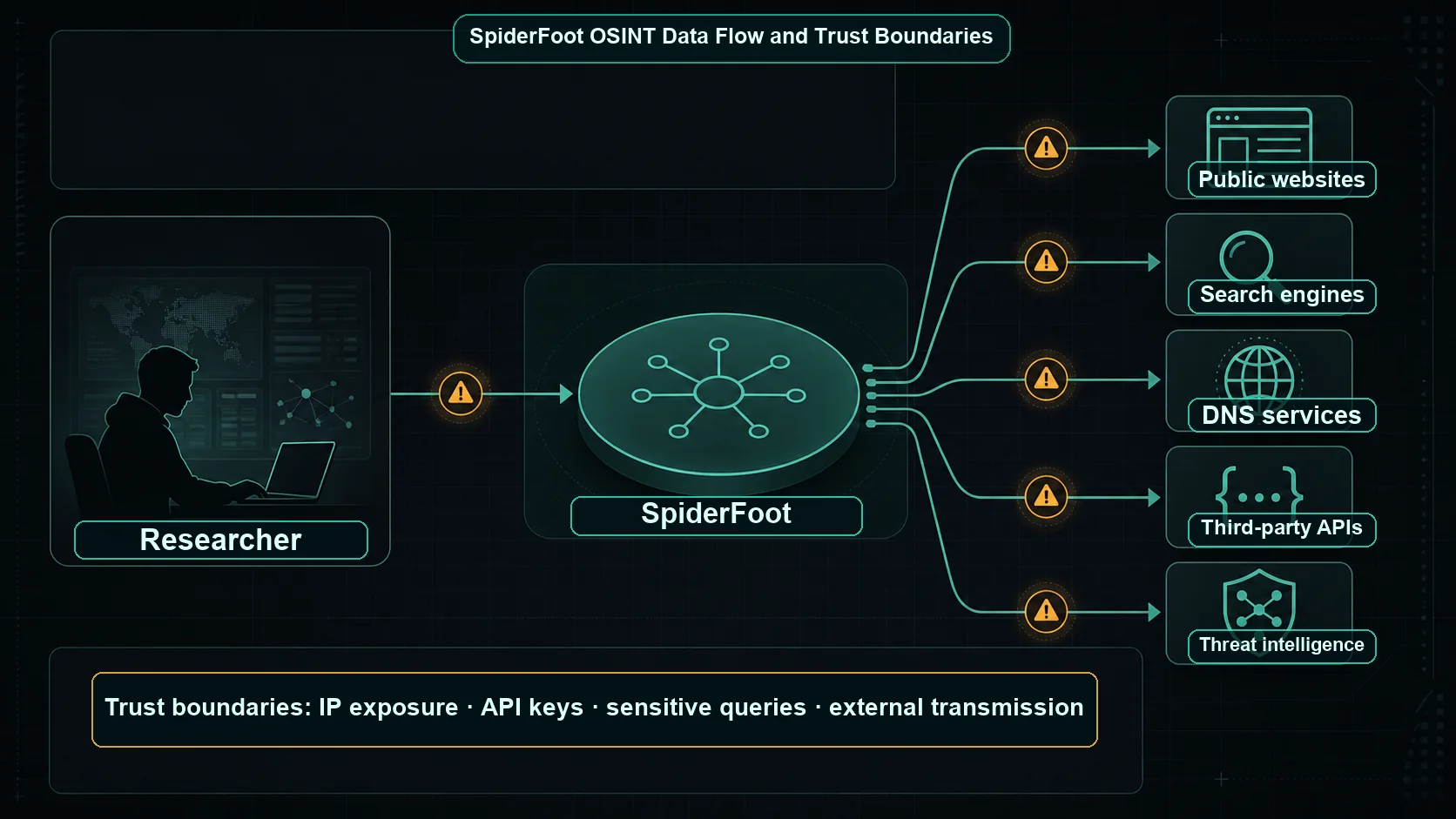
The safest practical model is straightforward: obtain the software from an official source, keep the deployment and Web UI private, protect API credentials, understand every enabled module, use the smallest scope that answers the question, and retain only the evidence that you genuinely need. If a module sends a query to a search engine, data provider, DNS service, or threat-intelligence API, that external service can usually observe the request from your infrastructure. Self-hosting gives you more control over the application and stored scan data; it does not make outbound lookups disappear.
This guide explains the real safety questions behind SpiderFoot: whether it is malware, what it sends outside your environment, how to protect API keys and scan results, when your IP address may be visible, and how to use it responsibly. It provides general security information, not legal advice.
What SpiderFoot Actually Does and Why That Creates Risk
The official SpiderFoot project is open-source OSINT automation software with a Web UI and command-line interface. Its modules can investigate identifiers such as domains, IP addresses, usernames, email addresses, phone numbers, networks, and organizations. The project documents more than 200 modules, output formats, an SQLite backend, API key import and export, Docker support, and integrations that range from public-web collection to threat-intelligence APIs.
Automation is the reason SpiderFoot is useful and the reason it needs operational discipline. One target can be expanded into related assets, public references, technical records, and service-provider queries. A scan may create outbound traffic, consume paid API credits, trigger rate limits, leave logs in external systems, and store an investigation record locally. Some modules retrieve passive information; others can involve more direct network behavior such as web requests, port scanning, or banner grabbing. The impact depends on the modules selected and the target entered, not on the product name alone.
That distinction also applies to browser-based OSINT tools. A convenient interface can reduce setup effort, but it cannot remove the need to consider what identifier is being submitted, where the result is processed, and whether a conclusion is supported by the underlying source. An automated match is a lead. It is not proof of identity, ownership, intent, or wrongdoing.
Is SpiderFoot Malware?
SpiderFoot should not be described as malware simply because it can automate reconnaissance. The public project is open source and distributed under the MIT license, with source code, release history, documentation, and issue tracking available for inspection. Those characteristics make review and reproducible installation possible; they do not make every copy found online trustworthy.
Like many security tools, SpiderFoot is dual use. A defensive team can use it to map its own exposed assets, identify impersonation signals, or validate external attack-surface inventory. An operator without authority could use similar capabilities in an intrusive or harmful way. The distinction is the authorized purpose, chosen actions, and local law and policy. Good security tooling does not remove an operator responsibility to stay within scope.
Download risk is therefore more concrete than a broad malware label. A repackaged archive, a copied container image, or a tutorial that asks you to disable protections can introduce malicious code or insecure defaults. Use the official repository and the official releases page, verify what you download, and review the version notes before putting a new build near production credentials or sensitive data.
Seven SpiderFoot Risks to Understand Before You Scan
1. Untrusted downloads and supply-chain changes
A security tool has broad access to the data and credentials you give it. Installing an unofficial build can turn a research workstation into a credential-harvesting or data-exfiltration risk. The safe path is to use the canonical project source or a verified release, review the version and dependencies, and test changes in a separated environment before introducing real API keys. The official project itself recommends a packaged release for normal use because the main branch may contain features and modules that have not been fully tested.
2. A publicly exposed Web UI
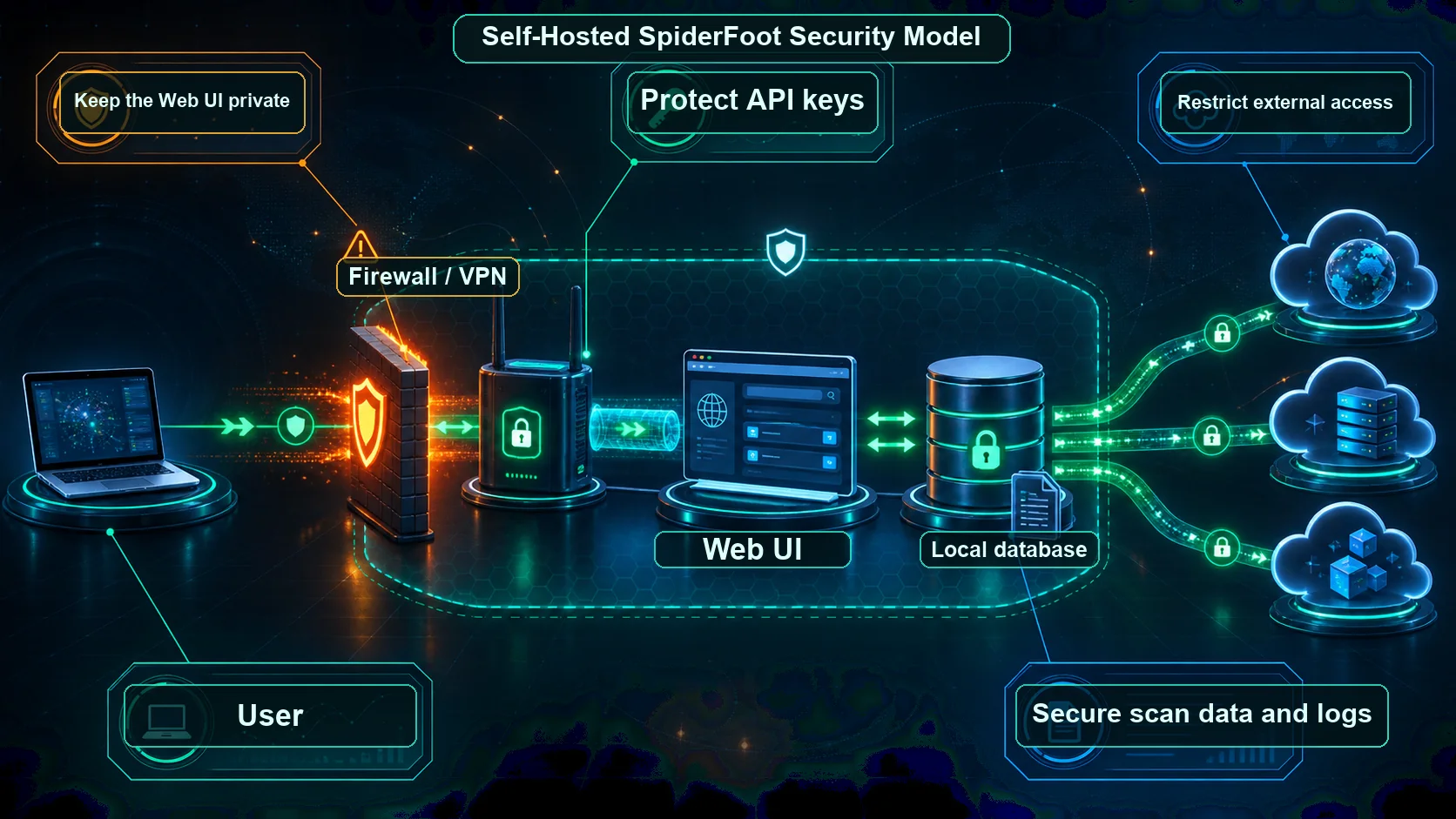
A Web interface is convenient, but an internet-facing investigation console creates an obvious target. An exposed UI may reveal scan data, become a path to privileged actions, or invite brute-force attempts if access controls are weak. Bind it to a private interface where possible, place remote access behind a VPN or authenticated reverse proxy, restrict ingress at the firewall, and use TLS for any connection that crosses an untrusted network. Do not publish the dashboard simply to make it easy to reach from anywhere.
3. API keys, tokens, and paid-service credentials
Many valuable modules need API credentials. Those keys can authorize data lookups, generate charges, expose an organization account, or be reused elsewhere if they are copied carelessly. Store secrets outside source control when possible, apply least privilege and usage limits, separate experimental keys from production keys, and rotate immediately if a key is exposed. GitHub notes that committed credentials can be targeted for unauthorized access and recommends immediate rotation after a leak; its secret scanning guidance is a useful backstop, not a replacement for prevention.
4. Sensitive investigation data in the local database and logs
A scan can become a compact dossier: target identifiers, discovered relationships, timestamps, raw module output, queries, and analyst notes may be sensitive even when individual inputs were public. The risk is not limited to the target. Colleagues, customers, journalists, research subjects, or internal systems can be affected if results are shared too widely. Treat the SpiderFoot database, backup files, exported CSV or JSON, and server logs as confidential case material. Use restrictive file permissions, encryption where appropriate, role-based access, a retention schedule, and a deletion process.
5. Your own IP address and infrastructure can be visible
SpiderFoot is not an anonymity tool. When a module contacts an external source directly, the source can normally see the IP address and other ordinary request metadata of the host making that request. That can reveal organizational interest in a target, affect how a provider rates or blocks traffic, or create an audit trail. A controlled egress design, an authorized research network, and a clear understanding of module behavior can reduce surprises. They do not create a promise of anonymity, and they should never be used to evade law, access controls, or accountability.
6. Rate limits, blocking, and unintended load
Automation can make many requests quickly. Public services, APIs, and target infrastructure have terms, quotas, and defensive controls for a reason. Ignoring them can cause a scan to fail, burn credits, trigger blocks, or create more traffic than the research question warrants. Start with a small, conservative module set, test against an authorized asset, watch output volume, and respect published service terms and rate limits. A slower scan with a documented purpose is usually more defensible than a broad scan that produces unreviewed noise.
7. Third-party data sources and external transmission
Every external module has its own logging, privacy, retention, location, and contractual practices. Submitting a domain, email address, username, or IP to a provider may reveal that you are investigating it. A self-hosted SpiderFoot instance may keep its own database private, yet an enabled module can still send a query to another organization. Before enabling a source, identify what value it adds, what data it receives, whether the query is permitted, and whether a less sensitive source could answer the same question.
Self-Hosted SpiderFoot vs Hosted OSINT Services
Self-hosting and hosted tools solve different problems. Self-hosting usually offers more direct control over the application, database, logs, updates, and access path. Hosted services can reduce operational work, but they add a provider trust boundary and may process data outside your environment. Neither option is automatically safer. The appropriate choice depends on the sensitivity of the work, the team ability to operate it securely, and the terms of each data source.
| Factor | Self-hosted SpiderFoot | Hosted OSINT service |
|---|---|---|
| Data control | You choose storage, access, backups, and retention. | The provider controls part of the processing and storage model. |
| Security responsibility | Your team must secure the host, UI, database, and egress. | The provider runs the platform, but you still protect accounts and scope. |
| Updates | You decide when to patch and test new versions. | The provider generally handles platform updates. |
| API keys | You manage keys, permissions, rotation, and leak response. | Some source access may be bundled, but account and provider risk remain. |
| Logs and exports | You can restrict access and define deletion rules. | Review account settings, contracts, and provider retention terms. |
| Privacy | More local control, but outbound modules still contact external sources. | Queries may traverse both the provider and its upstream sources. |
| Network exposure | Keep the UI private and restrict inbound and outbound paths. | You avoid hosting a UI, but trust the provider access model. |
| Convenience | Requires setup, monitoring, and disciplined operations. | Usually faster to start, with less infrastructure work. |
| Operational security | Can fit a controlled research environment when maintained well. | Can fit lower-sensitivity work if data handling is understood. |
Is It Legal to Use SpiderFoot?
Legality depends on where you operate, what you collect, how you collect it, the target, applicable privacy rules, computer-misuse laws, contracts, workplace policies, and source terms. Public availability does not remove all restrictions, and a capability being present in a module does not grant permission to use it. This guide is general security information, not legal advice.
The safest operating standard is authorization plus proportionality. Use SpiderFoot on assets you own, systems you are contracted to assess, test identities, or research subjects covered by a documented and legitimate purpose. Capture only what is necessary, avoid bypassing access controls, and stop if the work shifts beyond the authorized question. If a scan could affect a person, customer, employee, or regulated dataset, involve the appropriate legal, compliance, privacy, or security owner before collection.
Passive and Active OSINT: Module Choice Changes the Safety Profile
Calling a scan passive can be misleading if the actual module set is unknown. In a practical sense, passive collection often relies on sources that have already indexed or published information. Active behavior can create direct requests, probes, or interactions with infrastructure. The boundary is not always perfect: even an ordinary API request may reveal your interest to that provider.
| Research pattern | Typical behavior | Primary safety question |
|---|---|---|
| Passive source lookup | Queries a search index, public database, or intelligence provider. | What identifier is disclosed to the source, and what does it retain? |
| Web retrieval | Fetches public pages or metadata from a server. | Will the site see your infrastructure, and are requests within its rules? |
| API enrichment | Sends a target value to a service using your credential. | Is the key protected, permitted, scoped, and budgeted? |
| Direct network interaction | May contact services, scan ports, or collect banners. | Do you have explicit authorization and a tested scope? |
Review the description and configuration of each module before enabling it. Begin with the least intrusive sources, record why a more direct technique is necessary, and test the selected set against an owned asset. This turns a broad automation platform into an intentional research workflow.
See an Investigation Workflow Before You Automate One
This official SpiderFoot video demonstrates an investigation workflow in SpiderFoot HX. It is a helpful reminder that good OSINT is iterative: define the target, inspect the returned evidence, filter false positives, and decide what to do next. Do not let automation replace source review or authorization checks.
SpiderFoot Safety Checklist
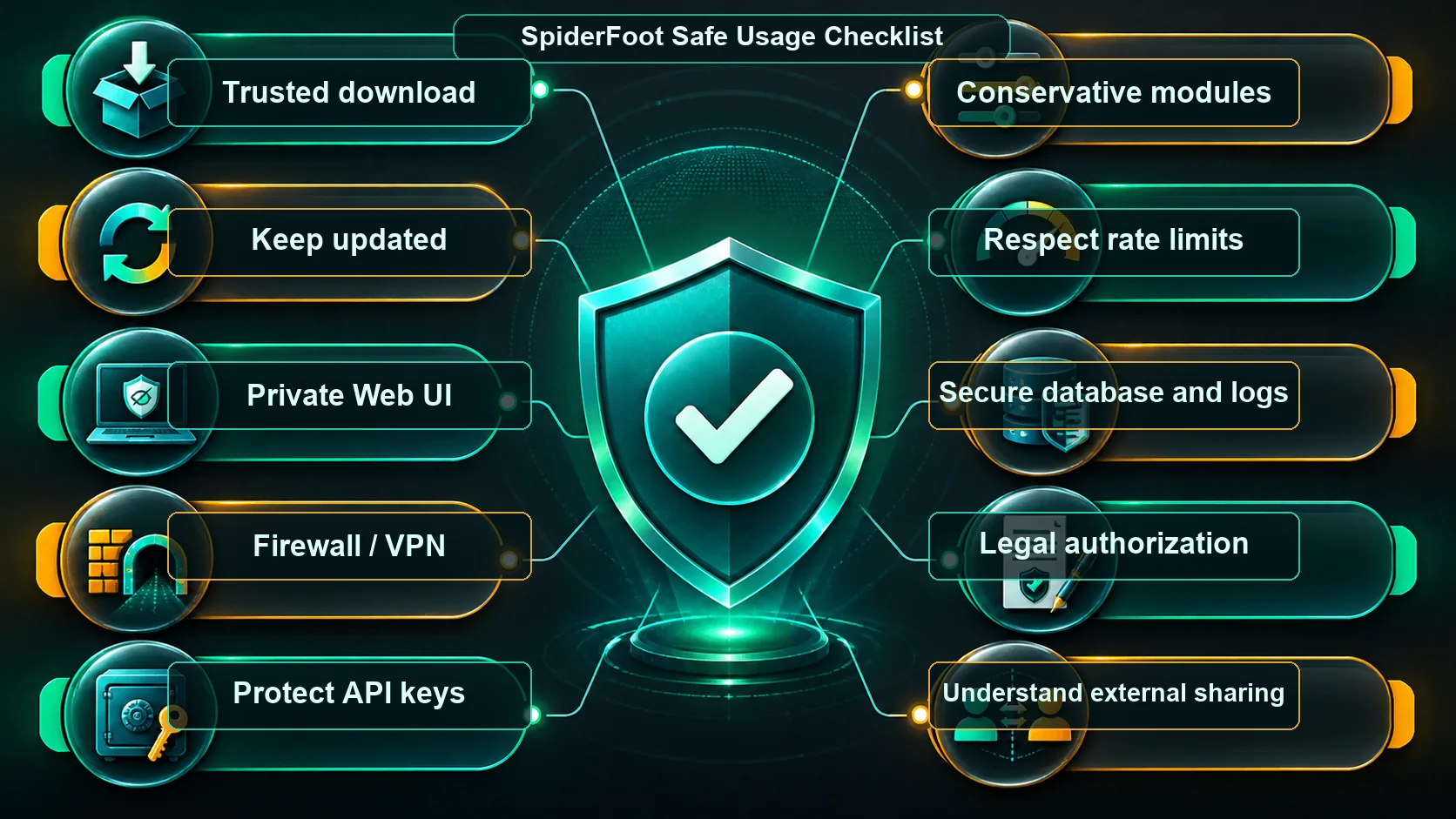
- Download only from trusted sources. Start with the official repository or published release, not a reposted archive or anonymous image.
- Keep SpiderFoot updated. Review releases, test upgrades before sensitive work, and avoid treating a fast-moving development build as a production baseline.
- Do not expose the Web UI publicly. Bind locally or to a private network when possible; public reachability should be an exception with strong controls.
- Use a firewall, VPN, and authentication. Restrict who can reach the application, require encrypted remote access, and remove access when a user no longer needs it.
- Protect API keys. Use separate keys per environment, least privilege, quotas where available, and a documented rotation process.
- Never commit keys or scan exports to Git. Keep secrets and case data out of repositories. If a credential leaks, revoke or rotate it first; deleting a line is not enough.
- Understand what each module does. Read the module description, source terms, query behavior, and output before making it part of a routine scan.
- Start with conservative modules. Enable only sources that are necessary for the question, then expand deliberately if the evidence justifies it.
- Respect service terms and rate limits. Configure within provider limits, pace experiments, and avoid turning a research scan into unnecessary load.
- Protect the database and logs. Restrict local file access, encrypt storage when the risk warrants it, and limit who can export results.
- Back up carefully. Backups are copies of sensitive investigation material. Encrypt them, limit access, and test restoration without broadening exposure.
- Revoke keys when a project ends. Temporary investigations and contractors should not leave permanent credentials behind.
- Separate experimental and sensitive production work. Use a test instance and test keys when evaluating unfamiliar modules, upgrades, or data sources.
- Scan only authorized targets. Keep a written scope for domains, IP ranges, identifiers, time window, methods, and escalation contacts.
- Do not assume SpiderFoot makes you anonymous. Plan for external sources to observe normal request metadata, and do not use privacy tools to evade law or accountability.
Who Should Be Extra Careful?
Researchers
Academic and independent research can create privacy risk when identifiers are combined across sources. Define a research question, minimize collection, separate raw data from publication notes, and seek ethics or institutional guidance where applicable.
Journalists and investigators
Source protection and investigative interest can both be sensitive. Avoid adding unnecessary identifying details to third-party queries, maintain a defensible record of what a source actually showed, and use editorial, legal, and safety review for high-risk cases.
Companies and security teams
Use written authorization, change-aware asset scope, named owners, and approved research infrastructure. The company risk is not just technical: improperly handled scan results can expose employee, customer, partner, or incident information.
Students and new practitioners
Practice on your own domains, public examples with explicit permission, or a deliberately built lab. Learn how a module behaves before aiming it at a real organization or person.
Operators of public VPS instances
A public virtual server is convenient but increases exposure: the UI, logs, database, egress IP, backups, operating-system patching, and cloud account all need attention. If you cannot maintain those controls, do not put sensitive investigations there.
Common Misconceptions About SpiderFoot Safety
| Misconception | Reality |
|---|---|
| “SpiderFoot is fully anonymous.” | No. External services may observe requests from your host. Self-hosting controls your instance; it does not erase outbound metadata. |
| “SpiderFoot is safe because it is open source.” | Open source improves transparency and review, but safe deployment still requires verified downloads, updates, secrets management, and access control. |
| “SpiderFoot is illegal.” | The software has legitimate defensive and research uses. Legality depends on the target, technique, jurisdiction, authorization, and source rules. |
| “SpiderFoot is safe for all targets.” | No. A scan that is reasonable for an owned domain may be inappropriate for a private person, a customer environment, or unapproved third-party infrastructure. |
| “Self-hosted means no data leaves my system.” | Not if modules contact public sites, APIs, DNS providers, or intelligence platforms. Inspect each integration. |
| “Automated output is verified intelligence.” | It is a set of leads and observations. Confirm material claims with independent sources and preserve uncertainty. |
When You Should Not Use SpiderFoot
Do not use SpiderFoot when you lack authorization, when the expected value does not justify the privacy or operational impact, or when a module would violate a source agreement or trigger direct interaction outside scope. Do not use it to bypass authentication, collect credentials, facilitate harassment, profile a person without a legitimate basis, or make consequential decisions from unverified correlations.
Pause when a scan begins to reveal sensitive personal information, when a result points to a new target outside the original scope, when you cannot explain where data will be sent or retained, or when a source starts responding with warnings, blocks, or unexpected behavior. Escalating to a responsible owner is a safety control, not a failure of research.
Final Conclusion: Is SpiderFoot Safe?
SpiderFoot is a legitimate and capable OSINT platform. It can be safe for authorized work when it is obtained from an official source, patched and tested, operated behind appropriate access controls, supplied with protected API keys, and used with a deliberately limited module set. The operator must also protect the database and logs, respect provider rules, and understand that some queries expose the research host to external services.
The most reliable conclusion is conditional: SpiderFoot is safe enough for a defined, authorized investigation when the surrounding process is safe. It is not a cloak of anonymity, a legal authorization, or a substitute for source verification. Treat the scan as the beginning of analysis, not the end of it.
Frequently Asked Questions About SpiderFoot Safety
Is SpiderFoot free?
The open-source SpiderFoot project is distributed under the MIT license. Individual data providers, commercial services, infrastructure, or API plans used with it can still have costs, limits, or separate terms.
Is SpiderFoot open source?
Yes. The source code is publicly available in the official SpiderFoot repository, which also provides project documentation, issue tracking, and release information.
Can SpiderFoot be detected?
It can be. A source or target that receives a direct request may log the IP address and ordinary request metadata of the scanning host. Detection depends on the enabled module and the service contacted.
Does SpiderFoot expose my IP address?
It may when a module makes a direct outbound request. Plan as if external providers can see your research infrastructure, and use an authorized, controlled network design rather than assuming anonymity.
Can SpiderFoot scan usernames?
Yes. The official project lists usernames among the target types it can investigate. A matching username is only a lead; confirm ownership with independent evidence before drawing a conclusion.
Can SpiderFoot be used for reconnaissance?
Yes, it is designed to automate OSINT and reconnaissance tasks. Use it only for targets and methods that you are authorized to assess, and choose modules proportionate to the objective.
Should I run SpiderFoot in Docker?
Docker can make deployment reproducible, but it does not remove security responsibility. Use trusted images, keep the Docker daemon protected, restrict mounts and exposed ports, and manage secrets separately. Docker documents that control of daemon credentials can amount to control of the host, so treat that access accordingly.
Is SpiderFoot suitable for professional investigations?
It can support professional investigations when it is part of a governed process with authorization, evidence review, source validation, access control, retention rules, and escalation paths. It should not be the sole basis for a legal, employment, fraud, or safety decision.
Sources and Further Reading
- SpiderFoot source repository and documentation — SpiderFoot Project
- SpiderFoot releases — SpiderFoot Project
- SpiderFoot MIT License — SpiderFoot Project
- Secrets Management Cheat Sheet — OWASP
- Secret Scanning — GitHub Docs
- Protect the Docker daemon socket — Docker Docs
- SpiderFoot official video channel — YouTube
- Performing an Investigation in SpiderFoot HX — SpiderFoot