Kali Linux SpiderFoot Review: Tutorial, Limits & Alternatives
Learn Kali Linux SpiderFoot setup, Web UI and CLI workflows, verified maintenance limits, and when to use local User Scanner for username and email OSINT.
Kali Linux SpiderFoot remains a useful way to learn automated reconnaissance, but its original open-source edition needs a maintenance audit before it deserves a place in a daily investigation workflow. It can connect infrastructure clues that would otherwise require many separate lookups. Its broad module catalog also hides a practical problem: a collector is only as useful as its current data source, parser, credentials, and error handling.
This SpiderFoot review explains how the framework works, gives a practical installation and scanning tutorial, and examines specific maintenance problems. For username and email investigations, our preferred starting point is User Scanner running locally. For a quick browser introduction, try our free username search preview or email OSINT preview, with the limitations described below.
Review date: November 12, 2026. This is a documentation and source-code review, not a live accuracy benchmark. We checked upstream release and commit records, selected modules, Kali packaging changes, community reports, and User Scanner's published CLI help. We did not run comparative target scans or measure a success rate. SpiderFoot.tools is an independent third-party service, not the official SpiderFoot website or an official hosted edition.
What SpiderFoot OSINT actually does
Steve Micallef created SpiderFoot; the main launcher dates its origin to 2012. It is a Python reconnaissance framework released under the MIT license, with a local web interface and command-line workflows. Intel 471 announced its acquisition of SpiderFoot on November 2, 2022. That commercial history should be kept separate from the update history of the public smicallef/spiderfoot repository.
The framework accepts more than domains. Its documented seeds include IPv4 and IPv6 addresses, hostnames, subdomains, CIDR ranges, ASNs, email addresses, phone numbers, usernames, human names, and Bitcoin addresses. These inputs are starting points for different collectors; accepting a person's name does not mean the tool can reliably resolve that person's identity.
Its most valuable architectural choice is a publisher/subscriber model. A module declares the event types it consumes and produces. A DNS collector can discover an address, publish an IP event, and let reputation or network modules enrich that address. Each new observation can trigger further collection. The plugin implementation and event class expose this mechanism, including the link from a discovered event to its source event.
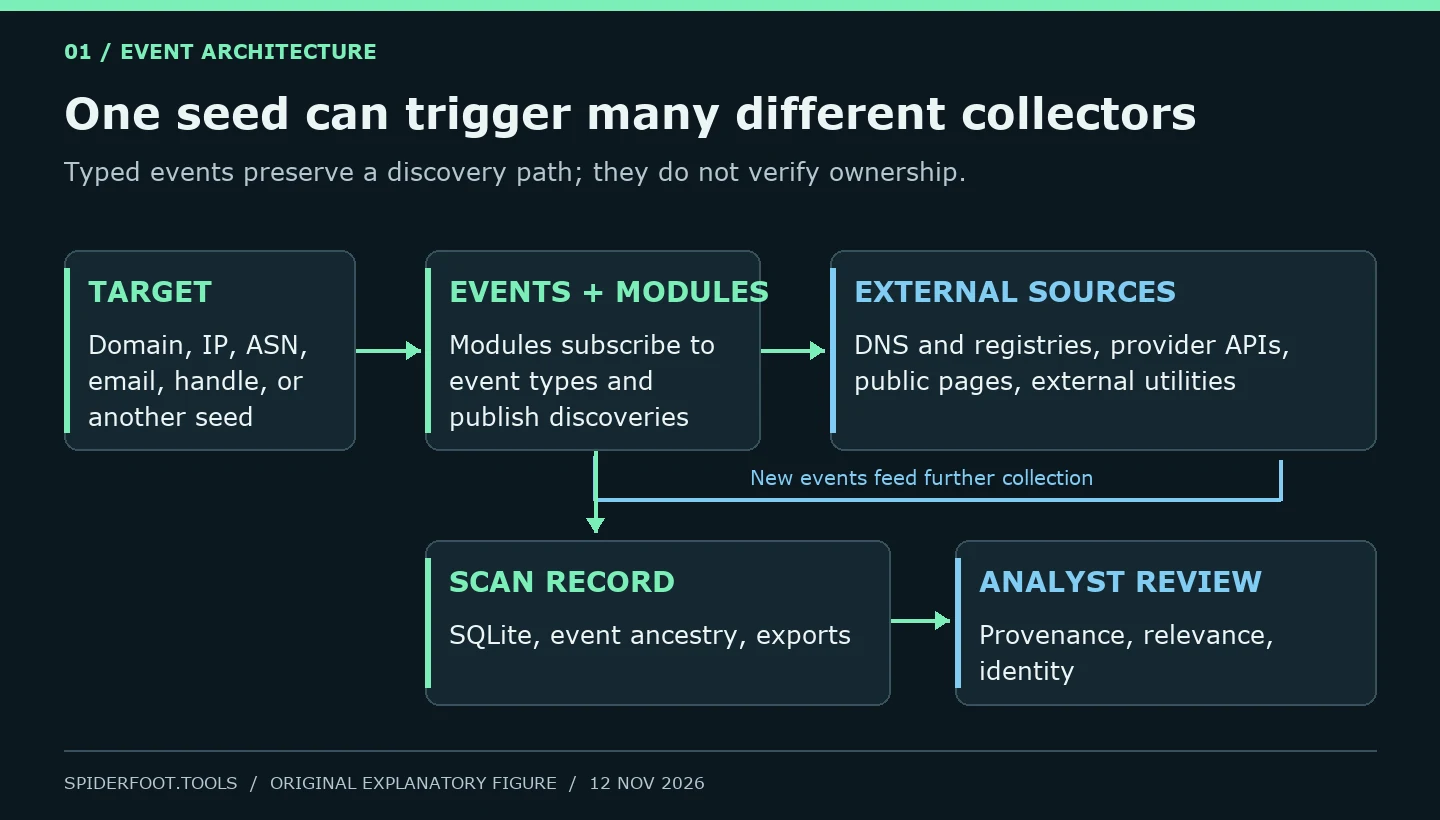
Under the interface, CherryPy serves the application, Mako renders templates, and SQLite stores scans, events, and configuration. A separate correlation layer interprets collected relationships. Exports support downstream analysis rather than locking all interpretation inside the web UI.
The catalog mixes fundamentally different collection methods: DNS and registry lookups, public-page scraping, API enrichment, search results, and wrappers around external utilities. Examples in the official integration catalog include Shodan, Have I Been Pwned, SecurityTrails, and GreyNoise. Some integrations require paid access or a suitable API entitlement; installing SpiderFoot does not grant access to their underlying datasets.
That design suits defensive exposure reviews, authorized infrastructure reconnaissance, and enrichment of suspicious domains or IPs. It is less convincing as an unattended people-search engine. Infrastructure relationships often have explicit technical identifiers; a username collision is a much weaker relationship. Neither a shared IP nor a shared handle proves common ownership.
How to use SpiderFoot on Kali Linux
1. Prefer Kali's packaged installation
This SpiderFoot tutorial starts with the distribution package described on the official Kali tool page. This avoids mixing a historical upstream dependency file into Kali's system Python.
sudo apt update
sudo apt install spiderfoot
# Record the installed package revision and upstream version.
apt-cache policy spiderfoot
dpkg-query -W spiderfoot
spiderfoot -V
spiderfoot -h
# Start the local web interface.
spiderfoot -l 127.0.0.1:5001
Open http://127.0.0.1:5001/ in your browser and keep the terminal running. Binding to loopback keeps the console on your machine. This is the reader's SpiderFoot console address, separate from SpiderFoot.tools. Record both the package revision and the tool version: 4.0-0kali5 and 4.0.0, for example, describe different layers of the installation.
If you deliberately evaluate upstream source, keep it in a separate virtual environment and record its commit. The upstream README's historical minimum of Python 3.7 is not a promise that its old dependency constraints build on every newer Python. A virtual environment prevents system-package conflicts; it cannot create missing binary wheels or repair incompatible source code. The dependency evidence later in this article explains why the Kali package is the better first attempt.
2. Create a small, explicit first scan
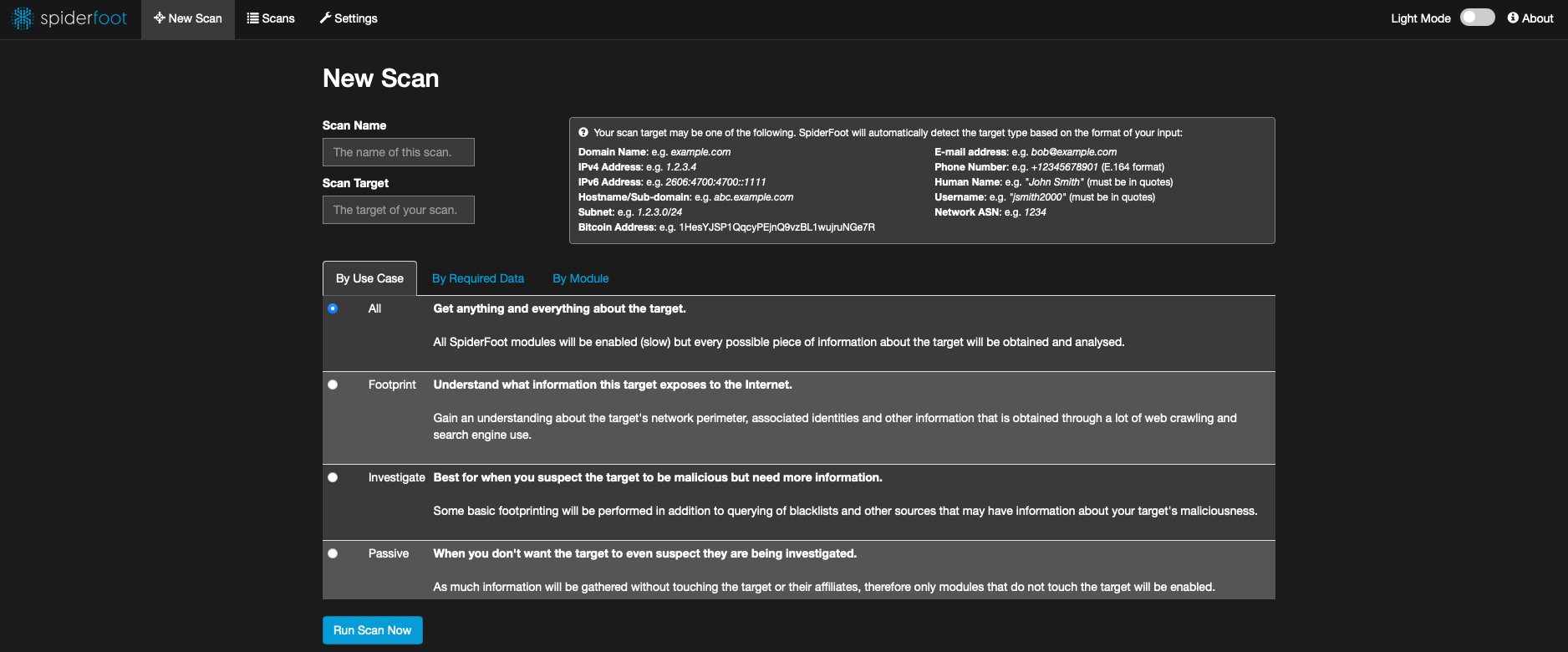
Use a target within your authorized scope, such as your own domain. In New Scan, enter a descriptive name and the target, then decide how modules should be selected. The actual upstream New Scan template provides three tabs: By Use Case, By Required Data, and By Module.
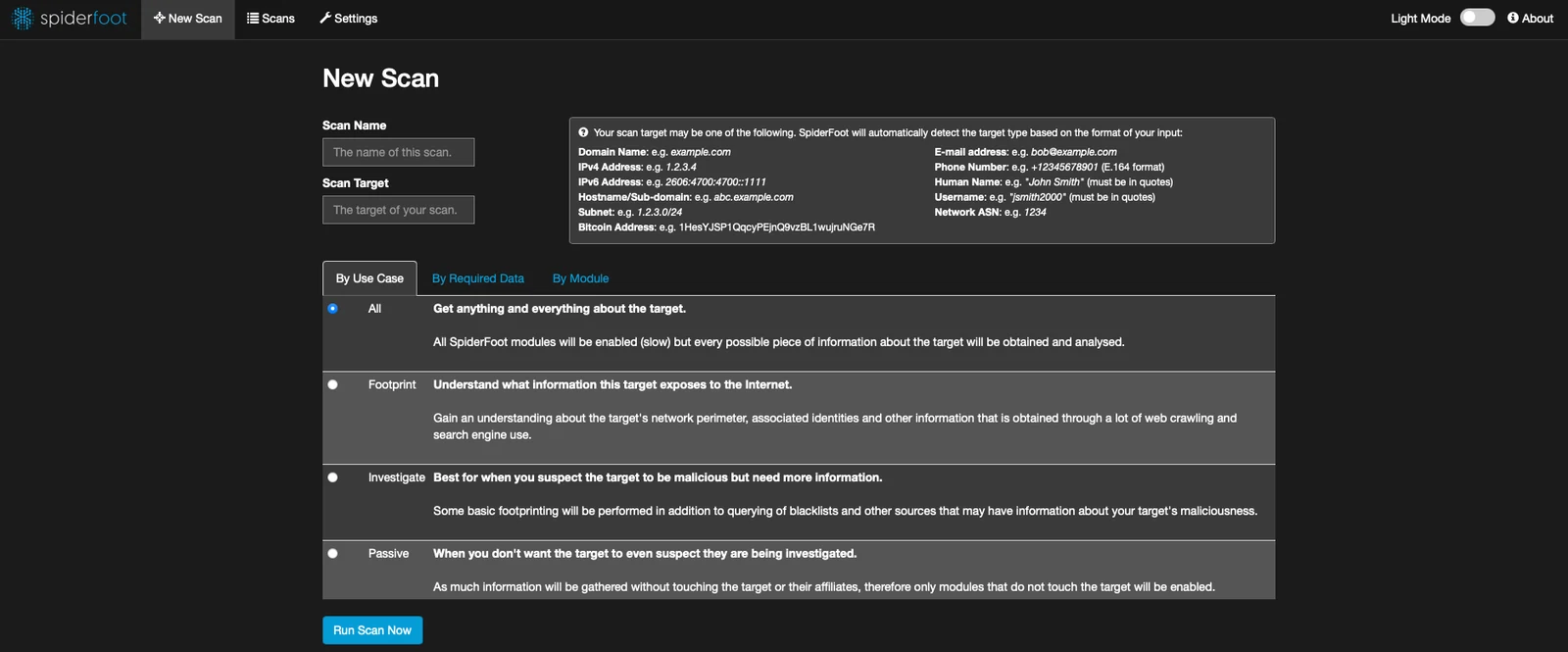

| Selection | Intended purpose | Operational consequence |
|---|---|---|
| Passive | Collect through modules labeled for collection without contacting the target or its affiliates. | Useful starting scope, but review module behavior. Third-party services still receive queries; the name does not provide anonymity. |
| Footprint | Explore a target's exposed infrastructure and related identifiers. | Can involve crawling and broader pivots. Set boundaries before running it. |
| Investigate | Enrich potentially suspicious infrastructure using reputation and related sources. | A blacklist mention still needs date, context, and ownership review. |
| All | Enable the broadest collection. | More requests, dependencies, and unrelated leads. It is an expensive way to debug an unverified installation. |
| By Module | Choose collectors yourself. | Best for isolating a failed integration and building a repeatable, validated workflow. |
The screenshot has All selected; that is the captured interface state, not our recommended first run. Start with Passive or a short list of modules, inspect the list, and click Run Scan Now. Presets are module-selection conveniences, not security boundaries.
SpiderFoot infers the seed type from input syntax. In this edition, a username needs literal double quotes, such as "your_handle"; a human name uses "First Last". In a shell, preserve those inner quotes with outer single quotes. The target-type parser checks quoted names and usernames separately. An unquoted handle is not equivalent to a quoted username.
3. Configure API keys before expanding coverage
Open Settings, find the relevant module, read its provider instructions, and enter its key in that module's key field. Save the changes, then run that collector against a suitable known target before adding it to a broad scan. Verify that the subscription covers the requested endpoint, not merely that the key was accepted by the settings form.
Distinguish missing credentials, denied entitlements, exhausted quota, changed response formats, and actual negative findings. These require different fixes. Keep exported keys and local configuration private. When sharing an error, redact credentials and query identifiers. A large API budget improves access to some datasets; it does not repair a retired endpoint or a stale HTML parser.
4. Use the CLI for repeatable collection
The main spiderfoot executable can run scans directly. These examples use placeholders: replace the domain and handle with targets you are authorized to examine. Review the module list before running the scan commands.
# Discover the installed modules and available output event types.
spiderfoot -M
spiderfoot -T
# A deliberately limited DNS and registry workflow.
spiderfoot -s example.com -m sfp_dnsresolve,sfp_whois -o json \
  > domain-results.json
# Select modules using the passive preset.
spiderfoot -s example.com -u passive -o csv > passive-results.csv
# Preserve literal double quotes around the username seed.
spiderfoot -s '"your_handle"' -m sfp_accounts -o json \
  > username-leads.json
In the command parser, -m chooses modules, -u chooses a use case, and -t chooses event types to collect, with automatic module selection. -t is not a switch that declares the seed's input type. Avoid -q while troubleshooting: its documented behavior hides errors as well as other logging.
Kali also provides spiderfoot-cli, the interactive client for a running SpiderFoot server. It is a different entry point from a direct scan:
# Run this in another terminal while the local server is running.
spiderfoot-cli -s http://127.0.0.1:5001
Use the client's built-in help to inspect the commands supported by the installed version. Keep this distinction clear when following older tutorials: the same-looking -s option means a scan target for the main executable and a server URL for the interactive client.
Reading SpiderFoot results without overclaiming
Begin with the scan's summary and data types, then inspect individual observations, their producing module, and the source event that led to them. Read logs alongside results. A scan can finish even when a useful collector failed or never had credentials. Completion is a statement about the job, not complete coverage of the subject.
Build a small evidence ledger: original URL or endpoint, observation time, requested identifier, module and version, response or error, and your interpretation. Keep observed facts separate from hypotheses. A link graph helps explain a pivot path; it does not make every edge equally strong or every node relevant.
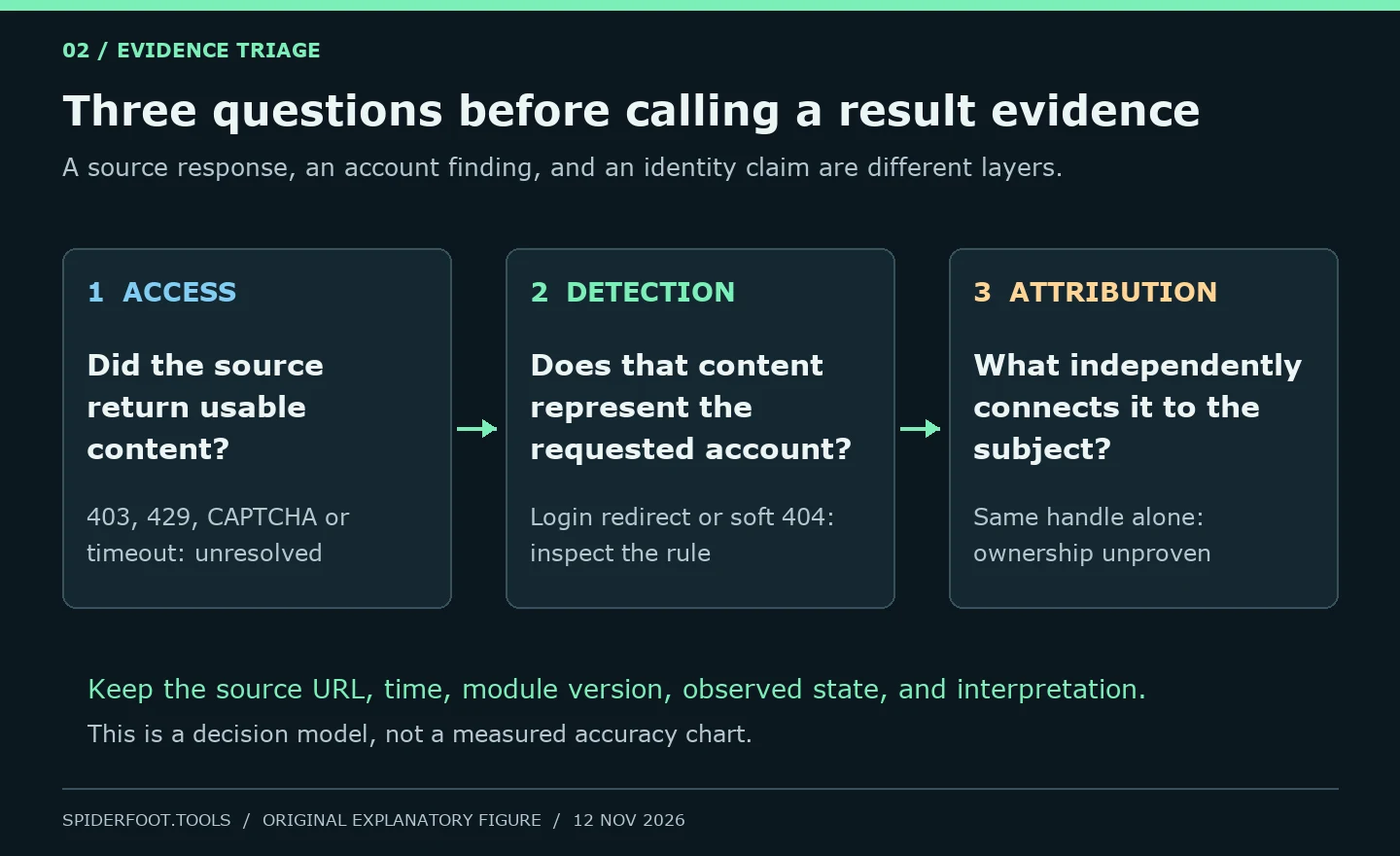
Three distinctions prevent many bad conclusions:
- Page exists versus account exists. A generic page, login redirect, or soft 404 can return HTTP 200 without containing the requested profile.
- Account exists versus account belongs to the subject. A reused handle, impersonator, or unrelated namesake may be a real account.
- No finding versus a supported negative. A CAPTCHA, timeout, unavailable API, or private profile leaves a gap. It is not proof of absence.
For important findings, reopen the original source, inspect its current context, and look for independent links or corroborating identifiers. Two aggregators repeating the same upstream record are not two independent confirmations. Exporting a graph with more nodes cannot resolve that dependency.
Maintenance status: what the evidence supports
The upstream release and Kali package are different clocks
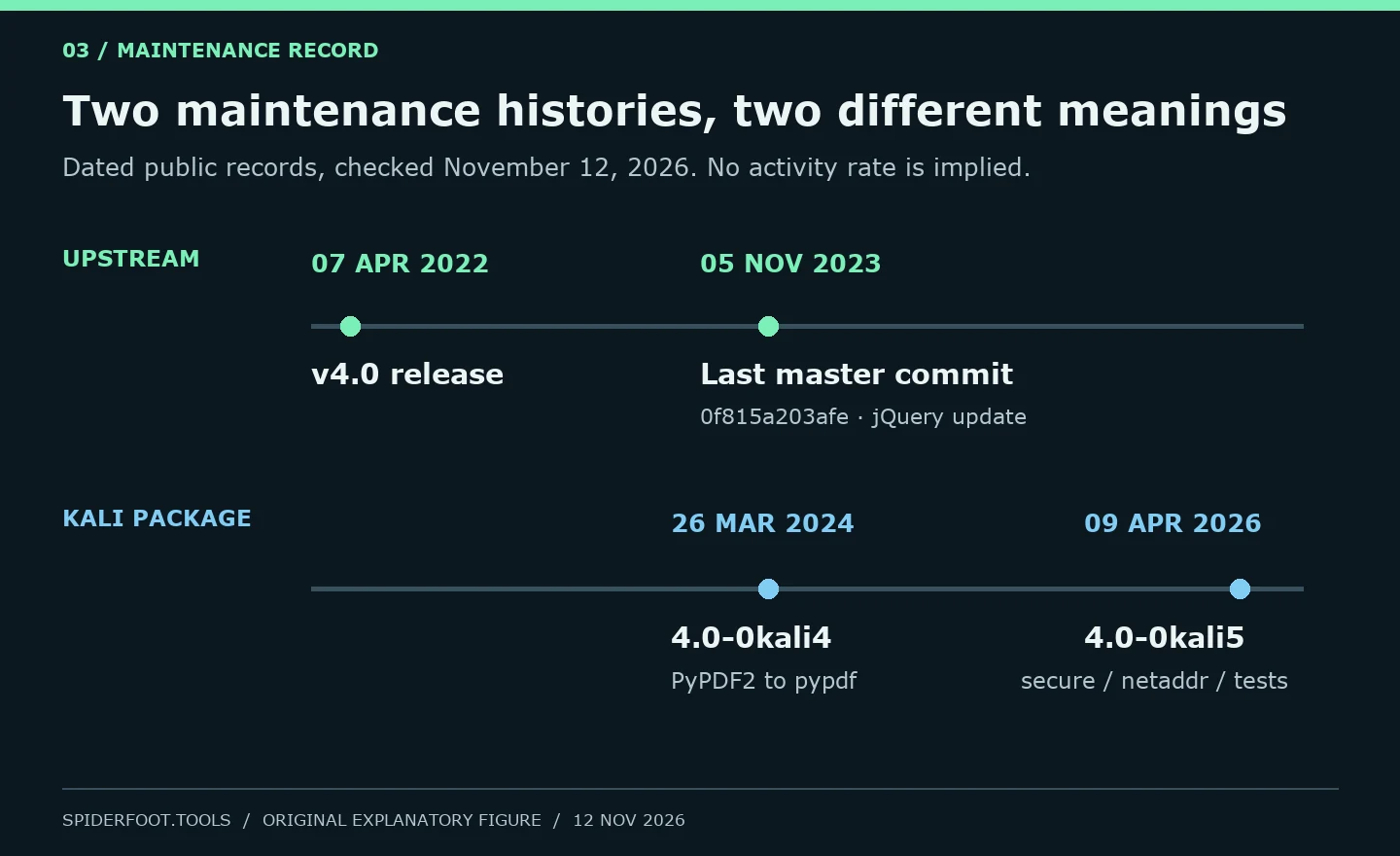
As checked on November 12, 2026, v4.0, published April 7, 2022, remains the latest formal upstream GitHub release. The master branch history ends at commit 0f815a203afe on November 5, 2023, a jQuery update. A repository can continue receiving issues and pull requests without incorporating those changes into its default branch.
Kali has continued distribution maintenance. Its package changelog records a March 2024 patch replacing obsolete PyPDF2 with pypdf and an April 9, 2026 revision, 4.0-0kali5, fixing secure compatibility, newer netaddr support, and a pytest marker. Those are useful packaging fixes. They do not establish that all upstream collectors have been refreshed for today's APIs or websites.
A concrete retired service: Zonefiles
The inspected sfp_zonefiles source still requests https://zonefiles.io/q/{key}/{domain}. In pull request #2122, opened October 16, 2026, the service's original founder reports that later owners shut Zonefiles down on August 15, 2025 and proposes migrating the module to NetAPI. The request was still open and unmerged when checked.
This is evidence of a specific integration migration waiting upstream. The shutdown date and the claim that the old module fails are attributed to the contributor; we did not independently execute authenticated Zonefiles requests. The old URL in the reviewed code is directly observable. A valid historical API key cannot, by itself, solve a service retirement.
Stale social parsing is visible in the code
The Twitter enrichment module fetches a profile URL and searches for HTML such as <div class="fullname"> and <div class="location">. It is not a current authenticated X API client. A response without those exact structures produces no corresponding enrichment, even if the account exists.
That is an architectural fragility demonstrated by the parser, not a measured claim that every Twitter lookup fails. JavaScript rendering, authentication gates, changed markup, localization, and anti-automation controls can all invalidate assumptions in a direct HTTP scraper. Updating an API key cannot fix a module that is scraping the wrong page structure.
Dependency constraints complicate modern Python installs
The v4.0 dependency file constrains packages including lxml<5, cryptography<4, and pyyaml<6. Later master requirements changed some bounds, so release and branch installations can fail differently. Issue #1871 includes a 2024 installation failure ending in PyYAML's cython_sources error. Issue #1943 describes Kali's externally managed Python restriction followed by an lxml build failure inside a virtual environment.
These reports should not be collapsed into “Python is broken.” System-package protection, missing development headers, unavailable wheels, and package incompatibility are separate layers. The practical response is to use Kali's package first, preserve a known environment, and diagnose the actual failing dependency. Disabling package-manager safeguards is not evidence that an installation is now compatible.
Integration with other command-line tools also ages. Open pull request #1952 proposes fixes for JSON/JSONL handling and error cleanup in the Nuclei, WhatWeb, and WAFW00F wrappers. This is a contributor's proposed repair, not proof that every tool version triggers the same bug. Importantly, the upstream test guide says live module integration tests are excluded from the ordinary pull-request test run. A green core test run would not establish current third-party coverage.
Username and email findings need more careful semantics
The Account Finder module deserves a balanced reading. It downloads WhatsMyName's current rules, uses existence and missing-page markers, and has safeguards including a random-handle check and common-name filtering. It is inaccurate to say that every detection rule is frozen with the 2022 release.
However, the engine still has limitations. Missing content becomes a false result internally; a transport failure can therefore disappear into a non-finding. When enabled, userfromemail extracts the email local part as a candidate username. That discovers possible handles; it does not prove that a platform registered the full email address. The module also emits an event named ACCOUNT_EXTERNAL_OWNED, whose confident label exceeds what a matching public route can establish. Filters and random controls reduce some errors but cannot settle ownership. A common handle should remain a hypothesis until independently connected to the subject.
What users say—and what those reports can tell us
Community discussions support a mixed assessment. They are useful for identifying failure modes and workflow expectations, but they are self-selected anecdotes with different versions, keys, targets, and network conditions.
- September 2024, r/OSINT: In “Soiderfoot?”, the original poster describes mostly unrelated results from email, username, and name searches. A reply says they mainly use it for domains and IP blocks. The poster's “99%” wording is a personal impression, not an independently measured error rate. The distinction between infrastructure enrichment and identity attribution helps explain the disagreement.
- April 2026, r/osinttools: In “After 4 years in OSINT, I use fewer tools than ever”, a contributor describes SpiderFoot as noisy but useful for initial reconnaissance. That is a reasonable role for a broad collector: generate leads, then spend analyst time validating the few that matter.
- June 2026, r/cybersecurity: “SpiderFoot was dead on modern Python. It's back.” announces a third-party revival fork. One commenter welcomes the return of a tool they previously enjoyed; another points to failing tests. The maintainer's installation and module-loading claims are not an independent audit, and activity in that fork is not activity in smicallef's master branch.
- June 2026, r/OSINTExperts: A user in this journalism-tool discussion reports repeated missing-key errors and uncertainty about paying for access. That is an access and onboarding complaint, not proof that the sources are useless or that paid access will solve unrelated parser defects.
The constructive lesson is to evaluate a workflow at module level. Someone enriching an IP through a working provider can have a good experience while someone resolving a common human name gets irrelevant leads. Both reports can be sincere. Neither justifies a universal accuracy claim.
A focused SpiderFoot alternative: run User Scanner locally
For username and email OSINT, we recommend starting with local kaifcodec/user-scanner rather than relying on an unvalidated original SpiderFoot installation. Its scope is narrower and fits that question better: platform-specific account checks, public profile metadata, and optional pivots from disclosed handles or links. It does not replace DNS, ASN, domain, IP, or corporate attack-surface reconnaissance.
The recommendation rests on inspectable engineering and recent maintenance, not an accuracy contest. We reviewed main revision 2d460352e6a9. PR #775, merged November 9, 2026, changes checks for 22 MediaWiki platforms in response to 403 bot-wall problems. Its reported live validation and test counts belong to the contributor; we did not repeat them. The merge is concrete evidence of responding to a contemporary failure mode.
There are useful design details beyond the README's platform counts:
- The engine supports asynchronous validators and adapts synchronous ones, returning a structured error when a validator raises an exception.
- The result model distinguishes taken, available, error, and skipped states, with reasons and source URLs. Username labels become Found/Not Found; email labels become Registered/Not Registered.
- The GitHub username validator first queries the public API for profile metadata and can fall back to HTML. This is more informative than a bare positive link, although the HTML fallback still needs scrutiny because a 200 response is accepted.
- The inspected GitHub email validator tries public-profile email search before a signup-availability check. If the required signup token is hidden by a bot challenge, it returns an error rather than claiming the address is unregistered. This code is a main-branch snapshot, not a guarantee about every published release.
These are advantages for investigation hygiene, not guarantees that all validators behave identically. Registration signals do not prove mailbox deliverability or account ownership. Metadata is still supplied by the platform or account. A growing module count measures catalog breadth, not successful coverage on your network.
Install a released version in its own environment
The package metadata requires Python 3.10 or later. At review time, PyPI version 1.5.2.5 was published on November 3, 2026. We installed that version in an isolated Python 3.13 environment and checked --version and --help; this verifies the entry point and documented flags, not live platform outcomes.
sudo apt install python3-venv
python3 -m venv ~/.venvs/user-scanner
source ~/.venvs/user-scanner/bin/activate
python -m pip install --upgrade pip
python -m pip install "user-scanner==1.5.2.5"
user-scanner --version
user-scanner --help
user-scanner -lu
user-scanner -le
Check for newer releases before adopting this dated pin. The November 9 merge is newer than the November 3 PyPI build: upgrading the same published version does not automatically install later GitHub fixes. If a reviewed main-branch change is needed, a separate environment can install that exact source revision:
# Optional source snapshot; requires git. Use a separate environment.
python3 -m venv ~/.venvs/user-scanner-source
source ~/.venvs/user-scanner-source/bin/activate
python -m pip install \
  "git+https://github.com/kaifcodec/user-scanner.git@2d460352e6a9a5498a85d8bdbbb0fa273784d597"
Start with selected modules and retain errors
# Replace these placeholders with your own authorized identifiers.
user-scanner -u YOUR_HANDLE -m github --all -v
user-scanner -e [email protected] -m github --all -v
# Broaden to a relevant category and export the observations.
user-scanner -u YOUR_HANDLE -c dev --all \
  -f json -o username-results.json
# After reviewing the initial leads, optionally follow scoped links.
user-scanner -u YOUR_HANDLE -m github --cross-scan \
  --cross-links verified --cross-depth 1 --all
The flags reference documents category/module selection, JSON/CSV exports, timeouts, concurrency, and delay. Keep --all during evaluation so unresolved checks remain visible. PDF export needs the optional user-scanner[pdf] dependencies. Some email modules may trigger notifications; --allow-loud explicitly enables that class of check. Read module behavior before expanding your scope.
In cross-scan terminology, a “verified” link is a platform/source classification, not independent verification of a person's identity. Follow only relevant links and inspect each pivot. Local execution gives you control over the environment and network vantage point, but target platforms and API providers still receive the requests.
Compare the tools by the question you need to answer
| Question | Original SpiderFoot | Local User Scanner |
|---|---|---|
| Where does a handle appear? | Account Finder plus broader event pivots; needs rule and result validation. | Dedicated username modules and profile metadata; our preferred starting point for this task. |
| Is an email associated with a service? | Mixes different email enrichment methods; deriving a handle from a local part is not full-address verification. | Dedicated email validators with explicit result states; still dependent on platform disclosure and anti-bot behavior. |
| Which domains, networks, or IPs are connected? | Broad infrastructure and reputation collection is a core architectural strength. | Outside its role as a complete infrastructure reconnaissance framework. |
| How are findings explored? | Local Web UI, event ancestry, correlation, and exports. | CLI, structured reports, profile enrichment, and optional cross-scan pivots. |
| What maintenance is visible? | Latest formal upstream release in 2022; master ends in 2023. Kali carries later packaging fixes. | Recent source merges and a November 2026 PyPI build; check whether a specific fix is actually in your installed artifact. |
| What still needs an analyst? | Coverage, source provenance, relevance, and ownership. | The same questions. Recent code does not remove identity ambiguity. |
Try SpiderFoot.tools as a free online preview
If installing Kali or a Python environment is inconvenient, SpiderFoot.tools provides a free browser introduction to public-information searches. Start with the username scanner, email scanner, or separate IP lookup. Our Methodology explains that these are distinct workflows, with different sources and classification rules. This site is an independent third-party service; it is not the original SpiderFoot project's official site, SpiderFoot HX, or a hosted copy promising parity with every upstream module.
The preview has material limits:
- Shared public-server IPs: hosted requests can inherit data-center reputation and shared usage restrictions. A source may respond differently to your local network.
- Platform controls: 403 and 429 responses, CAPTCHAs, redirects, regional restrictions, and timeouts can prevent an observation. Local execution changes the vantage point; it does not guarantee access or accuracy.
- Incomplete coverage: configured site totals are reference inventories, not proof that every source returned a usable response. Read the log and partial-error warnings.
- False results: stale source rules, generic pages, renamed accounts, private profiles, and handle collisions can produce false positives or missed accounts.
For username searches, candidate cards follow the scan API's Found status. For email searches, the positive label is Registered. Neither proves identity, ownership, or mailbox delivery. The Methodology also clarifies that a displayed fixed confidence value of 100 is a UI convention, not a measured probability, and that reaching 100% progress means category requests finished, not universal coverage. Blocked, rate-limited, and timed-out responses have no dedicated production-frontend classification branches, so inspect the returned status text and error context.
Use the online preview to understand the workflow and gather initial leads. For a broader authorized username or email investigation, prefer local User Scanner and compare source observations. Review the site's Privacy Policy before submitting identifiers; local execution also sends queries to the sources you choose.
Verdict: useful history, selective present-day value
SpiderFoot helped establish a valuable model for OSINT automation: typed events, reusable collectors, source ancestry, and a single place to examine relationships. Some collectors can still be useful, especially in a small, validated infrastructure workflow. The evidence does not support calling every module dead.
It does support a firm operational conclusion: we do not recommend an unvalidated original SpiderFoot installation as the primary intelligence tool for everyday investigations. The long release gap, inactive upstream master, retired-service integration, old scraping assumptions, and pending compatibility fixes create too much uncertainty for unattended reliance. Kali packaging patches are valuable but address only part of that maintenance burden.
For usernames, email addresses, and social-profile leads, begin with local User Scanner, retain unresolved results, and verify important findings at the source. For domains, IPs, and enterprise assets, choose and validate an infrastructure-focused workflow separately. When installation is inconvenient, our online preview offers a quick starting point—with the limits made explicit in Methodology.
Source notes and image credits
Research snapshot: November 12, 2026. SpiderFoot code links are pinned to 0f815a203afebf05c98b605dba5cf0475a0ee5fd; User Scanner source links to 2d460352e6a9a5498a85d8bdbbb0fa273784d597. Issues, pull requests, provider behavior, and package availability may change. Sources are linked beside their relevant claims; community reports and contributors' testing claims are explicitly attributed.
The New Scan image is a genuine screenshot distributed in the GPLv3-licensed T-Pot repository. The unmodified source image, GPL license, and SpiderFoot MIT notice are available locally. Other figures are original editorial diagrams, not product screenshots or benchmark charts. All displayed article images are locally hosted WebP files. See the complete image provenance and conversion notes.
// USEFUL_INTEL?
Signal that this research note was useful.