Quick Answer: What Can Someone Find From Your Username?
Depending on how distinctive and widely reused your username is, someone may be able to find other public accounts, profile photos, biographies, posts, comments, interests, technical projects, gaming profiles, forum activity, approximate location clues, professional information, and connections between otherwise separate online identities.
A username does not automatically reveal all of that. A common handle may produce thousands of unrelated matches; a private account may reveal little beyond its display name; and a matching username never proves that two accounts belong to the same person. The amount that can be found depends on uniqueness, reuse, public visibility, search-engine indexing, profile consistency, older accounts, linked websites, public metadata, and each platform setting.
This guide is about defensive privacy awareness and responsible OSINT. It explains what public username searches can indicate, where the limits are, how to audit your own footprint, and how to reduce unnecessary linkability. It is not a guide to accessing private accounts, bypassing controls, or investigating people without a legitimate reason.
Why a Username Can Become a Digital Identity Link
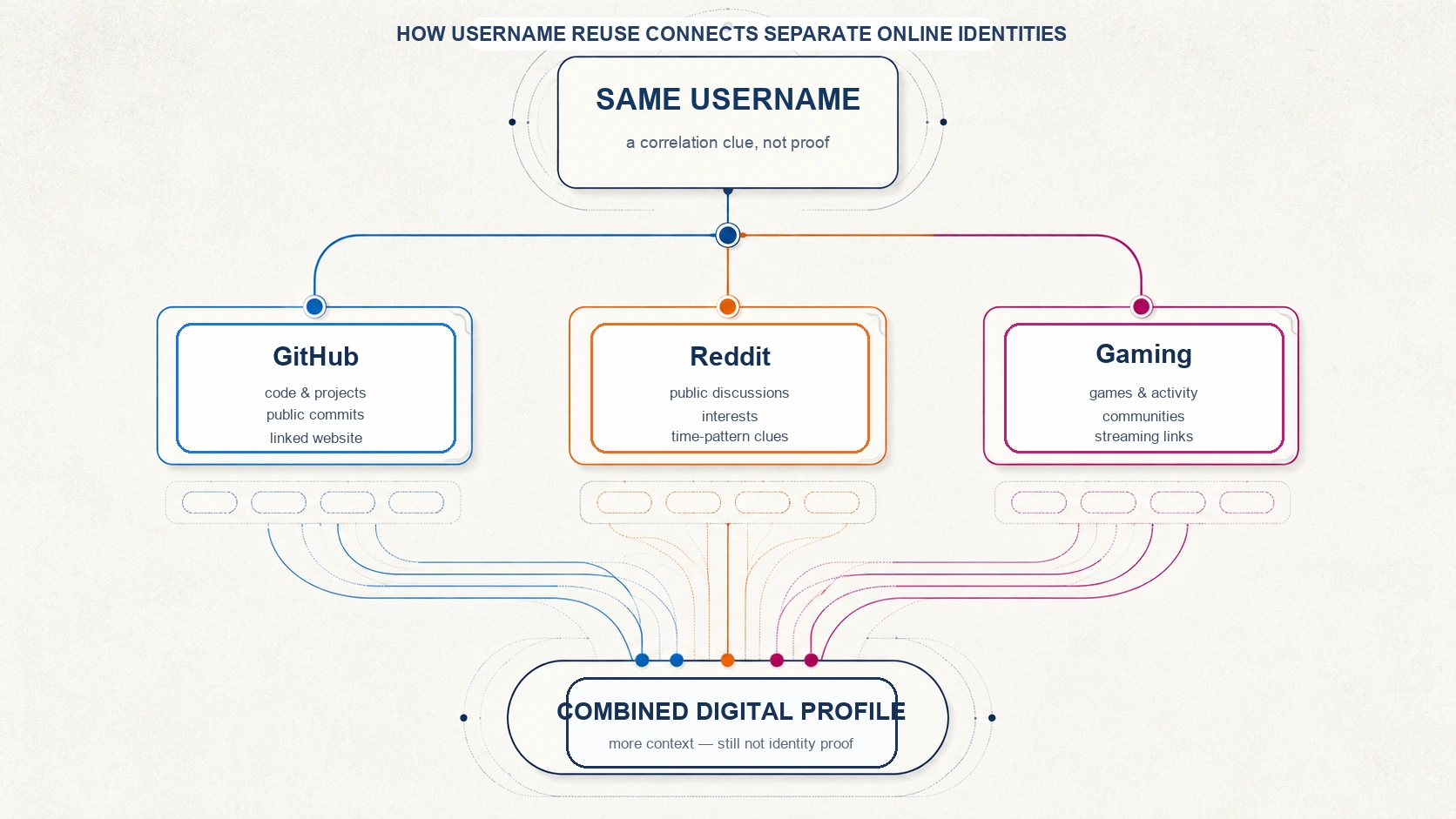
There is rarely one universal database that identifies a person everywhere online. Instead, an online identity is distributed across social networks, developer communities, games, forums, marketplaces, personal sites, old blogs, and comment systems. Each service may show only a small public fragment. A reused username can operate like a join key: a clue that invites careful comparison between those fragments.
Imagine two unrelated sites that both show the same distinctive handle, the same avatar, a similar biography, and the same portfolio link. The combination is stronger than any one signal. In contrast, a match on a common handle such as john123 is weak because many people could use it. Research on user identity linkage describes this as a difficult cross-platform problem that uses multiple kinds of public consistency signals; it is not solved responsibly by one matching string alone.
The practical privacy point is simple: separate accounts can become more linkable when you reuse identifiers and supporting details across them. The investigative point is equally important: a correlation clue is not confirmation of identity.
What Can Someone Actually Find From a Username?
Other social media accounts
Username reuse can help surface public profiles on social networks, video platforms, niche communities, and forums. A result is only a candidate. Useful context may include a consistent avatar, biography, linked site, writing topic, public timeline, or cross-link from an account that is already known. Without supporting context, a same-name result can be a collision, parody, impersonation, or an unrelated person.
Old and forgotten accounts
Older profiles are often the most revealing part of a digital footprint. People may have created hobby forums, gaming accounts, school communities, blog profiles, marketplace pages, or early developer accounts years before they began using tighter privacy settings. Those accounts may contain an old photo, a past nickname, a broad hometown reference, a hobby, an external link, or a former username. They may also be inactive, reassigned, or incomplete, which is why they should be treated as historical clues rather than unquestioned current facts.
Profile photos and avatars
An avatar can become a second correlation signal when it is reused across accounts. A person may use the same image, a crop of the same image, or an earlier version of it on a forum, portfolio, game profile, and social account. For self-audits, reverse-image search can help reveal where your own public images appear. It should be used to understand exposure, not to build intrusive dossiers about other people.
A real name or a nickname
A username itself does not reveal a real name. A name may become visible indirectly if the profile owner chose to publish it in a bio, author page, portfolio, forum signature, linked social profile, or project page. GitHub, for example, documents that public profiles can include information the user elects to share, such as a name, avatar, company, location, and public email address. The word can matters: a public handle is not evidence that a real name exists or is accurate.
Interests, hobbies, and long-term themes
One post normally says little. A public history of posts, comments, repositories, game activity, or community participation can reveal recurring interests: programming languages, favorite games, music, sport, photography, travel, professional topics, or causes. This is a behavioral profile, not a complete portrait. People experiment with interests, write on behalf of organizations, share content ironically, or change over time.
Professional and technical footprint
Developer usernames can lead to public projects, documentation contributions, issue discussions, package profiles, personal sites, and technology preferences. Public GitHub activity can be visible even when a profile is set to private, depending on the activity and repository. Commit email exposure also depends on configuration: GitHub offers a private noreply email option, while prior commits remain associated with the email used when they were authored. Review public repositories and profile fields as part of a personal privacy audit.
Forum and community activity
Public discussions can reveal expertise, opinions, projects, routines, and life events over time. Technical forums may show the problems someone has solved; hobby communities may show equipment, interests, or local event references. The relevant limit is that public context can be partial, stale, or misunderstood. A responsible reader distinguishes what a post explicitly says from what they merely infer.
Gaming accounts
Many people reuse a handle across game services, streaming platforms, esports communities, and game forums. Depending on public settings, a profile might show titles played, achievements, public groups, screenshots, activity, or outward links. It may also belong to a different player who chose the same name. Gaming data should be read as an account-level public record, not as automatic attribution to a real-world person.
Personal websites and domains
A handle can appear in a personal blog URL, portfolio, project documentation, profile page, GitHub Pages site, old author biography, or public site credit. That can create a bridge from an online alias to a professional identity if the owner linked the pages themselves. It can also create misleading results when a name is copied, a page is archived, or an account changes hands.
Approximate location clues
A username does not reveal a home address. Location clues usually come from a combination of voluntarily public information such as a bio, language, time zone, event post, local group, business page, or photo context. These are often broad and uncertain. A city reference can be historical; a language can be spoken anywhere; and a time pattern can reflect work shifts, travel, scheduling, or automation. Treat location as a hypothesis only when there is a legitimate need to evaluate it.
Posting patterns and time zones
Long public timelines may suggest active hours or a likely time-zone range. They cannot reliably establish where a person lives. Posts can be queued, written while travelling, published by a team, or made on an irregular schedule. Good analysis names the uncertainty instead of converting a pattern into a claimed fact.
Social connections
Public followers, following lists, friends, contributors, group memberships, and repeated co-participants can provide context about an account. They can also be noisy: follows can be aspirational, automated, one-sided, or old. A public connection is a relationship signal, not proof of an offline relationship.
Digital Footprint Risk Table
| Data type | How it may be found | Typical reliability | Privacy impact | Common false positives |
|---|---|---|---|---|
| Other social profiles | Same or similar public username, profile link, search result | Low alone; higher with independent context | Can connect separated audiences | Common names, parody, impersonation |
| Old forum accounts | Archived public profiles, old posts, remembered communities | Medium for account existence; lower for current identity | May expose older photos or details | Abandoned or reassigned usernames |
| Profile photos | Public avatar reuse or self-audit image search | Medium with corroboration | Can link otherwise separate profiles | Copied images, stock photos, fan accounts |
| Professional details | Public bios, portfolios, project pages | Medium to high when self-published and current | May link alias to work identity | Stale employer or role information |
| Gaming activity | Public game, streaming, or community profiles | Low to medium | Can reveal interests and public groups | Same handle used by another player |
| Location clues | Public bio, event, language, time, or local-group context | Low unless explicitly self-disclosed | May narrow a broad region | Travel, scheduled posts, remote work |
| Interests | Long-term public posts, comments, and projects | Medium for recurring themes | Can build a behavioral profile | Irony, research, temporary interests |
| Websites | Username in public URL, author page, portfolio, or site credit | Medium with ownership evidence | May connect social and professional context | Copied templates or contributor references |
| Technical projects | Public repositories, documentation, package profiles | Medium to high for public activity | May reveal skills and project history | Organization accounts or shared maintainers |
| Social connections | Public follows, groups, contributors, community activity | Low to medium | May reveal public affiliations | Automated follows, old relationships |
| Posting patterns | Public timestamps across a long period | Low for personal location or routine | May suggest activity windows | Automation, travel, team accounts |
How Username Uniqueness Changes What Can Be Found
Username uniqueness changes the quality of a search result. A common handle creates many candidate matches, which increases the chance of a false positive and makes cross-platform attribution harder. A distinctive handle produces fewer matches and can make a recurring pattern easier to notice. Neither outcome establishes identity by itself.
Common username → many candidate accounts → more collisions → harder attribution.
Distinctive username → fewer candidate accounts → easier correlation → still requires verification.
Unique does not mean identifying. A person can share a distinctive-looking name with a parody account, a fan account, a copied profile, or a previous owner. The right question is not “does the handle match?” but “what independent, current, public evidence supports or contradicts a connection?”
Why Reusing the Same Username Increases Your Digital Footprint
Username reuse is the largest linkability factor because it lets different public fragments point toward the same candidate identity. One platform might show game interests; another might show technical projects; a third might link a personal site; and a fourth might show public community participation. Any one fragment may be routine. In combination, they can create a richer picture of an online presence.
This effect is often called identity linkability. It does not require a single dramatic disclosure. Several small, consistent details can be more useful than one obvious field. That is why separating professional, personal, gaming, and hobby identifiers can be a sensible privacy choice when there is no reason to connect them.
A Matching Username Does Not Prove Identity
A responsible username investigation handles uncertainty explicitly. Usernames collide. They are copied, impersonated, abandoned, transferred, changed, and sometimes reused by a new account holder. Profile photos can be copied. A name can be used by a fan or a brand. A match is a lead for a self-audit or an authorized investigation, not a conclusion about a person.
| Confidence level | What it means |
|---|---|
| Low | Same username only. Record it as an unverified candidate. |
| Medium | Same username plus one consistent public signal, such as a similar avatar or topic. Check for competing explanations. |
| Higher, not absolute | Several independent, current, self-consistent public signals such as a linked website, matching biography, and direct cross-link. |
For consequential decisions involving employment, safety, fraud, legal matters, or journalism, an account match should never be the sole evidence. Preserve original public sources, check dates, seek independent corroboration, and state uncertainty clearly.
Does Changing Your Username Remove Your Digital Footprint?
Usually not completely. A rename may update a current profile, but older references can remain in search results, external links, quoted posts, screenshots, archived pages, or public documentation. The persistence and timing vary by platform and search engine. On GitHub, for example, the relationship between a username change and commit attribution can depend on the form of the private noreply email address used. That is a useful reminder that historical traces have platform-specific rules.
Changing a username can still be worthwhile when it reduces immediate discoverability or separates future activity. Treat it as one step in a broader review: update cross-links, rotate public-facing identifiers where appropriate, review old bios and images, and monitor whether stale references remain searchable.
What Happens After You Delete an Account?
Deleting an account can remove or hide content at the original service, but it does not guarantee that every external reference disappears immediately. Search results may need recrawling, other people may have quoted or linked public posts, and screenshots or archives may exist outside the original service. Google explains that removing a result from Search is different from removing material from the site that hosts it, and it provides separate processes for outdated content and certain personal-information removal requests.
Do not assume every account is preserved forever, either. Retention, deletion, indexing, and archival behavior vary. The practical response is to identify the original host first, use its removal or privacy tools, then check major search results and request updates where the relevant service allows it.
What a Username Usually Cannot Reveal by Itself
A public username normally does not provide passwords, private messages, private account content, an exact home address, a private email inbox, banking information, or device contents. Those data categories require separate exposure, publication, leakage, or authorized access through another channel. A careful privacy guide should not turn a correlation risk into a claim that a handle grants access to private life.
That limit does not make public exposure irrelevant. The concern is that small public disclosures can accumulate over years and become easier to connect when identifiers are reused. Privacy management is therefore about reducing unnecessary connections and reviewing what is already public, not about promising total invisibility.
How Username Search Tools Work
Username lookup tools generally check public profile URLs, search-engine results, or publicly accessible page responses for a supplied handle. A result can mean found, not found, unknown, or rate limited. It can also be wrong when a platform returns a generic page, changes its URL pattern, requires a login, or uses a shared response for missing profiles.
Use results as a triage list for your own accounts or authorized work. Open the original public page, review its context, and do not treat a tool card as proof. The username workflow on this site is designed around that same principle: it surfaces public leads that need source review, not identity verification.
How to Audit Your Own Username Digital Footprint
- Search your exact username. Use major search engines and review the original pages behind relevant results.
- Check the platforms you actually use. Look at public-facing profile URLs and what is visible without logging in.
- Review old communities. Think about forums, games, marketplaces, school communities, and blogs you used years ago.
- Use username-search tools as a lead source. Verify every result manually and expect false positives or gaps.
- Check reused avatars. Look for public places where your current or old profile image appears.
- Review developer profiles. Inspect public profile fields, repositories, old commits, package pages, documentation, and personal-site links.
- Look for old personal pages. Search portfolio, author, project, and profile pages that may include your handle.
- Review public visibility. Check what a logged-out visitor can see, including bio fields, lists, posts, images, and links.
- Document accounts you no longer use. Create a private inventory with service, URL, purpose, visibility, and the action you want to take.
- Decide what to remove, hide, update, or separate. Start with the accounts that create the most unnecessary cross-links.
If a search reveals personal contact information in Google results, Google provides a Results about you process for eligible removal requests. Removing a result from Search does not remove the source page itself, so the source host may need a separate request.
How to Reduce Your Username Digital Footprint
- Avoid using one distinctive username everywhere. Use separate identifiers for unrelated contexts when that separation serves a real privacy purpose.
- Separate professional and personal identities where appropriate. Do not cross-link them by default.
- Review old accounts. Close, anonymize, or update unused profiles where the platform allows it.
- Remove unnecessary bio details. A city, employer, school, or direct contact field may be useful only in selected contexts.
- Review public profile photos. Consider whether one avatar is connecting identities that you would prefer to keep separate.
- Check location settings and image metadata. Share location only when it is needed and appropriate.
- Review public developer work. Check profile fields, public email settings, repository documentation, and commit configuration.
- Close unused accounts where appropriate. Follow the platform process, then check whether public references need separate attention.
- Review search visibility. Ask site owners or search tools to update stale pages when their policies support it.
- Search your own handles periodically. A recurring self-audit catches forgotten accounts and newly indexed pages.
- Limit unnecessary cross-links. A link from a hobby account to a portfolio may be intentional, but it should be a deliberate choice.
- Use platform privacy settings deliberately. Settings reduce some exposure, but they cannot control copies or screenshots of content already shared.
- Do not confuse privacy with deception. The goal is sensible personal information management, not impersonation, evasion, or avoidance of legitimate accountability.
The FTC recommends reviewing privacy settings for devices, apps, and social accounts and thinking carefully before posting. Privacy controls are valuable, but they are only one layer: someone who can see public content can still preserve or share it.
A Realistic Fictional Example of Username Correlation
This is a fictional example. Consider the username PixelNomad47. A gaming profile publicly shows preferred games and a streaming link. A developer profile with the same distinctive handle shows open-source projects and a portfolio URL. A photography forum account has a matching older avatar and public posts about camera gear. An old community profile links a first name and a broad city reference.
No single page is necessarily sensitive. Together, the consistent handle, avatar, links, and themes create a much richer candidate digital footprint: interests, projects, public communities, and a possible professional connection. The safe conclusion is not “these accounts are definitely one person.” It is “there is enough public consistency to justify careful self-audit or authorized verification.”
Further Viewing: Digital Footprints and Online Privacy
This TEDx talk by digital education and social-media specialist Nicola Osborne explores what public digital traces can say about us. It is a useful companion to a username audit because it focuses on the human decisions behind online traces, rather than treating privacy as a one-time settings task.
Use the video as a prompt for your own review: what did you publish intentionally, what did an older profile make public by default, and which links between identities still serve you today?
Frequently Asked Questions About Username Digital Footprints
Can someone find my real name from my username?
Sometimes, if you publicly connected the handle to a name through a bio, site, project, author page, or profile. A username by itself does not guarantee that a real name is available or accurate.
Can someone find my email from my username?
Not from the username alone. An email may be public on a profile, website, or old commit record if its owner exposed it. GitHub users can choose a private noreply address for commits.
Can someone find my location from my username?
A handle does not directly reveal an address. Public bio fields, local events, images, language, or time patterns can create broad location clues, but they are often incomplete or wrong.
Can someone find all my social media accounts from one username?
No. Public searches can surface some accounts, but private settings, changed handles, unindexed profiles, common names, and different aliases all create gaps.
Is using the same username everywhere risky?
It can increase linkability, especially when combined with the same avatar, bio, and outward links. The impact depends on what each public profile reveals and whether you intend those contexts to connect.
Does changing my username erase my old accounts?
Not necessarily. Existing links, search results, citations, and platform-specific history may persist for a while or remain elsewhere. Review the original account and external references.
Are username lookup tools accurate?
They are useful for finding leads, but they can produce false positives, false negatives, unknown results, and rate-limit errors. Always verify the original public page.
Can someone find deleted accounts?
They may find a residual search result, mention, screenshot, or archive, depending on what was public and how other services handled it. That does not mean every deleted account remains discoverable.
Is searching a username legal?
Searching public information can be legitimate, but legality and appropriateness depend on purpose, jurisdiction, platform terms, privacy rules, and authorization. Do not use public research to harass, profile, or harm people.
How can I check what my username reveals?
Perform a self-audit: search your handle, inspect the public pages behind results, review old accounts and avatars, check developer profiles, document what you find, and reduce unnecessary exposure.
Sources and Further Reading
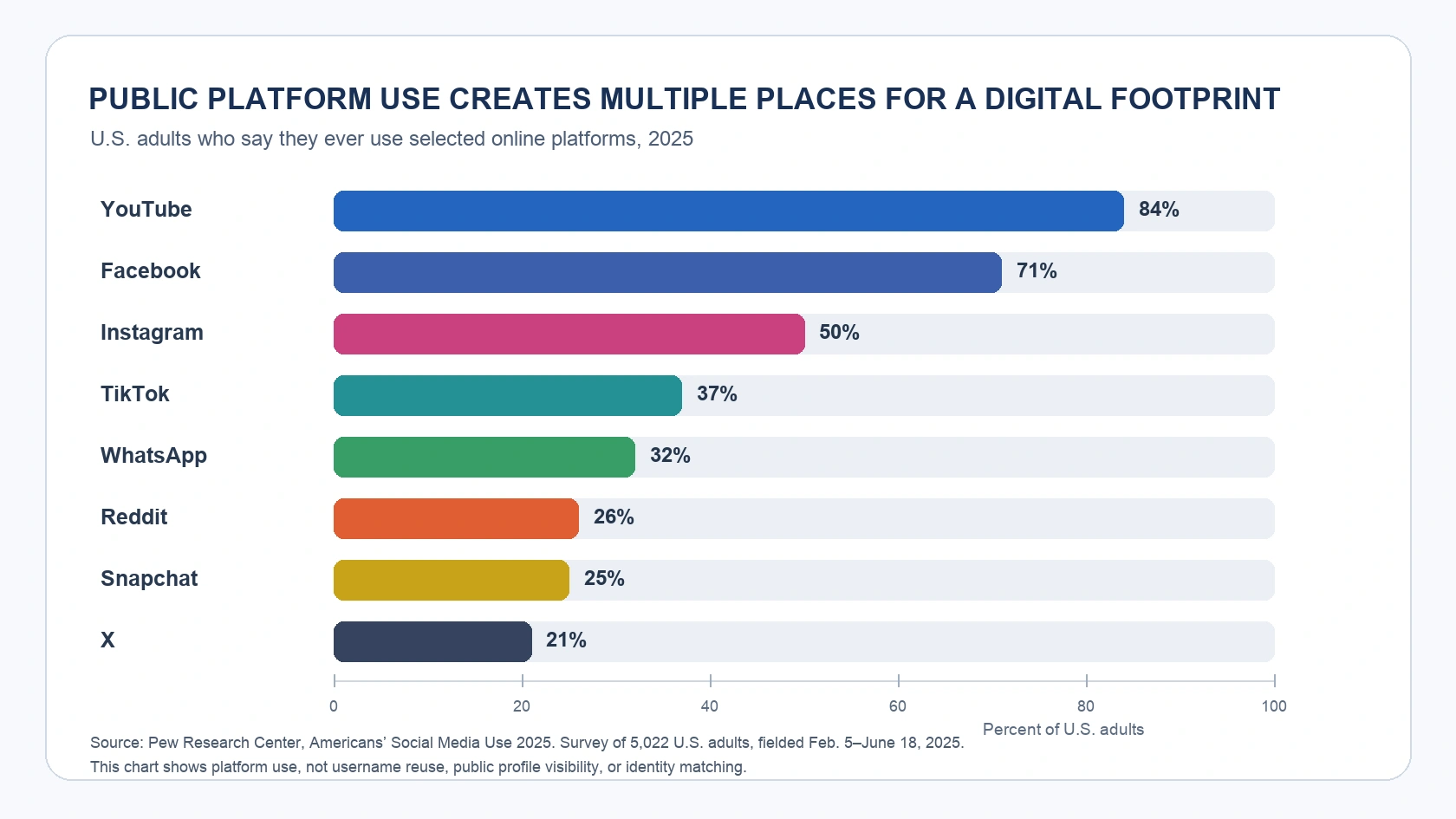
- Americans’ Social Media Use 2025 — Pew Research Center
- Profile reference — GitHub Docs
- Setting your commit email address — GitHub Docs
- Username reference — GitHub Docs
- Remove web results from Google Search — Google Search Help
- Find and remove personal info in Google Search results — Google Search Help
- Heads Up: Stop. Think. Connect. — Federal Trade Commission
- Privacy Framework — National Institute of Standards and Technology
- How Unique and Traceable are Usernames? — arXiv
- High-Order Consistency-Guided User Identity Linkage — Proceedings of Machine Learning Research
- What Do Your Digital Footprints Say About You? — TEDx Talks