Quick Answer: Why Can OSINT Results Be Wrong?
OSINT tools can return incorrect or misleading results because public data is incomplete, stale, duplicated, ambiguous, mislabeled, or interpreted outside its original context. A search result can be technically real and still be wrongly attributed to the person, organization, account, or event being investigated. The practical rule is simple: OSINT results are leads, not automatically facts.
There are two different failures to keep apart. Sometimes the underlying data is wrong: a database has an old address, a search engine indexes an error page, or an aggregator copied a typo. At other times the data is correct but the interpretation is wrong: a real profile named alexm is treated as the target Alex Morgan without evidence that the account belongs to that person. The second error is especially common because a believable match can feel more persuasive than an openly missing record.
CORRELATION ≠ CAUSATION
PUBLIC DATA ≠ ACCURATE DATA
MULTIPLE MATCHES ≠ CONFIRMATION
AUTOMATED RESULT ≠ VERIFIED RESULT
Good OSINT work therefore asks two questions before it makes a claim: what exactly did the source say? and what independent evidence connects that statement to the subject? If either answer is weak, the correct outcome is uncertainty, not a stronger story.
What Is an OSINT False Positive?
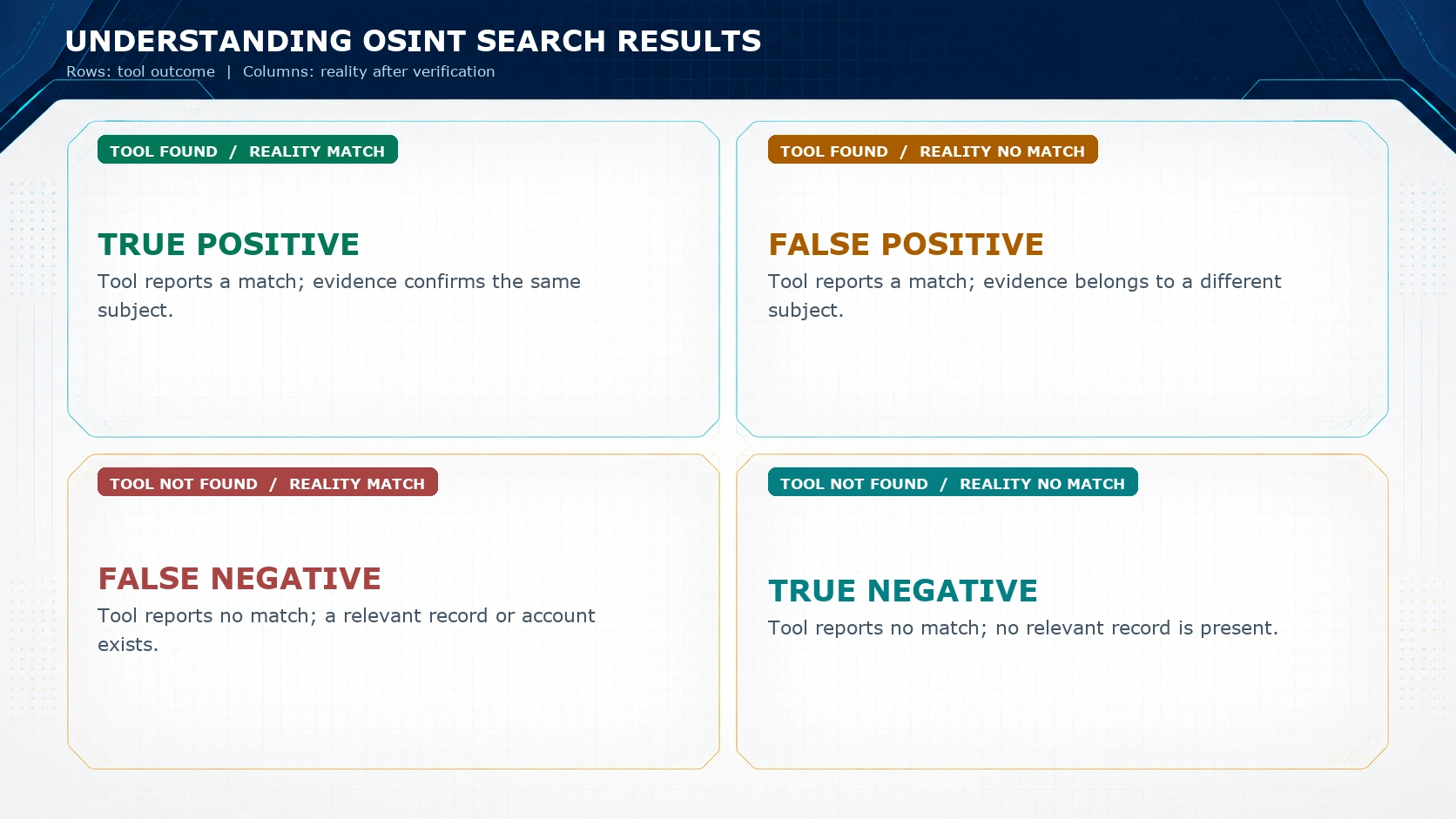
A false positive occurs when a tool, query, analyst, or workflow reports a relevant match even though the result does not belong to the target question. In identity research, that often means an account, email address, domain record, image, or IP indicator is attached to the wrong subject. In event research, it can mean a real photograph is assigned to the wrong date, location, or incident.
A false negative is the inverse: the tool reports no match even though a relevant record exists. A username lookup may miss a private profile, a platform may rate-limit a scanner, an account may have changed its handle, or a search engine may not have indexed the page. False negatives matter because absence in one tool is not proof of absence in the world.
| Tool outcome | Reality after verification | Meaning for an investigator |
|---|---|---|
| Match found | The result belongs to the subject | True positive: retain the evidence and record why identity is established. |
| Match found | The result belongs to someone else | False positive: preserve it as a rejected candidate, not a finding about the target. |
| No match found | A relevant record exists | False negative: try a lawful alternative source, spelling, date range, or manual review. |
| No match found | No relevant record exists | True negative: a limited result, never an absolute statement about the whole internet. |
Why Usernames Create So Many False Positives
Usernames are convenient discovery pivots, not identity documents. A shared handle can point to several unrelated people, and the same person can use several handles across time. Research on username traceability shows why names can sometimes be linked across services, but that possibility does not eliminate collision, reuse, or imitation. The safer question is not did the handle appear? but what durable evidence links this specific account to this subject?
Collisions, reuse, and reassignment
Short, common, or descriptive handles collide naturally. A handle can also be abandoned and later claimed by another user. Some platforms permit a rename, some recycle names after a period, and some leave old references visible in cached pages. A tool that reports a historical profile may be accurately reporting the page it saw while still being wrong about the current owner.
Impersonation and fan accounts
Impersonators, fan communities, parody accounts, and automated copycat profiles can reproduce a display name, biography fragment, profile photo, or posting style. None of those elements alone proves identity. Look for a self-authored cross-link from a known account, a verified organization page, a consistent long-lived contact point, or another relationship that would be difficult for an unrelated account to reproduce.
Soft HTTP detection errors
Automated username checks often depend on an HTTP response. That is not enough. A platform can return an ordinary success page for a missing account, a generic login page, an error template, or a redirect that looks valid to a simple checker. Google documents the closely related soft 404 problem: a URL can return a successful response code even when the page is effectively absent. Inspect the actual page content, canonical URL, account metadata, and platform state before calling a handle found.
Email Addresses: Strong Pivot, Weak Biography
An email address is often more discriminating than a username, but it is not a complete identity proof. Shared inboxes such as support@, sales@, or admin@ identify a function rather than an individual. Catch-all domains may accept mail for addresses that were never allocated. Aliases, forwarding rules, plus addressing, recycled business mailboxes, leaked contact lists, and copied signatures can all create misleading associations.
Separate the claim this address appears in a public source from the claim this person controls this address today. Prefer direct, time-bounded links: a currently controlled website that publishes the address, a verified account that links to it, or an explicit statement by the organization. Do not infer a persons location, employer, or intent solely from a contact address in a breach-index style result.
Domain Registration Data: Current Record, Historical Assumption
Domain data changes over time. Registrants transfer domains, change providers, add privacy services, and update contact details. Modern registration lookups also have deliberate access boundaries. ICANN describes RDAP as the standardized successor to WHOIS, and the Registration Data Policy explains why certain personal fields may be redacted or supplied through privacy and proxy services.
That means a redacted field is not evidence of malicious intent, and a visible historical field is not automatically evidence of current control. Record the retrieval time, the registry response, any transfer history available through legitimate sources, and the difference between a registrar, registrant, hosting provider, nameserver operator, and website operator. These roles are often conflated in weak reports.
An IP Address Is Not a Person
An IP address may identify a network allocation, hosting environment, VPN exit, proxy, CDN edge, mobile carrier, or organization gateway. It rarely identifies a person by itself. Shared hosting can place unrelated sites on one address. Network address translation can let many users appear behind one public address. RFC 6598 reserves shared address space for carrier-grade NAT, a reminder that an address can represent provider-side network context rather than one household or device.
Location results need the same restraint. MaxMind states that city-level geolocation is not precise enough to locate a specific household, individual, or street, and its data includes an accuracy radius. Treat a city or country label as a probabilistic network hint. Do not turn it into a claim about a persons physical location without a lawful, independent, and time-relevant basis.
| Observation | Unsupported inference | Safer wording |
|---|---|---|
| An address is assigned to a cloud provider. | The cloud provider owns the website content. | The site was observed using infrastructure associated with that provider. |
| A GeoIP result shows a city. | The account holder lives in that city. | The address was geolocated to an approximate area at lookup time. |
| Several domains resolve to one address. | One actor operates all domains. | The domains share an infrastructure point that may host multiple customers. |
Social Profile Misattribution and Context Collapse
Social content travels farther than its original context. Screenshots can hide dates, replies, edits, platform labels, and prior posts. A display name may change while old citations remain indexed. A profile can be suspended, copied, archived, or captured after a major change. When a post is used as evidence, collect the direct URL, account identifier, publication time, visible context, and a record of when it was retrieved. Then ask whether the post is self-authored, quoted, reposted, or merely attributed by another account.
Context collapse happens when a statement made in one setting is used to support a broader claim in another. A joke becomes a confession, a local reference becomes a location claim, or a reply becomes the original authors view. The remedy is slow reading: open the thread, inspect the post sequence, identify the speaker, and preserve the material before platform changes make later review impossible.
Reverse Image Search Is a Starting Point, Not Proof
Reverse image search can reveal prior appearances of an image, but it does not by itself establish the image source, date, location, photographer, or subject identity. Crops, recompression, mirrors, thumbnails, color changes, and derivative edits can alter what a search engine finds. Search engines also surface the best indexed or most linked version, not necessarily the earliest one.
Compare the full-resolution image when available, look for the oldest credible publication, examine captions and surrounding reporting, and check whether a claimed location is visually consistent with independently known features. Preserve the original file and its available metadata, while recognizing that metadata may be removed, altered, or absent. A near visual match supports a lead; it does not settle provenance.
Stale Data and Source Dependency
Public information has a half-life. A business address can move, a phone number can be reassigned, a domain can transfer, an account can change names, and a database can lag behind all of those changes. An old record can still be valuable, but only if the report labels it as historical and avoids present-tense claims.
Data aggregators compound this problem. Ten websites may appear to corroborate a claim while all copied it from one original directory, one scrape, or one outdated dataset. Quantity is not independence. Map the provenance: where did each site obtain the value, when was it collected, and can multiple apparent sources be traced to the same upstream record? A single primary source can be stronger than many derivative copies.
Independent Corroboration: What It Actually Means
Corroboration is not repeating a result in several tabs. Independent corroboration uses sources that have different collection paths or incentives to be correct. A self-authored website linked from a long-lived account, a company filing, and a contemporaneous public interview are more independent than three people-search pages sharing an unknown data broker. Bellingcat publishes workflows that explicitly separate identification, collection and preservation, verification, analysis, and review or confirmation. Its collection guidance likewise emphasizes source credibility, verification, and corroboration.
Independence is a spectrum. A platform profile and an archived copy of the same profile may confirm that the page existed, but they do not become two independent identity proofs. Write down the relationship between sources. This prevents a report from quietly counting the same evidence twice.
Automation Scales Discovery and Error at the Same Time
Automation is useful for widening a search, normalizing repetitive checks, and preserving clear query logs. It also magnifies bad assumptions. If a parser treats a generic error page as a profile, every scan repeats that false positive. If a matching rule ignores a date, middle initial, country code, or account creation signal, the tool can return a confident-looking list that contains several different people.
Use tools to produce candidates and preserve their raw states. Keep the query, date, endpoint or source, returned URL, and any status code or error message. Then sample results manually, especially when a change in platform behavior could affect every result. A tool should be able to say unknown, unavailable, requires review, and historical reference; binary found or not-found labels invite overclaiming.
Search Engine Results Are Not a Complete or Neutral Index
Search engines reflect crawling, indexing, ranking, localization, personalization, removals, and time. A result can be missing because the page was never indexed, is blocked, has changed, is new, is regional, or is simply ranked too low for the query. A result can be present after the source has changed or disappeared. Google also publishes guidance on HTTP status handling, which reinforces the distinction between a response and the underlying content state.
Use a search result as a pointer. Open the destination, evaluate the first-party page, note the retrieval time, and compare variants of the query. Never convert a missing result into the information does not exist. The defensible statement is narrower: not found in the searched sources at the time of review.
Confirmation Bias Turns Plausible Leads into Weak Conclusions
Confirmation bias is the tendency to favor evidence that fits an emerging story and to discount disconfirming evidence. It is not a moral failure; it is a predictable analytical risk. OSINT workflows are vulnerable because open sources offer many fragments that can be arranged into a persuasive narrative before identity or context is actually verified.
Build a disconfirmation step into every significant claim. Ask: What result would make this conclusion less likely? Is there another person with the same name or handle? Does the date precede the claimed role? Does the image have an earlier origin? Does the location contradict the time zone, language, or self-authored links? Contradictory evidence is not an inconvenience to hide. It is often the fastest route to a more accurate conclusion.
Evidence Strength and Qualitative Confidence
Do not pretend that a universal percentage can turn mixed public evidence into certainty. Use qualitative confidence labels tied to reasons. A label is useful only when the report explains what supports it, what limits it, and what could change it.
| Evidence pattern | Typical confidence language | What is still needed |
|---|---|---|
| One ambiguous public match | Unconfirmed lead | Identity link, source provenance, and time check. |
| Several sources with a shared upstream origin | Weakly supported | An independent collection path or primary source. |
| Direct cross-link plus time-consistent independent source | Likely | Record limits and test contradictions before action. |
| Multiple independent sources, preserved context, no material contradiction | Well supported | Keep the conclusion scoped to what the evidence actually proves. |
Use explicit language. Found ≠ verified. Not Found ≠ nonexistent. A report can say that an account appears likely to be associated with a person while still documenting ambiguity and avoiding an absolute identification claim.
How an OSINT False Positive Can Form
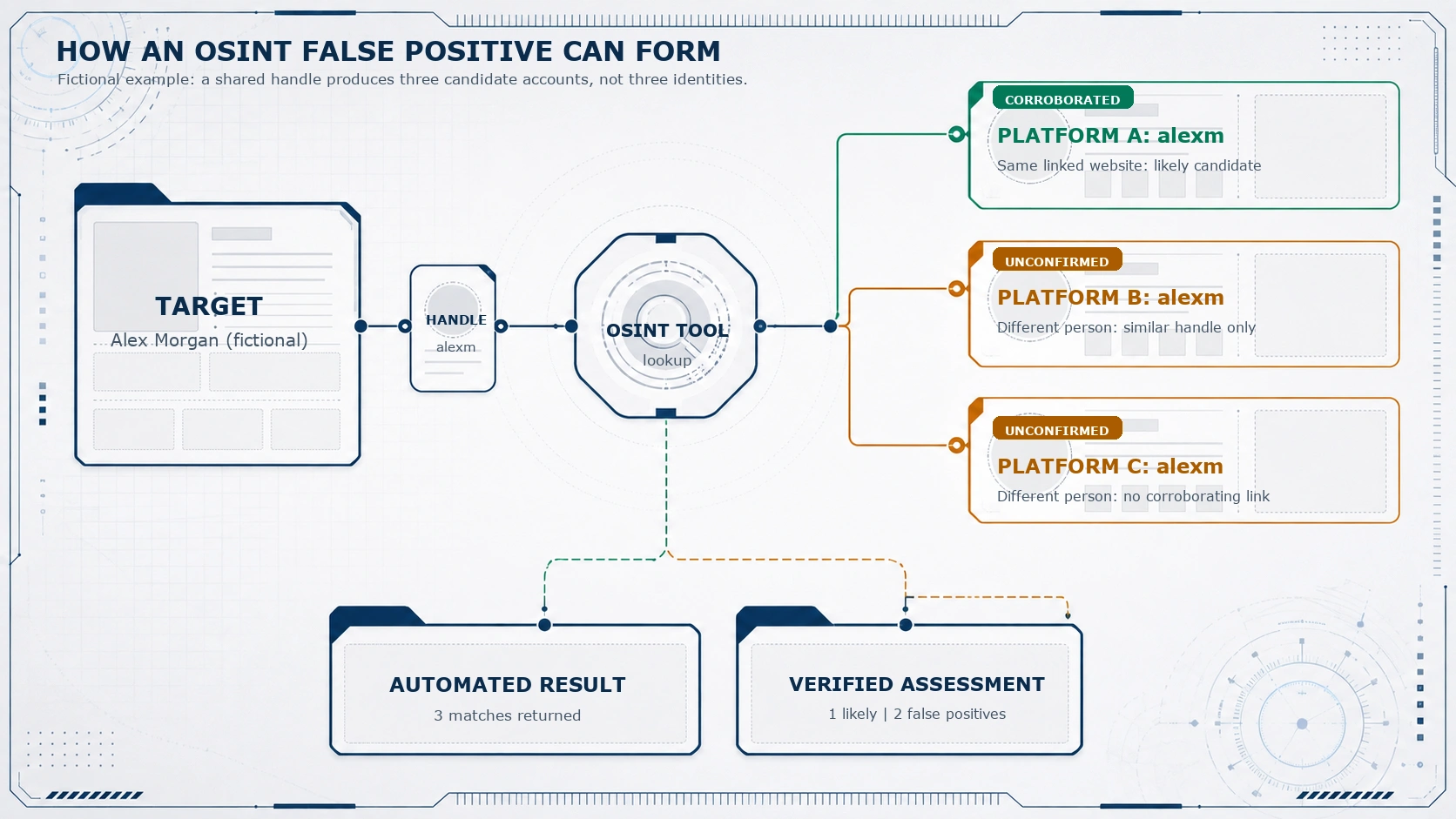
The fictional example below shows why an automated list must not be treated as a conclusion. A search for the handle alexm returns three platform accounts. One account has a direct link to a known website associated with the fictional Alex Morgan. The other two merely share a short handle, while one has a different avatar and the other has activity that conflicts with the relevant time zone. The automated output contains three candidates. The verified assessment contains one likely match and two false positives.
A 12-Step Verification Workflow for OSINT Results
- Define the claim. Write a narrow question such as whether a specific account is controlled by a specific subject, rather than an open-ended suspicion.
- Preserve the raw result. Record the URL, source, query, visible text, retrieval time, and lawful screenshot or archive reference where appropriate.
- Identify the original source. Separate a primary record from an aggregator, repost, quote, or search snippet.
- Check source authority. Ask what the source can genuinely know and whether it has a reason or mechanism to be accurate.
- Test identity. Seek durable links such as self-authored cross-links, stable contact points, or corroborated organizational references.
- Check freshness. Establish when the data was created, published, updated, and retrieved.
- Read the full context. Open the page, thread, document, image, or video rather than relying on a title, snippet, or screenshot.
- Search for alternatives. Look for people, entities, places, or events that could explain the same result.
- Corroborate independently. Prefer sources with different upstream collection paths.
- Look for contradictions. Record conflicting dates, locations, identifiers, language, or ownership evidence.
- Assign a qualitative confidence level. State why the conclusion is unconfirmed, likely, or well supported.
- Write the conclusion narrowly. Describe the observation, the inference, its limits, and any next verification step. Do not escalate a lead into a fact.
The SOURCE Framework for a Fast, Repeatable Review
For everyday research, use a compact five-part framework before relying on a result. It does not replace specialist methods for legal, safety, or investigative decisions. It makes the questions visible early enough to stop a false positive from becoming a report headline.
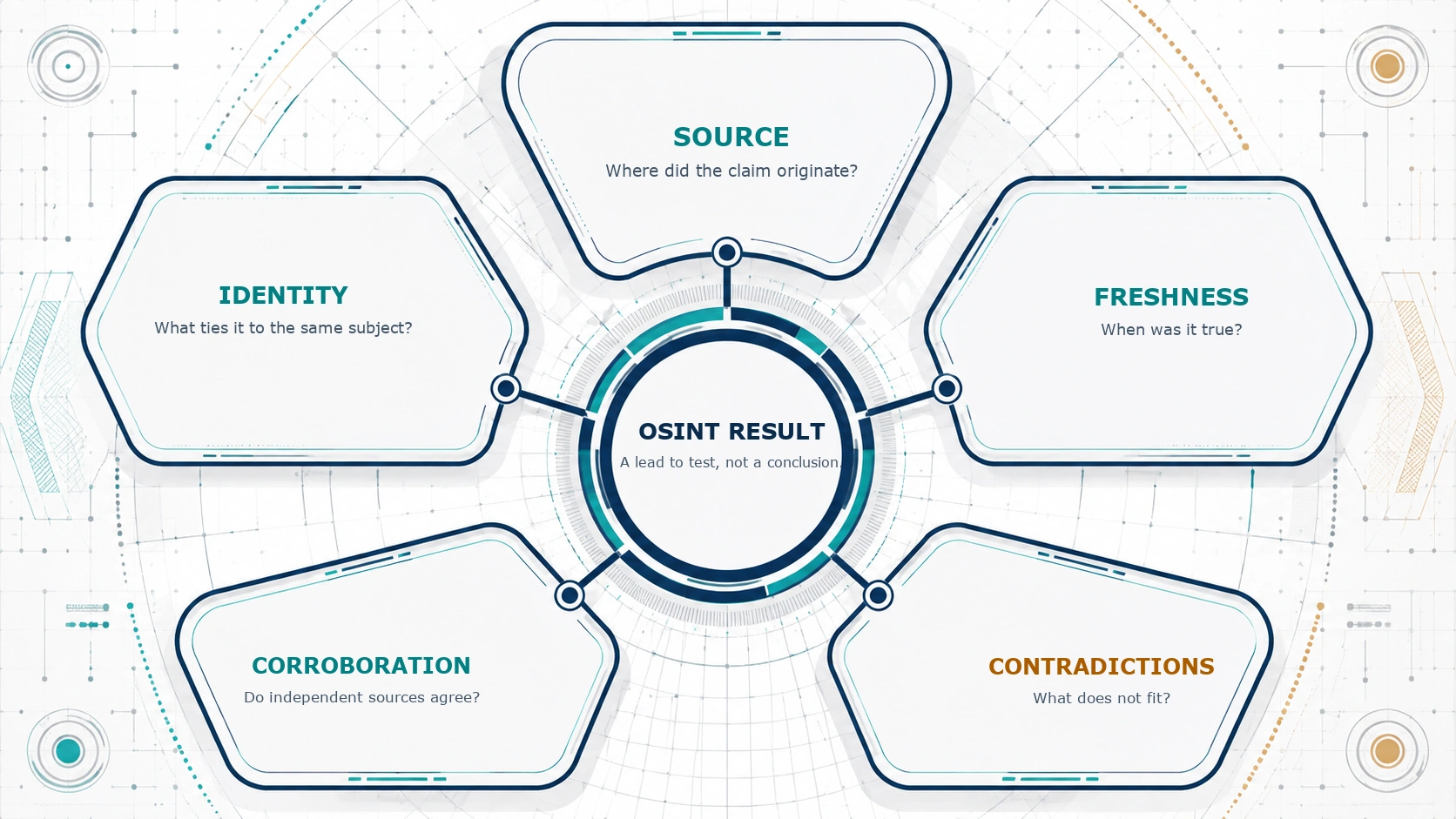
| Check | Question | Example action |
|---|---|---|
| SOURCE | Where did the claim originate? | Open the original record and distinguish it from a copied listing. |
| IDENTITY | What ties it to the same subject? | Require a durable cross-link, not a shared name or avatar alone. |
| FRESHNESS | When was it true? | Compare publication, update, and retrieval times. |
| CORROBORATION | Do independent sources agree? | Trace provenance before counting several sites as separate support. |
| CONTRADICTIONS | What does not fit? | Record conflicting facts and lower confidence or pause the claim. |
Worked Scenario: The Handle northstar_dev
Imagine a researcher is reviewing the fictional handle northstar_dev. A GitHub account and a Reddit account use the same handle, describe a Canadian developer, and link to the same personal website. That shared, self-authored link is stronger than the handle itself, although it still deserves a date and context check.
A gaming profile with the same handle says the user is in Australia, uses a different avatar, shows activity that conflicts with the relevant time pattern, and has no link to the website or other accounts. It may be a different person, an old account, or an unconnected use of the same name. The defensible assessment is not that all three profiles belong to one subject. It is that the GitHub and Reddit accounts are a likely linked cluster, while the gaming account is an unconfirmed candidate with contradictory evidence and should not be attributed without more proof.
High-Stakes Decisions Need a Higher Threshold
Employment screening, journalism, legal matters, safety decisions, and any action that could harm a person demand more than a plausible public match. The cost of a false positive is not abstract: it can damage reputation, create unfair exclusion, misdirect an investigation, or cause a response to focus on the wrong person. In these contexts, follow applicable law and policy, minimize personal data, preserve provenance, seek review, and avoid making consequential decisions on OSINT alone.
Professional investigative methods consistently emphasize collection, preservation, verification, analysis, and review. Bellingcat describes these stages in its published workflow and notes in its editorial standards that important claims should be checked against open-source evidence and other available data. The principle is broadly useful: high confidence should come from a transparent chain of evidence, not a confident interface.
What Good OSINT Tools Should Show
Tool design can reduce misinterpretation. A useful tool should separate direct observations from inferred relationships, show the original source URL, identify when a result was retrieved, expose error and unavailable states, and avoid labels that imply identity confirmation when it only found a similar string. It should retain negative and contradictory observations rather than hiding them behind a single score.
For username lookup results, practical states include:
- Found: a page or account was observed at this URL; ownership is not yet established.
- Not found: no qualifying page was observed under the tested conditions; the account may still exist elsewhere or later.
- Unknown: the response cannot reliably distinguish an account from an error page, redirect, login wall, or platform change.
- Unavailable: access limits, network errors, or service behavior prevented a reliable test.
- Requires review: the tool found a candidate but cannot establish the identity relationship automatically.
Common Mistakes to Avoid
- Treating a matching username, display name, or profile image as identity proof.
- Counting copied aggregator pages as independent corroboration.
- Using a search snippet, partial screenshot, or HTTP status as if it were the source itself.
- Ignoring timestamps and using historical data to make a present-tense claim.
- Converting IP geolocation into a claim about a persons exact location.
- Discarding contradictory evidence because it complicates the initial theory.
- Writing certainty language when the evidence only supports a lead.
| Observation | Inference | Better report sentence |
|---|---|---|
| A public profile uses the handle northstar_dev. | The profile belongs to the target. | A profile with the same handle was observed; identity remains unconfirmed without a durable link. |
| Three directories list the same phone number. | The number is current and owned by the named person. | Three directories repeat the number; their upstream source and current ownership were not established. |
| An image search returns a visually similar photograph. | The photograph depicts the claimed event. | A similar image was found; provenance, date, and location require separate verification. |
Watch a Verification Workflow in Practice
Bellingcat video Monitoring Wildfires Using Open Source Tools shows how an open-source workflow can bring together real-time sources, satellite imagery, timelines, and social media material. Its topic is wildfire monitoring rather than identity research, but the transferable lesson is the same: each source contributes a bounded observation that needs context and cross-checking.
When reviewing a video, image, or profile, resist the urge to extract one decisive-looking detail. Build the timeline, preserve the source, note what is directly visible, and test whether independent evidence supports the interpretation. That is how open-source research remains useful without becoming overconfident.
Frequently Asked Questions
1. Does a username match prove that two accounts belong to the same person?
No. It is a discovery lead. Look for durable, time-consistent cross-links or independent evidence before making an identity claim.
2. Are multiple matching profiles confirmation?
No. Multiple matches may be several people using the same name, or several copies of one upstream record. Assess identity and source independence.
3. Can a tool be accurate while the conclusion is wrong?
Yes. The tool may accurately report that a public page exists, while an analyst incorrectly attributes that page to the target.
4. Does a not-found result mean an account does not exist?
No. It means the tested method did not reliably find a qualifying result at that time. Privacy settings, platform changes, indexing, and rate limits can all matter.
5. Is WHOIS or RDAP data always current?
No. Registration data can be redacted, proxied, changed, or historical. Record when and where the response was obtained.
6. Can an IP address identify a persons home?
Usually not. Addresses can represent carriers, shared networks, VPNs, proxies, cloud systems, CDNs, or NAT gateways. GeoIP is approximate network context.
7. Does reverse image search prove where a photo was taken?
No. It can find related appearances. Provenance, date, location, and context still require verification.
8. What is the best first response to contradictory evidence?
Record it, lower confidence, and test alternative explanations. Do not hide it or force it to fit the first theory.
9. How should an OSINT report communicate uncertainty?
Separate observation from inference, name the sources and dates, describe limitations, and use qualitative confidence language with reasons.
10. When should OSINT findings receive additional review?
Always consider review when a finding could affect a persons safety, reputation, employment, legal position, or access to services.
References and Further Reading
- Google Search Central: Troubleshoot crawling errors and soft 404 pages
- Google Search Central: HTTP status codes and crawling
- ICANN: Registration Data Access Protocol
- ICANN: Registration Data Policy
- IETF RFC 6598: Shared Address Space
- MaxMind: Geolocation accuracy
- Bellingcat: Investigation workflow
- Bellingcat: Methodology
- Bellingcat: Collection protocol
- Bellingcat: Editorial standards and practices
- How Unique and Traceable are Usernames?
- Bellingcat: Monitoring Wildfires Using Open Source Tools